What should you look for?
Start by checking which display mode your PC or console can actually use. Then compare motion clarity, resolution and your audio setup based on how you play.
| What to consider |
What to look for |
Who might value this most? |
| Motion clarity and responsiveness |
Compare response time, overshoot and input lag measurements at the refresh rate and settings you use. |
If you track fast movements, you’ll want to know how the screen performs in practice, not just the maximum Hz figure on the box. Around 34% of consumers prioritise motion clarity and responsiveness. |
| Sharpness and versatility |
Weigh up Full HD against QHD for your viewing distance, and check whether your PC can reach the frame rate you want at that resolution. |
If you want more detail for other games or everyday use as well as competitive practice, consider which resolution your hardware can handle. Around 20% of consumers prioritise image sharpness and versatility. |
| Headphones and voice chat |
Check the audio output on your PC or console, and find out separately how the microphone connects. |
If you play with a headset, you’ll want to know where your game audio will come from and whether your microphone will work with the same setup. Around 13% of consumers start by considering their headphones and voice chat setup. |
| Compatibility with your device |
Check the supported resolution and Hz combination for each port; on a console, also check the active video signal. |
If you want to use the display mode you’ve chosen, check what your PC or console and the connection you’re using support. Around 20% of consumers prioritise compatibility. |
| Cost, energy use and aftercare |
Compare the exact model and its energy label; also check what the warranty terms add to your statutory rights. |
If you want to weigh the total cost against usage and aftercare, look beyond the listed screen specifications. Around 13% of consumers prioritise cost, energy use and aftercare. |
Joybuy products
This selection includes gaming monitors for competitive practice, from Full HD screens with high refresh rates to models with more resolution detail. Check which display modes are supported by your source device and connection for each model.
 No image available
Samsung Odyssey G4 G40H 25-inch Full HD
A good fit if you’re looking for a compact Full HD monitor with a high stated refresh rate for competitive practice.
Fast IPS panel; up to 300 Hz via DisplayPort and 240 Hz via HDMI. The stated 1 ms GtG applies in Extreme Mode.
FreeSync Premium, G-SYNC Compatible and a headphone output are listed. Check the microphone connection separately.
Joybuy
 No image available
LG UltraGear 27G810A-B 27-inch 4K UHD
An option if you want extra image detail alongside a high refresh rate and your hardware can handle the display mode you choose.
IPS panel; stated 4K at 180 Hz and Full HD up to 360 Hz in Dual Mode. The specifications list 1 ms GtG.
The product information lists HDMI 2.1, DisplayPort 1.4, G-SYNC Compatible and FreeSync Premium. Check which resolution and Hz combination your source device supports.
Joybuy
 No image available
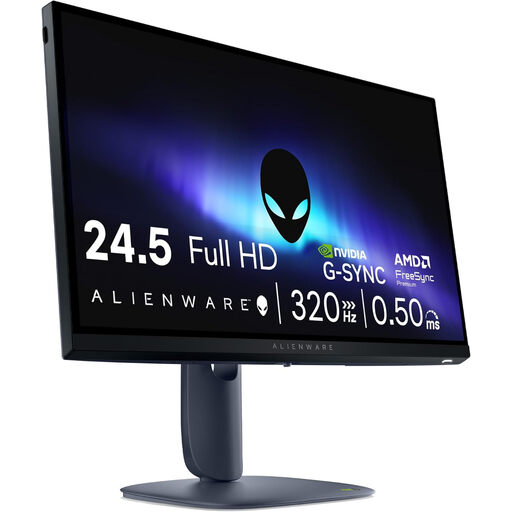
Alienware AW2525HM 24.5-inch Full HD
A good fit if you’re considering a more compact Full HD screen with a high stated refresh rate.
Fast IPS panel; 1920 × 1080 and up to 320 Hz according to the product information.
HDMI 2.1, DisplayPort 1.4, G-SYNC and FreeSync Premium are listed. Check which feature and display mode work with your device.
Joybuy
 No image available
MSI MAG 272QP QD-OLED X24 26.5-inch WQHD
An option if you want to combine competitive practice with WQHD detail and your PC can deliver the frame rate you need.
QD-OLED panel; 2560 × 1440 and 240 Hz. The product information lists 0.03 ms GtG.
Adaptive Sync, G-SYNC Compatible and FreeSync Premium are listed. Check which connections you’ll need for your chosen display mode.
Joybuy
 No image available
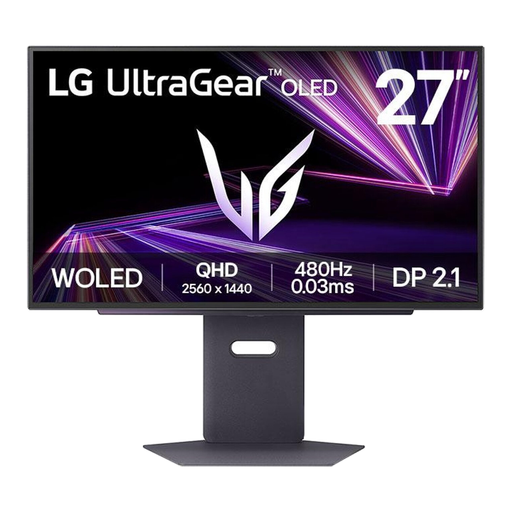
LG 27GX790A-B 27-inch QHD OLED
A good fit if you want to weigh up a high stated refresh rate and QHD resolution for competitive and versatile use.
OLED panel; 2560 × 1440 and 480 Hz according to the product information. The stated response time is 0.03 ms.
G-SYNC Compatible and FreeSync Premium Pro are listed. Read the warranty and usage terms for the exact model.
Joybuy
Frequently asked questions
Is 240 Hz automatically better for practising fast movements?
No. A higher refresh rate can shorten the time each image is displayed, but motion clarity also depends on response times, overshoot and the frames your PC delivers. Compare measurements for the display modes you use.
Do your headphones need to be connected to the monitor?
No, they don’t; choose an audio connection that suits your source device. On a PS5, you can set the output device and audio output. Check the microphone connection separately, as a headphone output on the monitor doesn’t confirm that this feature is supported.
How do you set the refresh rate you want to use?
First, check which resolution and Hz combination the monitor port supports, then select a suitable display mode on your source device. Next, check the active video signal; on a PS5, you can check the video output settings. A PC’s maximum specification doesn’t guarantee the same display mode on a console.
What should you check when using and maintaining your monitor?
Once connected, check the active resolution, refresh rate and audio output. Consult the manual for the exact model for cleaning and panel care, as instructions may vary between versions.
What are your rights in the Netherlands if a product is faulty or you buy online?
When you buy as a consumer, you’re entitled to a product that conforms to the contract. The Netherlands has no fixed statutory guarantee period, and the seller is your point of contact if there’s a fault. According to the Dutch Government, online purchases made under the applicable distance-selling rules generally come with a 14-day cooling-off period. Check the terms of the specific sale.
How can you compare monitors’ energy use?
Compare the energy label and model information for the exact version. The European Commission provides information about energy labels for electronic displays; where available, also check the consumption figures for the relevant picture mode.


