
Gamers with limited cockpit space
If you want to fit a monitor into a compact setup, compare more than just the diagonal screen size: consider the width, stand and mounting options too. AOC and Samsung have examples of 27-inch QHD models.


For a compact cockpit, a 27-inch QHD monitor is generally the more space-conscious starting point. A 34-inch ultrawide gives you more horizontal screen space, but needs more width. AOC lists the Q27G4XF as a 27-inch model with a resolution of 2560 × 1440, while Philips gives the Evnia 34M2C3500L/00 a resolution of 3440 × 1440. Also check that your game, PC and connection support your preferred aspect ratio, resolution and refresh rate.
If you want to fit a monitor into a compact setup, compare more than just the diagonal screen size: consider the width, stand and mounting options too. AOC and Samsung have examples of 27-inch QHD models.
A 34-inch ultrawide may be worth considering if you have enough space and your game makes good use of the extra width. Philips lists the Evnia 34M2C3500L/00 with a resolution of 3440 × 1440.
If motion, dark scenes or panel type matter to you, compare refresh rates and connections. For OLED, also consider screen elements such as HUDs that remain visible for long periods, along with the warranty terms. The features mentioned are specific to each model.
First, measure the available width and viewing distance. Then decide whether the extra horizontal screen space in your game is worth the larger screen and higher resolution.
When choosing a monitor for a compact cockpit, the main concerns are whether it will fit, how much you can see horizontally, motion handling and how it displays dark scenes.
| What to consider | What should you check? | Who should prioritise this? |
|---|---|---|
| Will the screen fit? | Measure the available width and depth. Compare these with the dimensions of the exact model, including its stand, and check the mounting options. | If cockpit space is limited, I want to know whether the screen will fit with its stand or mount. Around 31% of consumers making this choice put fit first. |
| How much of the view can you use? | Compare 16:9 with 21:9, and check how the picture and camera view look in your own game. | If I want to see more from side to side while docking, I weigh the extra width against the space available in my cockpit. Around 31% of consumers put horizontal visibility first. |
| Keeping track of movement | Check your PC’s performance and the maximum resolution and Hz supported by the port you use. MSI lists a maximum of 180 Hz via DisplayPort or USB-C and 144 Hz via HDMI at 2560 × 1440 for the MAG 274QRF QD E2. | If I want to keep track of movement while manoeuvring, I check whether my PC and connection can handle the settings I want. Around 23% of consumers prioritise motion handling. |
| Dark scenes and HUDs | Check the panel type. For OLED, look at the screen-care features and the exact model’s warranty terms for burn-in. | If dark areas of the picture matter to me, but I also use cockpit information that stays on screen for a long time, I want to consider the panel type and warranty terms together. Around 15% of consumers prioritise dark-scene performance. |
A 27-inch 16:9 monitor and a 34-inch 21:9 monitor need different amounts of width. The diagonal also doesn’t tell you how much space the stand, mount and connections will take up.
Measure the space available and compare it with the dimensions of the exact model, including its stand or mount.
You may need a suitable monitor arm or a different position for your screen.
The maximum refresh rate can vary by port. For QHD, MSI lists a maximum of 180 Hz via DisplayPort or USB-C and 144 Hz via HDMI for the MAG 274QRF QD E2.
Check the port specifications for both your monitor and PC before selecting the highest Hz setting.
You may need a different cable or connection.
The Samsung Odyssey G5 G55C is a curved 27-inch QHD model; its curvature doesn’t make it a 21:9 screen. Philips describes the Evnia 34M2C3500L/00 as a separate 34-inch, 3440 × 1440 option.
Compare aspect ratio and resolution separately from curvature, and assess the dimensions from your own viewing position.
ACM ConsuWijzer distinguishes between a manufacturer’s warranty and the seller’s legal responsibility. Dell lists three years of burn-in protection for the AW3426DW; this doesn’t prove that burn-in is impossible.
Read the burn-in terms for the exact OLED model, and consider any additional warranty separately from your legal rights.
An additional warranty is a separate purchase; check whether its terms suit the way you use the monitor.
The AGON by AOC Q27G4XF is an example of a 27-inch QHD monitor in 16:9 format.
The Evnia 34M2C3500L/00 is an example of a curved 34-inch ultrawide.
The Odyssey G5 G55C LS27CG552EUXEN is a curved 27-inch QHD model, not an ultrawide.
The AW3426DW is a 34-inch QD-OLED ultrawide for anyone exploring this type of panel.
The MAG 274QRF QD E2 is a 27-inch QHD model worth comparing for a compact setup.
This Joybuy selection features 27-inch gaming monitors, including QHD models for a more compact screen setup.
 No image available
The 27-inch size is worth comparing if cockpit width is limited.
The product name lists WQHD, 200 Hz and Rapid IPS.
 No image available
This 27-inch model is a compact screen option to compare with your cockpit dimensions.
The product name lists 2560 × 1440, 180 Hz, VA, FreeSync Premium, 2× HDMI 2.0 and 1× DisplayPort 1.4.
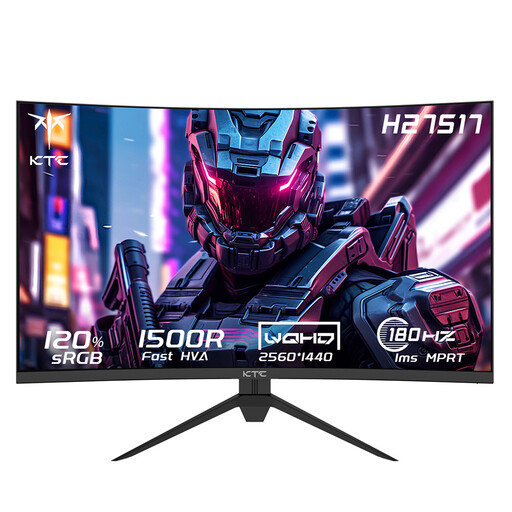 No image available
This curved 27-inch option is worth considering if you want to compare curved screens in a compact size.
The product name lists 2560 × 1440, 180 Hz, HVA and 1500R; the description mentions Adaptive-Sync and VESA mounting.
 No image available
A 27-inch model to compare if you’re looking for a curved screen that fits your available space.
The product name lists 2560 × 1440, 240 Hz, Rapid VA, FreeSync Premium and HDR Ready.
 No image available
The 27-inch size is worth comparing if a more compact setup is important.
The product name lists QHD, 144 Hz, IPS, Adaptive Sync, DisplayPort 1.4 and HDMI 2.0.
First, measure the space available and position the monitor securely, or use a suitable mount. Then check that your instruments and the docking view in your game are clearly visible. Set a resolution and refresh rate supported by your PC and the connection you’re using.
Check the screen-care features and warranty terms for the exact model, as HUD elements that remain visible for long periods need consideration. Dell lists burn-in prevention measures and a three-year warranty for the AW3426DW; this is a manufacturer claim, not proof that burn-in is impossible.
According to ACM ConsuWijzer, if a product doesn’t meet reasonable expectations during normal use, the seller must put this right under the legal guarantee. There is no general fixed two-year period for this in the Netherlands. For a standard online purchase, you can usually cancel within 14 days of delivery, subject to applicable exceptions.
The European Commission states that computer monitors are covered by EU energy labelling rules for electronic displays. Labels range from A to G; check the information for the exact model before factoring in its energy class.