
Pilot with limited desk space
You want a clear cockpit view without the screen and stand taking over your available space. Compare the dimensions and aspect ratios: MSI and Dell list model dimensions and screen sizes to help you decide.


For a compact cockpit, a 27-inch 16:9 monitor is usually the more practical choice if desk width and depth are limited. A 34-inch 21:9 ultrawide is a better fit if you want more horizontal screen space and your setup can accommodate it. Also check how your game displays the image, what your PC can handle and the refresh rate available through each connection. If HUD elements stay on screen for long periods, OLED needs extra consideration: LG warns that displaying the same image for too long can cause faint marks.
You want a clear cockpit view without the screen and stand taking over your available space. Compare the dimensions and aspect ratios: MSI and Dell list model dimensions and screen sizes to help you decide.
You want more horizontal screen space and can fit a wider monitor. Check whether your game displays the aspect ratio you want; MSI specifies a 21:9 resolution of 3440 × 1440 for the MAG 342CQR E2.
You keep cockpit instruments on screen for long periods and are weighing up OLED against the need to consider static images. LG warns that displaying the same image for too long can cause faint marks.
A good fit if: you have limited width or want a straightforward screen for both your cockpit and other PC use.
The trade-off: you get less horizontal screen space than with 21:9.
A good fit if: the monitor fits your setup and your game supports the ultrawide display you want.
The trade-off: these screens take up more space. A resolution of 3440 × 1440 also requires your PC to handle more pixels than 2560 × 1440.
Start by checking the physical fit and choosing your preferred aspect ratio. Then decide which panel features and connections suit your games and how you use your monitor.
| What to consider | What should you check? | Who should give this more weight? |
|---|---|---|
| Physical fit | Measure the available width and depth, then compare them with the monitor dimensions, including the stand. According to MSI, the MAG 342CQR E2 is 808,60 mm wide and 269,97 mm deep with the stand. | If my desk has limited space, I want to make sure the screen and stand will both fit before choosing a larger screen. Around 33% of consumers in this situation say physical fit is their main buying concern. |
| Horizontal view | Check the aspect ratio in your game and compare the monitor’s width with your setup. | I want more space across my cockpit view and can fit a wider monitor. Around 27% of consumers prioritise a wider horizontal cockpit view. |
| Static HUD and OLED | Consider how long the same HUD stays visible and read the care and warranty terms for the exact OLED model. LG warns that displaying the same image for too long can cause faint marks. | My cockpit HUD often stays on screen during long flights, so I want to factor this into my panel choice. Around 20% of consumers say long periods of HUD display are their main concern. |
| PC and connection | Check the maximum resolution and refresh rate for each input, then compare them with your PC’s outputs and performance. For the MAG 342CQR E2 at 3440 × 1440, MSI lists a maximum of 180 Hz via DisplayPort and 100 Hz via HDMI; for the G2725D at QHD, Dell lists a maximum of 180 Hz via DisplayPort and 144 Hz via HDMI. | I want to be able to use the resolution and refresh rate through the connection on my PC. Around 20% of consumers prioritise PC and connection performance. |
A 34-inch ultrawide has different physical dimensions from a 27-inch 16:9 screen. The stand can also affect how much depth you need.
Measure the available width and depth and compare them with the dimensions of the exact model, including the stand, before choosing a panel type.
The specified maximum refresh rates differ by connection for the MSI MAG 342CQR E2 and Dell G2725D.
Check the resolution and maximum Hz for the port you want to use, then compare them with your PC’s output.
LG says that displaying the same image for too long can cause faint marks on its OLED monitors.
Consider how long static elements stay visible and read the care instructions and warranty terms for the exact model.
The MAG 342CQR E2 is an example of a 34-inch curved VA ultrawide for a setup with enough space.
The G2725D is an example of a 27-inch QHD IPS option for a setup with limited width.
The UltraGear 34GX900A-B is an example of a 34-inch OLED ultrawide for anyone considering OLED and a wider screen.
The PG34WCDN is a 34-inch OLED ultrawide for anyone looking for a high refresh rate and with enough room for it.
This selection includes compact 27-inch monitors and 34-inch ultrawides for anyone looking for more horizontal screen space.
 No image available
The 27-inch size is worth considering if you have limited space.
WQHD, 200 Hz and Rapid IPS, as stated in the product name.
 No image available
The 27-inch size suits anyone considering a more compact monitor; check the dimensions of the exact model against your setup.
2560 × 1440, 180 Hz, FreeSync Premium and HDR10, as stated in the product name. The product name also lists HDMI and DisplayPort connections.
 No image available
A 34-inch ultrawide can give you more horizontal screen space if it fits the width and depth of your cockpit setup.
WQHD, VA, 1800R curve and 120 Hz, as stated in the product name.
 No image available
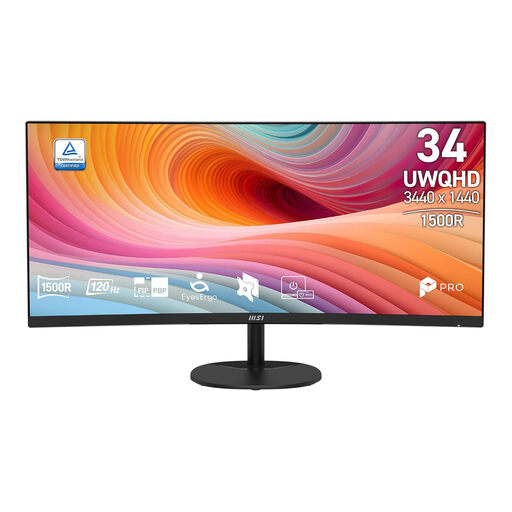
This 34-inch ultrawide is an option if you want more horizontal space and it fits your setup.
UWQHD, 21:9, 120 Hz and a curved VA panel, as stated in the product name.
 No image available
The 34-inch ultrawide format is an option if you want more horizontal space and have enough room.
3440 × 1440, 144 Hz, 1500R curve and VA panel, as stated in the product name. The product name also says that there are no speakers.
Measure the available width and depth, then compare them with the dimensions of the exact model, including the stand. For example, MSI lists the MAG 342CQR E2 as 808,60 mm wide and 269,97 mm deep with the stand.
No, it varies by model and connection. For the MAG 342CQR E2 at 3440 × 1440, MSI specifies a maximum of 180 Hz via DisplayPort and 100 Hz via HDMI; for the G2725D at QHD, Dell lists a maximum of 180 Hz via DisplayPort and 144 Hz via HDMI.
For its OLED monitors, LG recommends running the image cleaning function in the monitor settings if displaying the same image for a long time has caused faint marks. Follow the manual for the model you bought and check the applicable warranty terms.
According to the Dutch government, the seller is your point of contact if a product you bought is faulty. For distance purchases, you generally have a 14-day cooling-off period; check the terms that apply to your specific purchase.