
Vandaag of morgen in huis

Kwaliteit gegarandeerd

Welkomstaanbiedingen ontgrendelen: GRATIS bezorging | Tot 80% korting | Gratis 30 dagen JoyPlus-proefperiode
Download de app
Choosing a gaming monitor sounds simple: look for a high refresh rate, a fast response time and an attractive screen size. In practice, those figures can be misleading. A 240Hz monitor is not automatically the right choice for your PC, and a screen with HDR10 support will not necessarily deliver the same picture quality as another HDR10 model.
Joybuy Product Recommendation Officer filters the most important information using verifiable specifications. This helps you see which features matter for gaming, working from home and multimedia.
A 240Hz gaming monitor or even a 300Hz model sounds appealing for esports. However, your computer must also be able to produce enough frames per second. With a less powerful PC, much of a 240Hz screen’s potential may go unused. For many gamers, a 144Hz gaming monitor, 165Hz or 180Hz model offers a practical balance between smooth visuals and system performance.
Also check which connection provides the maximum refresh rate. For example, a screen may support different values via HDMI and DisplayPort.
Manufacturers quote response times using GTG, MPRT or another measurement method. These figures are therefore not always directly comparable. A claimed 0.5ms MPRT response time does not automatically mean that every transition takes 0.5ms in practice.
As well as the stated response time, consider the panel type, overdrive settings and user experiences. IPS panels are often known for their wide viewing angles, VA panels for their contrast and OLED panels for their deep blacks. None of these characteristics makes one technology suitable for every user.
A Full HD monitor measuring 24 inches can be a clear choice for fast-paced games. At 27 or 32 inches, the same resolution may look less sharp because of the lower pixel density. If you want a larger screen, you will often be looking at a 1440p gaming monitor or a QHD monitor.
An ultrawide screen also requires more graphics processing power. Measure your desk too: a 34-inch screen is considerably wider than a standard 24-inch monitor.
Refresh rate is measured in hertz. A 100Hz, 144Hz or 180Hz monitor can display movement more smoothly than a 60Hz screen, provided that the computer produces enough frames.
A monitor with Adaptive Sync synchronises its refresh rate with the graphics card’s frame rate. This can help reduce tearing and juddering. Check whether the monitor supports FreeSync, G-SYNC Compatible or another variant, and whether your graphics card works with it. FreeSync is listed for the LG 34WR50QK-B; the product information indicates that G-SYNC may work, but the monitor is not officially certified as compatible.
A curved screen, such as a curved gaming monitor with a 1500R or 1800R curvature, can feel particularly comfortable with ultrawide formats because it follows your viewing angle more closely. It is not an essential feature for every gamer. Check that your desk is deep enough and that the stand offers sufficient adjustment.
A VA panel generally offers high static contrast. IPS is appealing for wide viewing angles and consistent colours. OLED and QD-OLED can provide deep blacks and fast pixel transitions, but when using the screen for long periods with static elements, always check the manufacturer’s maintenance and warranty terms.
HDR10 means that the screen can process HDR10 signals. The final HDR experience also depends on brightness, contrast, local dimming, source material and settings. According to information provided by the brands themselves, several of the models mentioned support HDR10. Treat this as one specification among many, rather than as an independent guarantee of quality.
Also consider the HDMI version, DisplayPort, USB hub, USB-C, built-in speakers and VESA compatibility. For a laptop or home office setup, USB-C may be more important than an extremely high refresh rate.
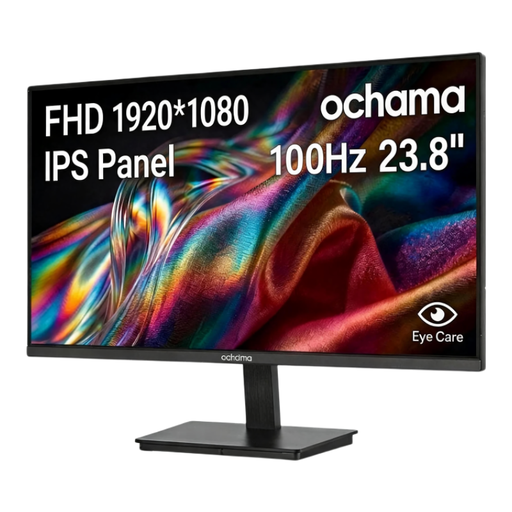
Why it suits this profile: The 23.8-inch Full HD screen combines everyday office work with casual gaming and takes up little space on a typical desk.
The Full HD resolution suits the compact screen size. The stated 100Hz is a clear specification, without paying for a refresh rate your system may not be able to use.
23.8 inches, 1920 × 1080 pixels, 100Hz and a slim bezel on three sides.
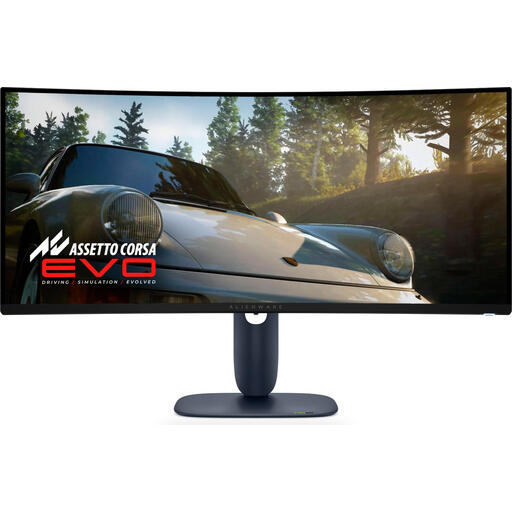
Why it suits this profile: If you want to combine gaming, films and multitasking on one wide screen, this 34-inch QD-OLED model offers an extensive set of specifications.
The combination of 3440 × 1440, 21:9 and 240Hz makes the screen’s intended use clear. However, check beforehand that your graphics card can drive ultrawide images at this refresh rate.
34 inches, QD-OLED, 3440 × 1440, 240Hz, DisplayPort, HDMI and USB connections.

Why it suits this profile: For esports and fast-paced shooters, a 24.5-inch Full HD screen with a high refresh rate is a focused choice, provided that your PC can deliver enough frames.
The product specifications mention both 320Hz and support for FreeSync Premium and G-SYNC Compatible. Check that you are using the right cable and settings to make the most of the maximum value.
24.5 inches, Full HD, 320Hz, IPS panel, HDMI 2.1, DisplayPort 1.4 and adjustable stand.
We have compiled a complete, up-to-date list of products that fully meet these strict selection criteria and the applicable European safety regulations.
For many PC gamers, 144Hz or 165Hz is enough for smooth movement. Esports players with a powerful PC may benefit from 240Hz or higher, but the difference depends on the game, frame rate, connection and personal preference.
It can be, but check the laptop’s video output and supported resolution. USB-C does not always support video signals; the port must have DisplayPort Alt Mode or a similar feature. For a laptop with limited graphics performance, Full HD may be more practical.
Its lifespan depends on usage, heat, power supply and build quality. Place the screen securely, do not block the ventilation openings and clean it with a dry, soft cloth. With OLED models, it is advisable to follow the manufacturer’s instructions on screen care and static image elements. In the European Union, consumers are entitled to at least the statutory guarantee of conformity; additional rights may depend on the circumstances and national legislation.
