
Vandaag of morgen in huis

Kwaliteit gegarandeerd

Welkomstaanbiedingen ontgrendelen: GRATIS bezorging | Tot 80% korting | Gratis 30 dagen JoyPlus-proefperiode
Download de app
Buying a gaming monitor seems simple until you start comparing dozens of models. Terms such as 240Hz, HDR10, 0.3 ms and Adaptive Sync sound appealing, but they only mean something if they suit your PC, games and desk. A high refresh rate, for example, is of little use if your graphics card can’t reach a similar frame rate in your favourite game.
As Joybuy Product Recommendation Officer, I look beyond product specifications to see how useful they are in practice. Read on to find out which features are really worth checking, which marketing claims deserve a closer look and what type of monitor might suit the way you play.
A 240Hz gaming monitor or 180Hz gaming monitor can display movement more smoothly than a 60Hz screen. However, your computer needs to deliver enough frames per second to take advantage of it. For graphically demanding games, a QHD monitor at 144Hz may be more practical than a Full HD monitor at 240Hz, depending on your graphics card and settings.
Check the connections, too. Look at the maximum resolution and refresh rate supported over HDMI and DisplayPort. The cable and port you choose can affect the signal you actually get.
A stated response time of 0.3 ms, 0.5 ms or 1 ms isn’t always directly comparable with other models. Manufacturers may use different measurement methods, such as GtG or MPRT. MPRT is often linked to motion clarity settings, while GtG describes the transition between shades of grey.
So don’t just compare the lowest figure. Consider the panel type, refresh rate and any overdrive settings, too. An IPS gaming monitor is generally known for its wide viewing angles, while a VA gaming monitor often has a higher stated contrast ratio.
HDR10 indicates that a monitor can process a particular HDR signal. It doesn’t automatically mean that dark and bright scenes will always look convincing. Check the brightness, contrast and certification, such as DisplayHDR, too.
According to the product information, the Philips Evnia 34M2C5501/00 supports HDR10 and has a VA panel, UWQHD resolution and a 180Hz refresh rate. These are specifications you can verify; the final picture quality also depends on the game, settings and viewing environment.
A Full HD gaming monitor with 1920 × 1080 pixels generally puts less demand on your graphics card. This can make it a good choice for competitive games and budget-friendly systems. A 24-inch screen also keeps pixel density at a manageable level.
A QHD gaming monitor with 2560 × 1440 pixels gives you more detail and screen space. At 27 inches, QHD is a practical combination for gaming, streaming and everyday use. Ultrawide models often have a resolution of 3440 × 1440 pixels. An ultrawide gaming monitor with a 21:9 aspect ratio is a good option for racing games, open-world games and multitasking.
If you’re considering a 32:9 model, check that your desk is wide enough. For example, the CRUA 49-inch monitor has a resolution of 5120 × 1440 pixels and a 1500R curve. A curved gaming monitor like this needs a sturdy, wide set-up, and you may need a second person to help assemble it.
Refresh rate is measured in hertz:
Adaptive Sync matches the screen’s refresh rate to the graphics card’s output. Products may offer this under brand names, such as a FreeSync monitor. Check that it’s compatible with your graphics card. A “G-SYNC Compatible” label isn’t the same as having a built-in G-SYNC module.
Check the stand, too. Height adjustment, swivel and tilt help you position the screen at eye level. A VESA mount is useful if you want to use a monitor arm, but check the arm’s size and weight capacity.
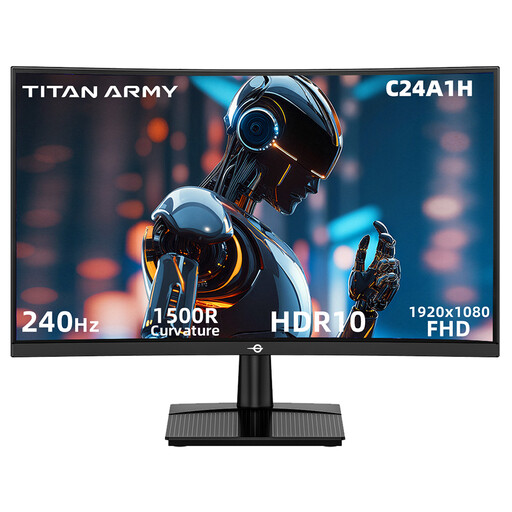
Why it suits this profile: This 23.6-inch Full HD model combines a VA panel with 240Hz, FreeSync compatibility, and HDMI 2.0 and DisplayPort 1.2 connections. It’s a good fit for beginners who mainly play fast-paced competitive games.
The product information lists both the resolution and the supported connections. Just make sure your PC can deliver 240 frames per second.
Full HD, 240Hz, 1500R curve and VESA 100 × 100 mm, according to the product specifications.
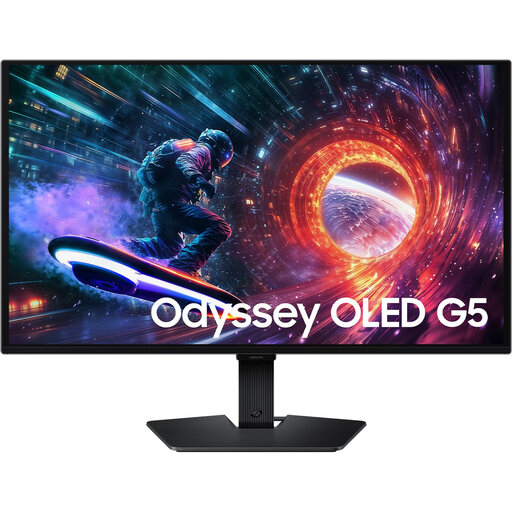
Why it suits this profile: This 27-inch OLED model combines QHD, 180Hz, HDR10 and support for AMD FreeSync and NVIDIA G-SYNC Compatible. The product description states a response time of 0.03 ms GTG.
The product specifications list the OLED panel, QHD resolution and synchronisation technologies separately. Check the connections and guidance for using OLED screens.
2560 × 1440 pixels, 180Hz, OLED panel and VESA 100 × 100 mm, according to the stated product details.
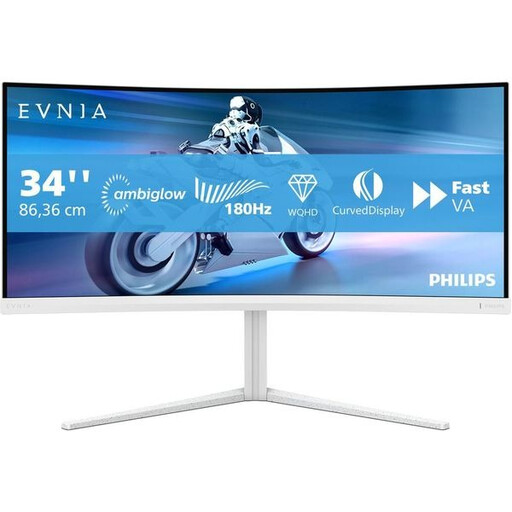
Why it suits this profile: This 34-inch, 3440 × 1440 monitor is aimed at gamers who want a wide screen for open-world games, racing games and multitasking. It has a VA panel, a 180Hz refresh rate and a 1500R curve.
The specifications list the resolution, panel type, Adaptive Sync, and HDMI, DisplayPort and USB-C connections. Check that your desk is wide enough.
UWQHD 3440 × 1440, 180Hz, 1500R curve, height adjustment, swivel and tilt.

Why it suits this profile: The product information lists 320Hz, a Fast IPS panel, 0.5 ms GTG and support for G-SYNC Compatible and FreeSync Premium. It’s a good match for players who focus on fast-paced competitive games.
The high refresh rate is listed alongside specific Full HD, HDMI 2.1 and DisplayPort 1.4 specifications. Check that your PC and game can make the most of the high frame rate.
320Hz, 24.5-inch Full HD, height-adjustable stand and pivot function, according to the product details.
We’ve put together a complete, up-to-date list of products that meet these strict selection criteria and the applicable European safety regulations.
For many players, a 144Hz gaming monitor offers a good balance between smooth movement, hardware requirements and price. The difference between 60Hz and 144Hz is more noticeable than the jump from 144Hz to 240Hz. Most importantly, check whether your PC can consistently reach over 100 frames per second in the game you play.
Lifespan depends on usage, ventilation, brightness settings and panel type. LCD monitors can last a long time with normal use. If you have an OLED gaming monitor, follow the maintenance guidance and advice on static images. Product information for several of the models mentioned states a minimum statutory warranty of two years for consumers in the EU; always check the current terms when you buy.
Power consumption varies depending on screen size, brightness, resolution and panel type. A large ultrawide gaming monitor or OLED model may use more power than a compact Full HD monitor. Check the stated typical power consumption, and use energy-saving features when the screen is inactive for long periods.
