
Vandaag of morgen in huis

Kwaliteit gegarandeerd

Welkomstaanbiedingen ontgrendelen: GRATIS bezorging | Tot 80% korting | Gratis 30 dagen JoyPlus-proefperiode
Download de app
Choosing a gaming monitor isn’t just about getting the highest refresh rate. A 240Hz screen may be less suitable than a 144Hz gaming monitor if your PC can’t deliver the necessary frame rate, the resolution doesn’t suit your graphics card or the stand offers little adjustment.
As Joybuy Product Recommendation Officer, I assess the key product specifications and common marketing claims. This helps you see which features matter for PC gaming, competitive gaming, films and working from home.
A 200Hz or 240Hz gaming monitor can display movement more smoothly than a 144Hz gaming monitor. This is especially relevant for fast-paced games and a PC that consistently delivers high frame rates. With a less powerful computer, you won’t get the full benefit.
So, check more than just the maximum refresh rate:
A stated response time of 1ms MPRT or 0.5ms MPRT describes a measurement method; it isn’t a general guarantee of picture quality. MPRT and GtG are different measurements. Also consider the refresh rate, overdrive settings and feedback on motion handling.
HDR10 means the screen can process HDR10 signals. On its own, it doesn’t tell you how much contrast, brightness or local dimming is available. A monitor with HDR10 may therefore differ from a model with higher brightness or an official DisplayHDR rating.
Read colour claims carefully, too. For example, a brand may state a particular sRGB or DCI-P3 percentage based on its own testing methods. Use the stated colour gamut as a point of comparison, not as an absolute guarantee of colour reproduction in every application.
A Full HD gaming monitor with 1920 × 1080 pixels puts less demand on your graphics card. At 24 inches, the pixel density is generally practical for gaming and everyday use. At 27 or 32 inches, Full HD may look less refined at close range.
A QHD gaming monitor with 2560 × 1440 pixels displays more detail and gives you more room to work. However, your PC will need more graphics processing power. An ultrawide monitor can be a good choice for a wide workspace or racing and simulation games. Check that your desk is wide enough and your PC can handle the ultrawide resolution before you buy.
An IPS monitor is generally known for its wide viewing angles and consistent colours. This makes it practical for content creators, working from home and setups where you don’t sit directly in front of the screen.
According to product specifications, a VA monitor often offers higher static contrast than IPS. This can be useful for dark games and films. Motion handling varies between models, though, so consider more than just the panel type.
For casual gaming and office work, even 100Hz can feel smoother than 60Hz. For competitive games, 144Hz, 200Hz or 240Hz are sensible options, provided your computer can deliver enough frames.
Adaptive Sync matches the screen’s refresh rate to the graphics card’s frame rate. This can help reduce tearing. Check whether the screen supports FreeSync, G-SYNC Compatible or VESA Adaptive-Sync, and whether it works with your graphics card. According to the manufacturer’s product information, for example, the Lenovo Legion 27-10 supports AMD FreeSync Premium, VESA Adaptive Sync and G-SYNC Compatible. Always check compatibility in the driver settings after installation.
DisplayPort and HDMI are important for a gaming monitor used with a PC. Check the number of connections and the resolution and refresh rate supported by each input. For laptops, USB-C with Power Delivery can be more convenient. According to its product specifications, the Dell Pro Plus P2725DE combines USB-C with up to 90W Power Delivery, a USB hub and an RJ45 connection.
Also look out for:
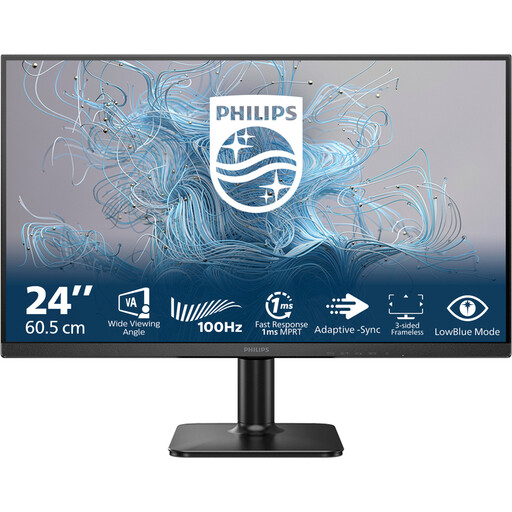
Why it suits this profile: This 24-inch Full HD monitor is suitable for everyday work, multimedia and casual gaming, without the higher hardware demands of QHD.
The product specifications state that it has a 100Hz refresh rate and a VA panel, so you won’t be paying for an excessively high gaming refresh rate you don’t need.
24 inches, 1920 × 1080 pixels, 100Hz refresh rate and a VA panel.
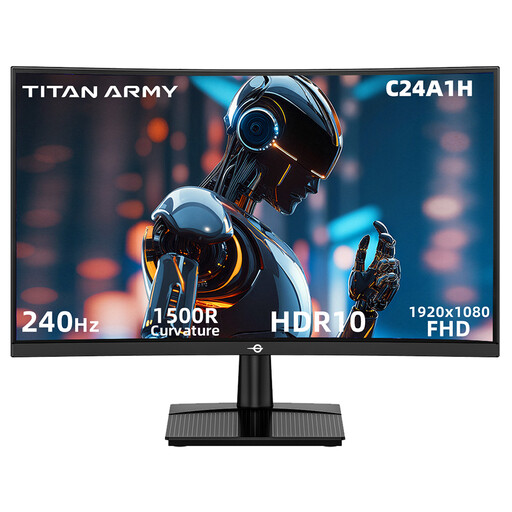
Why it suits this profile: This 23.6-inch curved gaming monitor combines Full HD with 240Hz and is designed for players of fast-paced competitive games.
According to the product specifications, the listed HDMI 2.0 and DisplayPort 1.2 connections support 1920 × 1080 at 240Hz. FreeSync Compatible is also listed.
1500R curvature, 240Hz, 1ms MPRT, VA contrast of 3000:1 and VESA 100 × 100 mm.
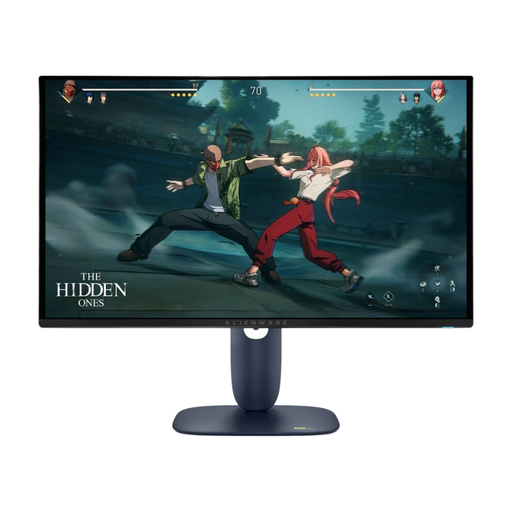
Why it suits this profile: For anyone who values QHD detail, a QD-OLED panel and a high refresh rate more than a low purchase price.
The listed specifications make clear that this is a QHD screen with 280Hz and HDR10. The anti-burn-in claim comes from Alienware’s product information and isn’t a guarantee for every usage scenario.
2560 × 1440 pixels, QD-OLED, 280Hz, 0.03ms response time according to the product specifications, and an adjustable stand.
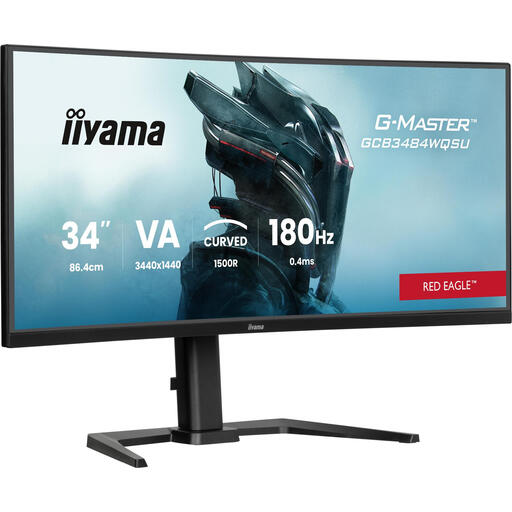
Why it suits this profile: This 34-inch ultrawide monitor is designed for gamers and streamers who want extra horizontal workspace and a wide field of view.
The 3440 × 1440 resolution and 180Hz refresh rate are clearly stated. Do check that your desk and graphics card are suitable for this wide screen.
34 inches, 3440 × 1440 pixels, 180Hz, 1500R curvature, USB hub and height adjustment.
We’ve put together a complete, up-to-date list of products that meet these strict selection criteria and the applicable European safety requirements.
For high refresh rates, use the right cable and set the frequency manually in Windows or your graphics card settings. Also check that FreeSync, G-SYNC Compatible or another Adaptive Sync mode is enabled in both the screen menu and the driver.
Position the screen directly in front of you and adjust the viewing height so you don’t have to look up for long periods. For wall mounting, make sure the VESA size matches and that the wall bracket can support the monitor’s weight. Use only the supplied or a suitable power cable, and keep the ventilation openings clear.
For many gamers, 144Hz is a practical balance between smooth movement and hardware demands. A 200Hz or 240Hz gaming monitor is most worthwhile when your PC consistently achieves a similar frame rate in your chosen game and your competitive play style benefits from it.
Lifespan depends on usage, heat, power supply and panel technology. A monitor may continue working beyond its warranty period, but wear to the backlighting, connections or pixels is still possible. Keep your proof of purchase and check your statutory warranty rights in the Netherlands.
Power consumption varies according to screen size, brightness, resolution and refresh rate. Check the energy label or product specifications. A larger ultrawide screen or a model with higher brightness will generally use more power than a compact Full HD monitor. If you’ll be away for a while, switch the screen off rather than just locking your computer.
