
Vandaag of morgen in huis

Kwaliteit gegarandeerd

Welkomstaanbiedingen ontgrendelen: GRATIS bezorging | Tot 80% korting | Gratis 30 dagen JoyPlus-proefperiode
Download de app
Buying a gaming monitor seems simple: choose a large screen, a high refresh rate and a short response time. In practice, the differences often come down to the details. For example, a screen may support 240Hz, but only through a specific connection. A monitor with HDR may also have limited brightness, making the effect less noticeable in some games and films.
There are three common pitfalls for gamers in the UK:
The resolution determines how much detail the screen can display. A Full HD gaming monitor with 1920 × 1080 pixels puts less strain on your graphics card than a QHD gaming monitor with 2560 × 1440 pixels. A 4K gaming monitor with 3840 × 2160 pixels offers more detail, but usually requires a more powerful PC to achieve high frame rates.
Refresh rate is measured in hertz:
For consoles, you should also check the maximum output. A 240Hz screen may still be limited to a lower refresh rate when used with a console.
An IPS gaming monitor is generally known for its wide viewing angles and consistent colours. This can be useful for gaming, films, office work and basic content creation. According to product specifications, a VA gaming monitor often offers a higher static contrast ratio, which can affect how dark scenes appear. Your experience will also depend on the overdrive settings used.
An OLED gaming monitor uses self-lit pixels. Models such as the Alienware AW2725D combine deep blacks and a fast stated response time with QHD resolution. If you’re considering OLED, check the warranty and usage guidance for prolonged display of static images.
A curved gaming monitor can be a comfortable choice for wider screens, such as a 34-inch ultrawide with a 21:9 aspect ratio. Consider the curvature, viewing distance and desk depth. A 1500R screen calls for a different seating position from a flat 27-inch model.
A monitor with a 1 ms response time can help keep movement looking sharp, but the measurement method matters. MPRT and GtG aren’t directly comparable. Check whether the stated figure depends on a specific mode.
FreeSync gaming monitors, G-SYNC gaming monitors and VESA Adaptive Sync match the screen’s refresh rate to your graphics card’s frame rate. This can help reduce tearing and judder. Check that your graphics card, cable and chosen input are compatible.
When choosing an HDR gaming monitor, look beyond the HDR label. Consider brightness, contrast, HDR certification and how the screen handles HDR content. According to their product specifications, several of the models below support HDR10 or HDR Ready. These are technical features, not a guarantee that every game will look the same.

Why it suits this type of user: The combination of a 27-inch screen, Full HD, IPS and 200Hz makes this a straightforward choice for a first PC gaming setup, while still being useful for office work.
The product specifications list 200Hz, 0.5 ms GtG, Adaptive-Sync, HDMI 2.0b and DisplayPort 1.2. This means you can check the key connection and synchronisation details before buying.
27-inch IPS panel, 200Hz, HDR Ready, VESA 100 × 100 mm and an anti-glare screen.
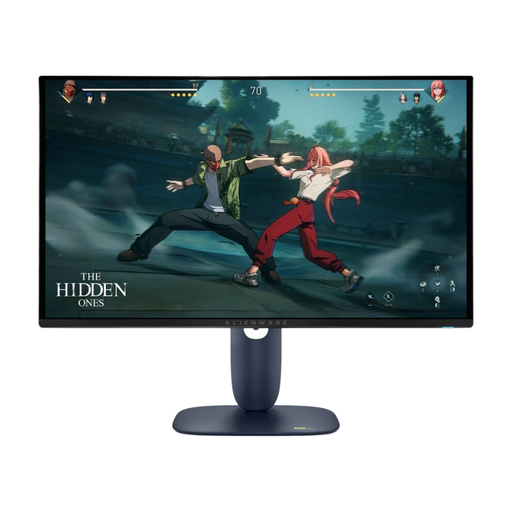
Why it suits this type of user: For anyone looking for QHD resolution, OLED technology, a high refresh rate and extensive synchronisation features in one screen.
The product specifications list QHD, QD-OLED, 280Hz, 0.03 ms and DisplayHDR 400 True Black separately. This makes it easy to compare these features with your PC hardware and how you plan to use the monitor.
2560 × 1440 pixels, 280Hz, G-SYNC Compatible, FreeSync Premium Pro, HDMI 2.1 and USB connections.
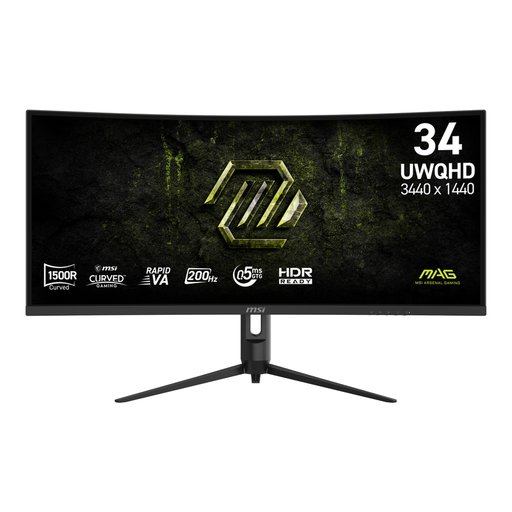
Why it suits this type of user: The 21:9 aspect ratio is designed for gamers and multitaskers who want extra horizontal space for games, windows and entertainment.
The product specifications list a resolution of 3440 × 1440, 200Hz, 1500R, two HDMI 2.0b ports and DisplayPort 1.4a. Check in advance that your graphics card can handle this ultrawide output.
34-inch UWQHD VA panel, 200Hz, Adaptive Sync, 1500R curvature and an adjustable stand.
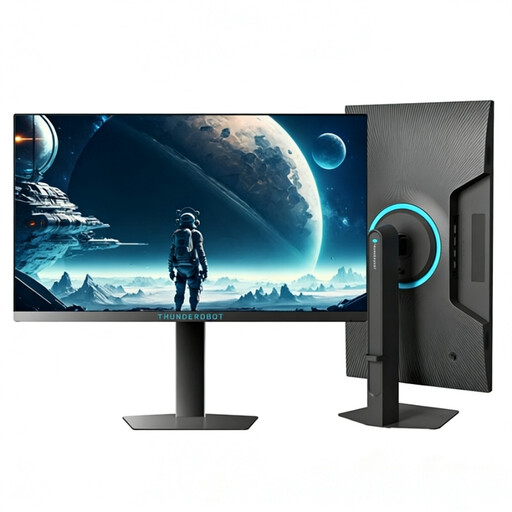
Why it suits this type of user: The compact Full HD screen and stated 320Hz are aimed at players who prioritise high frame rates and a manageable screen size over a higher resolution.
Full HD requires less graphics processing power than QHD or 4K. However, check whether your system can actually deliver more than 240 frames per second to make good use of 320Hz.
24.5 inches, Full HD, 320Hz, 450 nits according to the product specifications, and a height-adjustable, swivel stand.
We’ve put together a complete, up-to-date list of products that meet these strict selection criteria and current European safety requirements.
Before placing your order, check:
For many gamers, a 144Hz gaming monitor is a clear improvement over 60Hz. Whether a 165Hz, 180Hz or 240Hz model is worthwhile depends on your games, graphics card and preferred level of responsiveness. A higher refresh rate is most useful when your PC can deliver a sufficient frame rate.
Ideally, use a connection that supports your chosen resolution and refresh rate. DisplayPort is often used for PC gaming, while HDMI is important for consoles and modern graphics devices. Check the cable supplied too, as not every cable supports every combination of resolution and refresh rate.
Lifespan depends on how long it’s used, heat, power supply and panel technology. Keep the ventilation openings clear, use a stable power connection and clean the screen with a soft, dry cloth. For OLED models, it’s worth reading the manufacturer’s guidance on static images, pixel protection and warranty terms.
