
Vandaag of morgen in huis

Kwaliteit gegarandeerd

Welkomstaanbiedingen ontgrendelen: GRATIS bezorging | Tot 80% korting | Gratis 30 dagen JoyPlus-proefperiode
Download de app
Buying a gaming monitor seems simple until you compare screen sizes, resolutions, refresh rates and synchronisation technologies. A high Hz value or short response time sounds appealing, but it does not tell you everything about how suitable a monitor is for your PC, games and workspace.
The key question is therefore not which monitor has the longest list of features, but which combination of specifications suits the way you use it. A monitor for esports has different requirements from a screen for single-player games, working from home or photo editing.
A 240Hz gaming monitor, 300Hz gaming monitor or 320Hz gaming monitor can display smooth motion, but your PC must also deliver enough frames per second. If you usually play at 80 to 120 fps, you will not make full use of that maximum refresh rate.
So check:
A high refresh rate can make sense for an esports monitor. For casual gaming, films and productivity, 100Hz to 180Hz may already offer a practical balance.
The term 1ms gaming monitor may refer to GTG, MPRT or an activated overdrive mode. These measurement methods are not the same. A quoted response time is therefore no guarantee that every transition will have exactly the same speed in every setting.
Pay attention to the full specification:
Compare response time alongside the panel type, the manufacturer’s review specifications and the settings you can actually use.
An HDR10 monitor can accept HDR signals, but the visible impact also depends on brightness, black levels and any local dimming. According to the manufacturer’s own information or the product listing, HDR10 support therefore does not automatically mean that every game will display a strong HDR effect.
When assessing HDR, also check:
A Full HD gaming monitor with 1920 × 1080 pixels places less demand on your graphics card and works well at 24 to 25 inches. At 27 inches, Full HD may look less appealing to some users because of the lower pixel density.
A QHD gaming monitor with 2560 × 1440 pixels offers a noticeable increase in detail. It is a popular middle ground for 27-inch screens. A 4K gaming monitor with 3840 × 2160 pixels is appealing for single-player games, image editing and sharp text, but requires more graphics processing power at high refresh rates.
An ultrawide screen, such as 3440 × 1440 at 34 inches, provides extra horizontal workspace. However, check that your desk is deep and wide enough, and that your favourite games display correctly in 21:9.
An IPS gaming monitor is generally known for wide viewing angles and consistent colour reproduction. This is useful for content creators, multitasking and setups where you do not sit directly in front of the screen.
A VA gaming monitor often offers higher static contrast according to the product specifications. As a result, dark scenes may appear differently from those on IPS. The choice depends on your preference for contrast and colour consistency, as well as the games you play.
Neither panel type is automatically suitable for every user. Also consider brightness, coating, connections and ergonomics.
FreeSync and G-SYNC Compatible match the screen’s refresh rate to the graphics card’s frame output. Check that your GPU, cable and monitor settings are compatible.
An official G-SYNC Compatible label is not the same as a monitor on which you are attempting to enable G-SYNC manually. For example, the LG 34WR50QK-B is listed as not officially G-SYNC Compatible; manual operation may vary and, according to the product information, is undertaken at your own risk.
Also look for height adjustment, tilt, swivel, VESA 100 × 100 mm, a USB hub and the number of HDMI and DisplayPort connections. A high refresh rate is less useful if your desk setup does not allow for a comfortable viewing height.
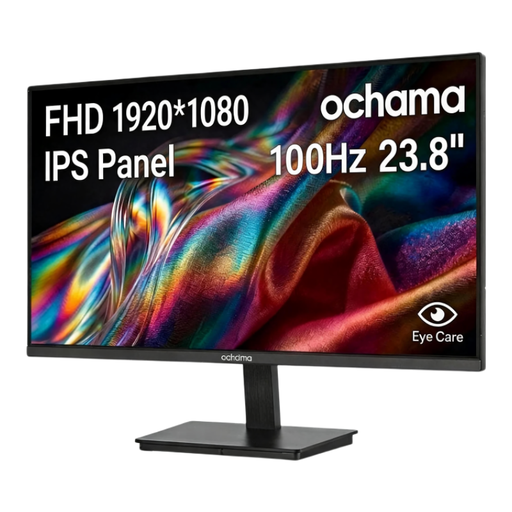
Why this suits the profile: The 23.8-inch Full HD screen with 100Hz is suitable for everyday computing, office work and casual gaming, without immediately moving to very high resolutions or refresh rates.
The specifications clearly state Full HD and 100Hz. This means you are not paying for a high 240Hz or 320Hz value that you may not use for basic tasks.
23.8 inches, 1920 × 1080 pixels, 100Hz and a slim three-sided frame for a tidy workspace.
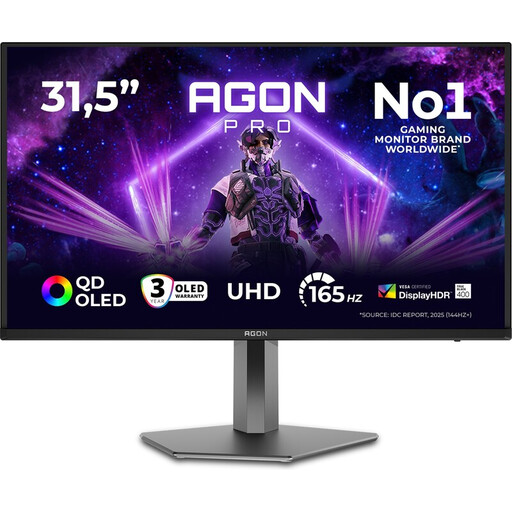
Why this suits the profile: This model combines 4K resolution, 165Hz, QD-OLED technology and HDMI 2.1 for users who want to combine gaming with creative work and entertainment.
The combination of resolution, panel technology and connections is clearly specified. However, check whether your PC can run 4K at high frame rates.
32 inches, 3840 × 2160 pixels, 165Hz, QD-OLED, HDMI 2.1 and an adjustable stand according to the product information.

Why this suits the profile: For fast-paced shooters and esports monitors, 320Hz, Full HD and a Fast IPS panel are designed to deliver a high refresh rate and low quoted response time.
The 320Hz value is paired with HDMI 2.1, DisplayPort 1.4 and Adaptive Sync support. Check the cable and set 320Hz manually in Windows or your GPU software.
24.5-inch Full HD, 320Hz, Fast IPS, 0.5ms GTG according to the specifications, G-SYNC Compatible and FreeSync Premium.
We have put together a complete, up-to-date list of products that fully meet these strict selection criteria and the applicable European safety regulations.
Use this quick checklist:
The difference can be particularly noticeable in fast-paced games and at high fps. The benefit is smaller when your PC cannot reach the higher refresh rate, or when you mainly use it for slower-paced games, video and office software.
QHD is a practical choice for 27 inches if you want more detail than Full HD. Bear in mind that it places a greater load on your graphics card. For maximum sharpness when working with photos and video, 4K may be appealing, while Full HD is easier to drive.
Its lifespan depends on heat, daily use, brightness settings, connections and changing requirements for resolution and speed. A model with an adjustable stand, VESA support and plenty of connections can remain useful for longer as your setup changes.
