
Vandaag of morgen in huis

Kwaliteit gegarandeerd

Welkomstaanbiedingen ontgrendelen: GRATIS bezorging | Tot 80% korting | Gratis 30 dagen JoyPlus-proefperiode
Download de app
Buying a gaming monitor may seem straightforward until you start comparing specifications. A 240Hz screen is not automatically right for your PC, a quoted response time of 1 ms can vary depending on the measurement method, and a large ultrawide screen will not fit every desk. Terms such as HDR10, Adaptive Sync and OLED are also often used without clearly explaining what they mean for you.
With this buying guide, you can compare gaming monitors based on verifiable features. That way, you avoid paying for functions you are unlikely to use.
A 240Hz, 300Hz or 320Hz gaming monitor can display motion more smoothly than a 60Hz screen. However, this is mainly beneficial when your PC also produces enough frames per second. With a basic graphics card, a 320Hz gaming monitor may therefore make little difference.
For many players, a 144Hz, 165Hz, 180Hz or 200Hz gaming monitor offers a practical middle ground. As well as the maximum refresh rate, consider the resolution and the performance of your graphics card.
A gaming monitor with a 1 ms response time sounds clear-cut, but manufacturers use different measurement methods. GtG stands for Grey-to-Grey, while MPRT measures motion blur in combination with a special display mode. A value of 0.5 ms MPRT is therefore not directly comparable with 1 ms GtG.
Also check whether the quoted speed is only available with overdrive or a specific setting. Overly aggressive overdrive can cause visible image artefacts.
A 34-inch ultrawide monitor or a 49-inch model with a 32:9 aspect ratio takes up a lot of space. Check the width, stand depth and viewing distance beforehand. A curved gaming monitor can make the edges more comfortable to see within your field of view, but the curvature does not change the amount of desk space required.
Also look out for VESA support, height adjustment and cable clearance. A screen that fits technically may be awkward to use in practice if the stand takes up too much room.
An IPS panel generally offers wide viewing angles and consistent colours. Based on their product specifications, VA panels are often known for a higher static contrast ratio. An OLED gaming monitor switches individual pixels off to display dark images. According to the manufacturer's product specifications, a QD-OLED monitor combines OLED technology with quantum dots.
With OLED, it is advisable to check the instructions and warranty terms regarding prolonged display of static images. If you also use the screen for office work with fixed menus, the recommended maintenance and screen protection functions are relevant.
FreeSync, G-SYNC Compatible and other forms of Adaptive Sync synchronise the display's refresh rate with the frame output of the graphics card. This can help reduce tearing and stuttering, but performance depends on the combination of monitor, graphics card, cable and settings.
Therefore, check:
HDR10 can display compatible content with a greater range between dark and light areas. The visible impact also depends on brightness, contrast and the content itself. Therefore, do not treat HDR10 as a standalone guarantee of quality.
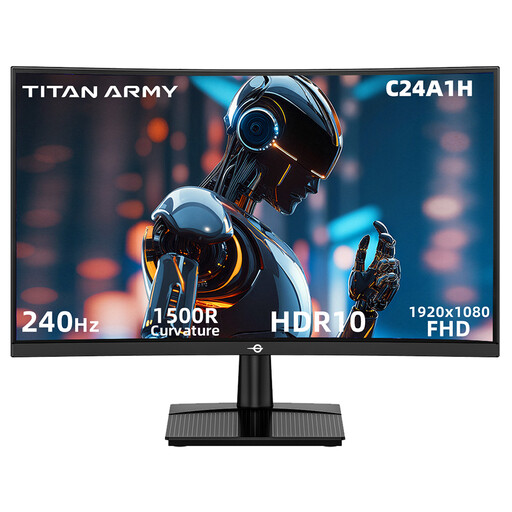
Why it suits this profile: This 23.6-inch Full HD screen combines a 240Hz refresh rate with a compact 1500R curve for players who mainly enjoy fast-paced PC games.
Full HD resolution generally requires less graphics processing power than QHD or 4K. The product specification also states FreeSync compatibility and HDMI 2.0/DisplayPort 1.2 for 240Hz at Full HD.
240Hz, VA panel, HDR10 support and VESA 100 × 100 mm.
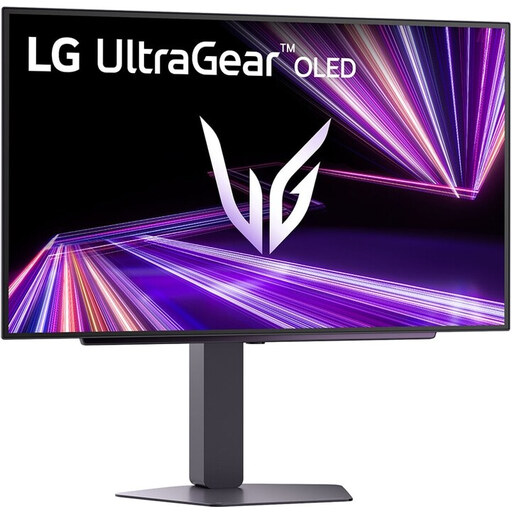
Why it suits this profile: For those who combine gaming with films or creative applications, this OLED model offers QHD resolution, 240Hz and support for HDR True Black 400.
The specifications state both a 0.03 ms response time and compatibility with G-SYNC and FreeSync Premium Pro. However, check that your graphics card and cable support these settings.
OLED panel, QHD, 240Hz, HDMI 2.1 and height-adjustable stand.

Why it suits this profile: Esports enthusiasts seeking high frame rates get a Fast IPS panel with 320Hz and support for HDMI 2.1 and DisplayPort 1.4.
Full HD resolution keeps the graphics load lower than with 4K. The product specification lists a 0.5 ms response time, 400 cd/m² brightness and both G-SYNC Compatible and FreeSync Premium.
320Hz, Fast IPS, adjustable stand and USB 3.2 connections.
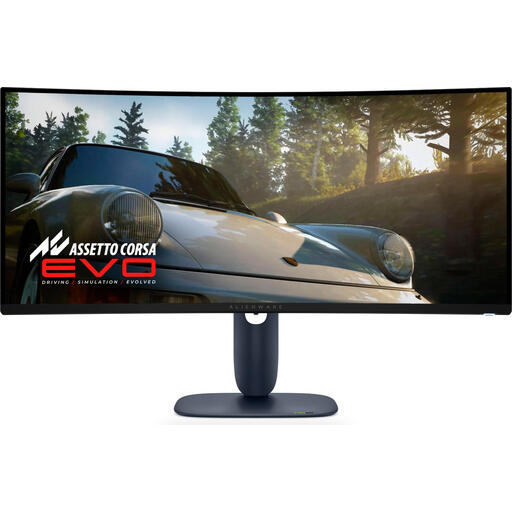
Why it suits this profile: The 21:9 aspect ratio and 3440 × 1440 resolution provide room for multiple windows, widescreen games and creative software.
The adjustable stand helps you achieve a comfortable viewing height. However, measure your desk and viewing area: the monitor is over 81 cm wide without the stand.
QD-OLED, 240Hz, 3440 × 1440, HDR10 and USB/HDMI/DisplayPort connections.
We have compiled a complete, up-to-date list of products that fully meet these strict selection criteria and the applicable European safety regulations.
For many PC and console gamers, 144Hz is enough to experience noticeably smoother motion than at 60Hz. A higher refresh rate is particularly relevant for fast-paced competitive games and a PC that can also achieve high fps.
QHD displays more detail than Full HD, especially on screens measuring 27 inches or more. However, it also places greater demands on the graphics card. Full HD can be a practical choice when a high fps matters more to you than extra sharpness.
The lifespan depends on usage, heat, transport and power supply. Keep ventilation openings clear, use a suitable power connection and clean the screen with a soft, dry cloth. With an OLED gaming monitor, it is advisable to use the built-in pixel maintenance and screen protection functions as described in the manual.
