
Vandaag of morgen in huis

Kwaliteit gegarandeerd

Welkomstaanbiedingen ontgrendelen: GRATIS bezorging | Tot 80% korting | Gratis 30 dagen JoyPlus-proefperiode
Download de app
Buying a gaming monitor might seem straightforward – until you start comparing refresh rates, panel types and connectivity options. A 240Hz screen isn’t automatically right for every gamer. A high resolution also demands more from your graphics card, while a large screen with Full HD can look less sharp up close.
Watch out for three common pitfalls:
A Full HD gaming monitor of 24 or 24.5 inches is a practical combination for competitive games. The lower resolution is less demanding on your graphics card, making high frame rates more achievable. The Thunderobot CF25F300L, for example, has a 24.5-inch Full HD panel with 320Hz.
A QHD gaming monitor with 2560 × 1440 pixels shows more detail. At 27 inches, QHD is a popular balance between sharpness and performance. Examples include the Alienware AW2725DM with 180Hz and the MSI MAG 275CQDF X24 with 240Hz. With QHD, do check whether your graphics card can deliver the frame rate you want.
A 144Hz gaming monitor is already noticeably smoother than a standard 60Hz screen. For competitive PC gaming, 240Hz, 300Hz or 320Hz can be appealing. The difference becomes relevant when your system actually achieves high frame rates. For console gaming, the console’s maximum output is also important; a 320Hz monitor won’t automatically make a console faster.
Bear in mind that terms like “HDR-ready” and “HDR10” don’t automatically mean every HDR image will give the same brightness or contrast impression. Compare brightness, contrast, panel type and the stated HDR specification together.
A monitor with FreeSync synchronises the refresh rate with a compatible AMD graphics card. Some models also state G-SYNC Compatible. According to the product information from Alienware and Samsung, their mentioned models support both technologies. Always check compatibility with your graphics card, cable and chosen connection.
Also look at:
The features mentioned are based on product descriptions. Claims about visual comfort or reducing discomfort should not be taken as medical effects. Take regular breaks during long sessions and adjust the height and viewing angle practically.
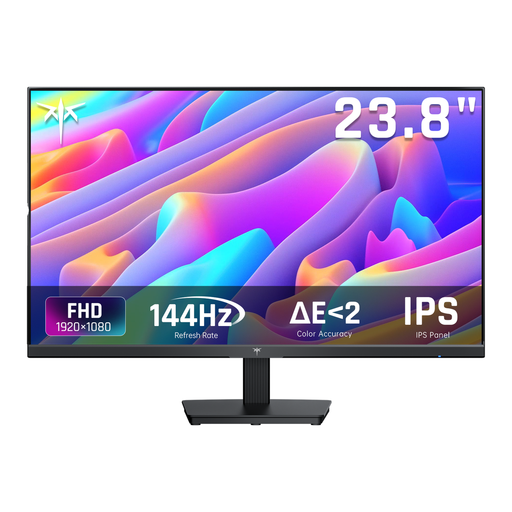
Why this fits the profile: A 24-inch IPS screen with Full HD and 144Hz offers a straightforward starting point for PC gaming, office work and everyday use.
The specifications list both 144Hz and the connections and Adaptive Sync, so you don’t have to rely on a standalone response time claim.
IPS panel, 24 inches, 144Hz, HDMI and DisplayPort; the stand tilts from -5° to 15°.
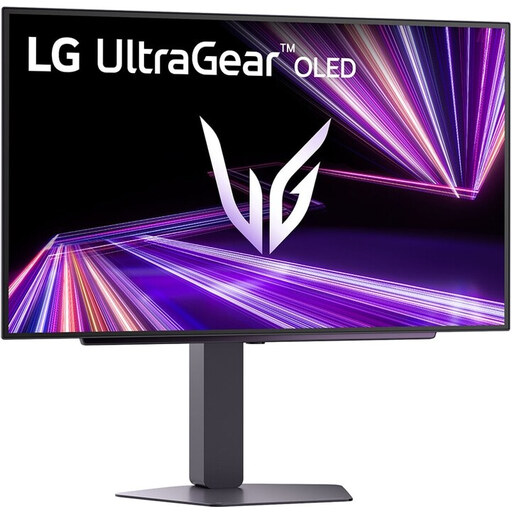
Why this fits the profile: For gamers and creators who want QHD detail, OLED contrast and a high refresh rate in one screen.
The product information specifically mentions OLED, 2560 × 1440, 240Hz, DisplayPort 1.4 and HDMI 2.1. Do check whether your PC can make use of this combination.
27-inch QHD OLED, 240Hz, stated response time of 0.03ms, HDR True Black and height adjustment.

Why this fits the profile: Aimed at esports players with a powerful PC who want a compact Full HD screen and a very high refresh rate.
Alongside 320Hz, HDMI 2.1, DisplayPort 1.4 and G-SYNC Compatible are listed. This lets you match the connection to your PC in advance.
24.5-inch Full HD IPS, 320Hz, stated 0.5ms GtG, 400 cd/m² and a height-adjustable, swivelling stand.

Why this fits the profile: A large 32-inch screen with 1500R curvature suits single-player games, films, side-by-side work windows and everyday entertainment.
The combination of QHD, 165Hz, FreeSync and dual HDMI and DisplayPort connections is clearer than just a general claim about speed.
32-inch QHD VA panel, 1500R, 165Hz, 100% sRGB according to the product description and VESA 100 × 100mm.
We’ve put together a full, up-to-date list of products that fully meet these strict selection criteria and comply with current European safety regulations.
For many players, 144Hz is a practical choice. The image is smoother than at 60Hz, while the required frame rate is usually more achievable than with 240Hz or 320Hz. Consider your games, graphics card and budget before going higher.
That depends on the console and the desired refresh rate. Check the supported resolution, HDMI version and frame rate of your console. A monitor with HDMI 2.1 can be relevant for certain combinations, but the monitor won’t change the console’s maximum output.
The lifespan depends on usage, ventilation, brightness, connections and panel type. Choose a model with enough headroom in resolution and refresh rate, use the supplied cables and follow the manufacturer’s cleaning and safety instructions. This will help you avoid hitting limitations too quickly with a new PC or console.
