
Vandaag of morgen in huis

Kwaliteit gegarandeerd

Welkomstaanbiedingen ontgrendelen: GRATIS bezorging | Tot 80% korting | Gratis 30 dagen JoyPlus-proefperiode
Download de app
Choosing a gaming monitor isn’t just about picking one with a high refresh rate or striking design. The right choice depends on your PC, favourite games, available space and how you plan to use the monitor. An esports enthusiast has different needs from someone who switches between gaming, working from home and watching films.
Look out for these three common pitfalls:
A high refresh rate without enough PC performance
A 240Hz gaming monitor can only be fully utilised if your computer can deliver high frame rates at the resolution you’re using. If you have a less powerful graphics card, a QHD gaming monitor with a 144Hz refresh rate may be a more sensible compromise.
A low response time that isn’t always directly comparable
Manufacturers use terms such as GtG, MPRT and Smart MBR. These refer to different measurement methods. So, a quoted response time of 0.5 ms doesn’t guarantee that every pixel transition will take exactly that long in every situation. Also check the refresh rate, Adaptive Sync and reviews of the monitor’s picture settings.
HDR as a marketing term without enough brightness
HDR10 or HDR Ready means the monitor can process HDR signals. It doesn’t automatically mean you’ll see noticeably more contrast or get a convincing HDR picture. So, check the brightness and contrast too, along with any DisplayHDR rating if one is listed.
A Full HD gaming monitor with 1920 × 1080 pixels puts less demand on your graphics card. That makes Full HD a practical choice for competitive games and compact setups. A 24-inch screen also keeps pixel density reasonably high.
A QHD gaming monitor with 2560 × 1440 pixels gives you a clearer picture on a 27-inch screen for gaming, video and productivity. You get more screen space to work with, but you’ll also need a more powerful graphics card. At 32 inches, QHD can look comfortably large, although some users may find the lower pixel density less sharp.
A 27-inch gaming monitor is a practical middle ground for many PC gamers. Just check your viewing distance and how deep your desk is. A 34-inch ultrawide, such as the MSI MPG 346CQRF X24, takes up more space and is best suited to anyone looking for a wider view for work or gaming.
Refresh rate is measured in hertz. A 144Hz gaming monitor can display a new image more often than a 60Hz screen. This can make fast-paced shooters and racing games feel smoother.
Competitive players can choose models with 240Hz or even 320Hz. The difference between 144Hz and 240Hz is most noticeable when your PC consistently achieves high frame rates. A 320Hz gaming monitor is designed for specific esports scenarios and fast Full HD setups. Don’t just look at the highest number: check which connection and resolution you’ll need too.
Adaptive Sync, including AMD FreeSync, matches the screen’s refresh rate to your graphics card’s frame rate. This can help reduce tearing and stuttering. Check that the feature works through your chosen HDMI or DisplayPort connection, and find out what range it supports. For consoles, the options depend on the console, game and cable.
An IPS gaming monitor is generally known for its wide viewing angles and consistent colour reproduction. That makes it a practical choice for gaming, films, photo editing and working from home. For example, the Philips Evnia 27M2N3500NF uses an IPS panel with QHD resolution, a 144Hz refresh rate and a stated viewing angle of 178°.
A VA gaming monitor often offers higher static contrast. This can make dark scenes look different from how they appear on an IPS screen, but check the stated response time and whether there may be motion blur during dark transitions.
An OLED gaming monitor can offer deep blacks and high contrast. If you’ll be using it for long periods with static elements on screen, such as taskbars or game interfaces, it’s worth checking the manufacturer’s settings and screen-care features. According to the product information, the Samsung LS27FG500SUXEN is a 27-inch QHD OLED model with a 180Hz refresh rate.
A curved gaming monitor can create a more immersive feel, particularly on larger screens. Curvature, such as 1500R, comes down to personal preference and may take some getting used to. Also consider whether a flat monitor might be better for working with text and spreadsheets.
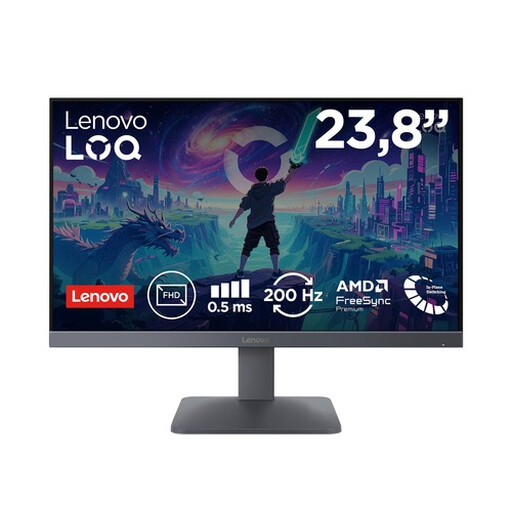
Why it suits this profile: This compact Full HD model is a good fit for your first gaming setup, a smaller desk or a combination of PC gaming and console use.
Choosing a 23.8-inch Full HD screen means you won’t need a more powerful graphics card unnecessarily. The stated 200Hz refresh rate is achievable with a suitable source.
Fast IPS, 200Hz, AMD FreeSync Premium, HDR10, two HDMI 2.1 ports and DisplayPort 1.4, according to the product specifications.
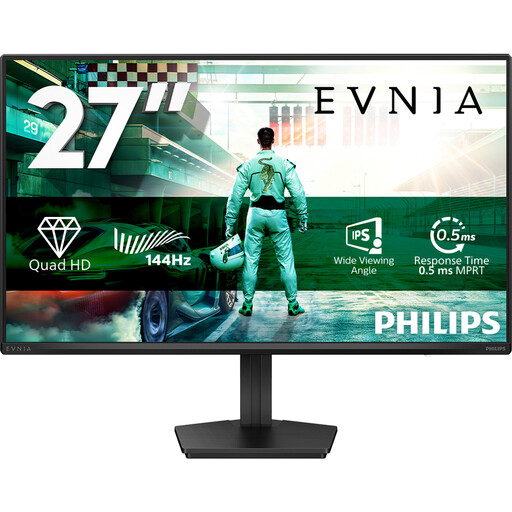
Why it suits this profile: A versatile choice if you want to combine gaming, entertainment and productivity on one 27-inch screen.
The QHD resolution is clearly specified, and 144Hz suits a wide range of PC setups. HDR10 isn’t presented here as a guarantee of a particular picture quality.
IPS panel, 2560 × 1440 pixels, 144Hz, Adaptive Sync, DisplayPort 1.4, HDMI 2.0 and VESA 100 × 100 mm, according to the product details.

Why it suits this profile: Designed for players looking for a high refresh rate and a compact Full HD setup for fast-paced competitive games.
Full HD puts less strain on your graphics card than QHD or 4K. The 320Hz refresh rate is most useful when your PC and game can actually deliver high frame rates.
IPS panel, 320Hz, stated brightness of 400 cd/m², HDMI 2.1, DisplayPort 1.4, height adjustment, and support for G-SYNC Compatible and FreeSync Premium, according to the product information.
We’ve put together a complete, up-to-date list of products that meet these strict selection criteria and the applicable European safety regulations.
For many players, 144Hz is a practical choice. It gives you a smoother picture than 60Hz without always requiring a very powerful graphics card. For esports, 240Hz or 320Hz may be worth considering, but only if your PC can consistently achieve high frame rates.
Not necessarily. QHD gives you more detail and screen space on a 27-inch monitor, but it requires more graphics processing power. Full HD is often a better fit for a 24-inch screen, an entry-level PC or a player who prioritises high frame rates over extra sharpness.
Lifespan depends on how you use the monitor, heat, power supply and panel type. Check the warranty, connections and VESA support before you buy. A monitor with enough DisplayPort or HDMI bandwidth and an adjustable stand can remain useful for longer if you upgrade your PC or change your workspace later on.
