
Vandaag of morgen in huis

Kwaliteit gegarandeerd

Welkomstaanbiedingen ontgrendelen: GRATIS bezorging | Tot 80% korting | Gratis 30 dagen JoyPlus-proefperiode
Download de app
As a serious gamer, you know your monitor is just as important as your graphics card. However, the market for high-end gaming monitors is a maze of marketing terms and specifications that create more confusion than clarity. Before you invest in a premium model like the Alienware AW2725D, it's crucial to know what to look for. Many gamers fall into the same traps, ending up with an expensive screen that fails to meet their expectations.
Here are the three most common missteps and how you can avoid them.
To avoid a bad purchase, focus on the specifications that truly matter for a high-end gaming experience. These are the non-negotiable factors.
The Alienware AW2725D is a 27-inch QD-OLED gaming monitor. This is not a standard OLED. QD-OLED (Quantum Dot Organic Light Emitting Diode) combines the advantages of two technologies. Just like with OLED, each pixel can be individually turned on or off, delivering perfect black levels and infinite contrast. The addition of a Quantum Dot layer provides a wider and purer colour spectrum. The result is an image that is both extremely fast and colourful. The fast response time monitor of a QD-OLED, often around 0.03ms GtG, completely eliminates ghosting, a crucial advantage in competitive games.
For a high-end PC, a QHD 280Hz monitor is an excellent balance. The QHD resolution (2560x1440) is noticeably sharper than Full HD without the extreme system requirements of 4K. This allows you to achieve high framerates. A 280Hz refresh rate ensures an extremely fluid image, where every movement is displayed instantly. To experience this without "screen tearing," synchronisation technology is essential. The AW2725D is a G-Sync compatible monitor and also supports AMD FreeSync Premium Pro, ensuring a seamless experience regardless of your graphics card brand.
As mentioned earlier, not all HDR is created equal. The certification to look for on OLED panels is DisplayHDR True Black. The Alienware AW2725D has a DisplayHDR 400 True Black certification. This guarantees that the screen can achieve deep black levels and has a high peak brightness for impressive highlights. This makes HDR gaming on a QD-OLED screen a completely different experience than on a standard LCD monitor.
Not everyone has the same needs or budget. Below are a few options tailored to different types of gamers, based on their objective specifications.
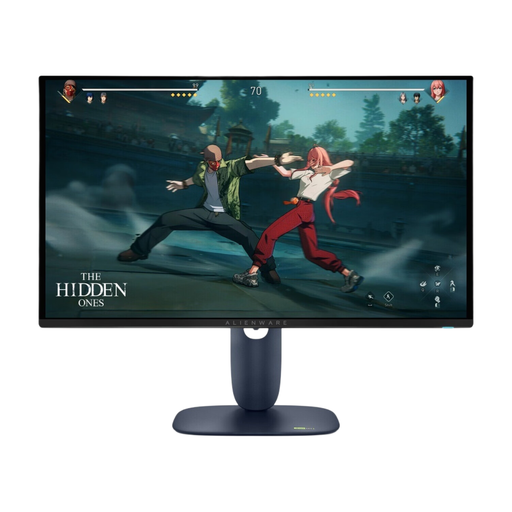
Why This Fits Their Persona: For gamers where every millisecond counts. The combination of a 280Hz refresh rate and a 0.03ms GtG response time from the QD-OLED panel offers a tangible advantage in fast-paced shooters and racing games.
This screen delivers a true, measurable 0.03ms GtG response time, not a misleading MPRT value. The DisplayHDR 400 True Black certification guarantees an impactful HDR experience, not an empty marketing claim.
Unparalleled motion clarity and responsiveness. Perfect black levels and vibrant colours thanks to the QD-OLED panel.
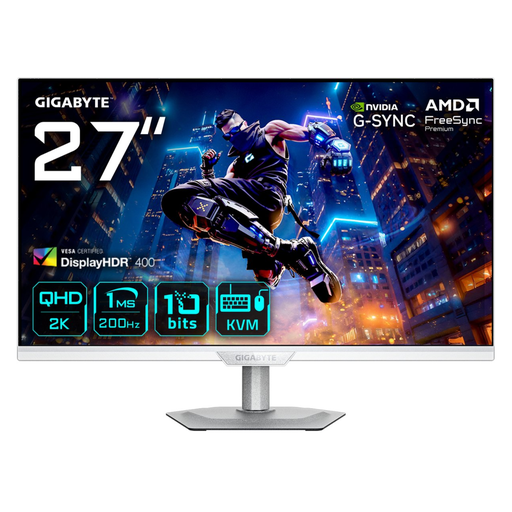
Why This Fits Their Persona: A strong performer for those who want high speeds and good colours without the premium price of OLED. Ideal for a mix of competitive and graphically rich single-player games.
This screen uses a SuperSpeed IPS panel with a true 1ms GtG response time, offering a good balance between speed and colour. The Quantum Dot technology ensures better colours than a standard IPS panel.
High 200Hz refresh rate and QHD resolution with vibrant colours at a more accessible price point. Includes a KVM switch for multi-platform use.
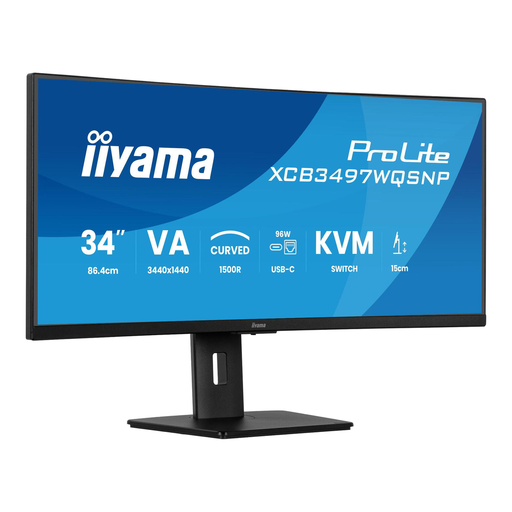
Why This Fits Their Persona: For users who divide their time between immersive single-player games (like RPGs or racing sims) and productivity. The ultrawide format and built-in KVM switch are highly practical.
This monitor focuses on its strengths: an immersive 1500R curve and a VA panel for high contrast, ideal for cinematic games. It makes no false promises about competitive e-sports speeds.
Ultrawide (21:9) format for a wide field of view in games and more screen real estate for work. The USB-C dock and KVM switch simplify your desk setup.
We have compiled a complete, up-to-date list of products that fully meet these strict selection criteria and local regulations.
Modern QD-OLED monitors, including the AW2725D, use advanced technologies to minimise the risk of burn-in. According to the manufacturer, there are features like pixel shifting and special algorithms that protect the panel's lifespan. Furthermore, Dell often provides an extensive warranty that covers burn-in, which offers extra peace of mind. To be safe, it is still advisable to auto-hide static interface elements, like the taskbar, and to avoid leaving the monitor on a static image for unnecessarily long periods.
To fully utilise the 280Hz of a QHD monitor like the AW2725D in the latest games at high settings, a high-end graphics card (such as an NVIDIA GeForce RTX 4070 Ti or higher, or a comparable AMD card) is recommended. For e-sports titles like Valorant or CS:GO, which are less demanding, you can achieve very high framerates even with a slightly less powerful card. In all cases, G-Sync/FreeSync technology ensures the experience remains smooth, even if you don't consistently hit 280 fps.
DisplayHDR 400 True Black is a certification specifically for displays that can render perfect blacks, such as OLED panels. This means a much higher contrast and deeper black tones than a standard LCD screen with a regular HDR 400 certification. An LCD screen always has a backlight, meaning black is never truly black. An OLED panel can turn off pixels completely. The result is a much more vibrant and realistic image, especially in dark scenes in games and movies.
