
Vandaag of morgen in huis

Kwaliteit gegarandeerd

Welkomstaanbiedingen ontgrendelen: GRATIS bezorging | Tot 80% korting | Gratis 30 dagen JoyPlus-proefperiode
Download de app
Buying a gaming monitor seems straightforward until you compare the specifications side by side. A high refresh rate, for example, is of little use if your PC cannot reach that frame rate. A large screen can also take up too much desk space, while an inexpensive monitor mount may not be suitable for your monitor’s weight or VESA size.
Joybuy Product Recommendation Officer filters the most important information based on verifiable product specifications. This helps you see which features are relevant to the way you use your monitor and which marketing claims you should check carefully before ordering.
A 240Hz or even 300Hz monitor sounds appealing for competitive gaming. However, you also need a graphics card and game settings capable of delivering enough frames per second. For an office PC or console, a Full HD monitor with 144Hz or 180Hz may be more practical than a more expensive display with a higher refresh rate.
You should also read the stated response time carefully. Manufacturers use terms such as GtG, MPRT or a minimum measured value. So do not simply compare “0,03 ms” with “1 ms”; also consider the panel type, connections and measurement method used.
A 4K monitor displays more pixels than a QHD monitor, but it also requires more graphics processing power. A 27-inch gaming monitor with a QHD resolution of 2560 × 1440 often offers a practical balance between sharpness and performance. A 32-inch gaming monitor can provide more workspace, but individual pixels may be more noticeable at Full HD.
With a 49-inch ultrawide monitor, the aspect ratio also plays a major role. A 32:9 display is wide and suitable for simulations and multitasking, but check beforehand that your desk is deep and wide enough.
Not every monitor mount fits every screen. Always check:
A mount for a 27-inch screen is not automatically suitable for a 49-inch ultrawide monitor. Only install a wall or ceiling mount on a structure capable of supporting the total weight. Plasterboard without a suitable supporting structure is not sufficient.
For a desk, 24 to 27 inches are common sizes. A 27-inch gaming monitor usually works well at a normal sitting distance. A 32-inch gaming monitor provides more room for games, films and windows, but requires you to sit further back to view the entire image comfortably.
A curved gaming monitor can be particularly comfortable with wider screens, as it follows your viewing direction more closely. However, the curvature, such as 1500R or 1800R, is not a guarantee of a better experience. Check that you sit directly in front of the screen and that your desk is deep enough.
According to the product specifications, an OLED gaming monitor or QD-OLED monitor offers deep blacks and a fast stated response time. However, the manufacturer of the MSI MPG 491CQP warns against displaying static images for long periods because of the potential risk of burn-in. This is an important consideration when using desktops with fixed taskbars or dashboards.
A monitor with FreeSync or monitor with Adaptive-Sync can match its refresh rate to the image output of a compatible graphics card. This can help reduce tearing and stuttering, but real-world performance depends on the source, cable, driver and supported range.
Therefore, check whether the desired refresh rate is available through the correct connection. HDMI and DisplayPort may support different maximum resolutions and refresh rates depending on the model.

Why it suits this profile: This 27-inch curved gaming monitor combines Full HD with 180Hz, making it suitable for beginner PC gamers who want smooth visuals without moving straight to QHD or 4K.
The specifications clearly list Full HD, VA, 180Hz, 1500R, HDMI and DisplayPort. Adaptive-Sync is supported, but the graphics card and cable must also support it.
27 inches, 180Hz, stated minimum response time of 0,5 ms, matte screen and VESA 100 × 100 mm.
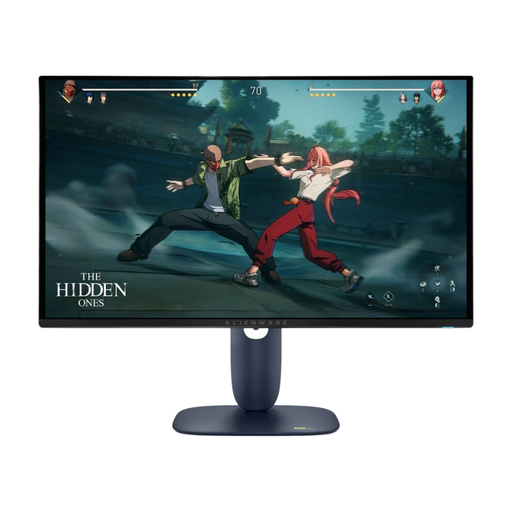
Why it suits this profile: For gamers and content creators who value QHD resolution, a QD-OLED panel and extensive synchronisation options.
The model separately lists QHD, 280Hz, HDMI 2.1, DisplayPort 1.4, G-SYNC Compatible, FreeSync Premium Pro and VESA 100 × 100 mm.
26,7-inch QHD, QD-OLED, 280Hz, stated response time of 0,03 ms and height-adjustable stand.
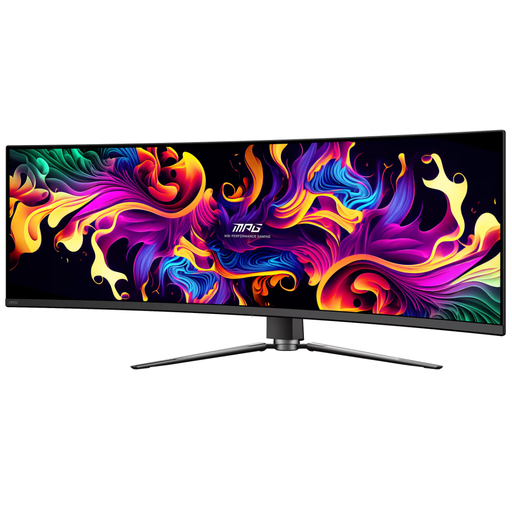
Why it suits this profile: This 49-inch ultrawide monitor is aimed at simulation enthusiasts, multitaskers and users who want to place multiple windows side by side.
The dimensions, 32:9 aspect ratio, 1800R curvature and VESA 100 mm are specified. However, check your available desk space and suitable mounting options beforehand.
5120 × 1440, 144Hz, HDMI 2.1, DisplayPort 1.4, USB-C with up to 90W Power Delivery and FreeSync.
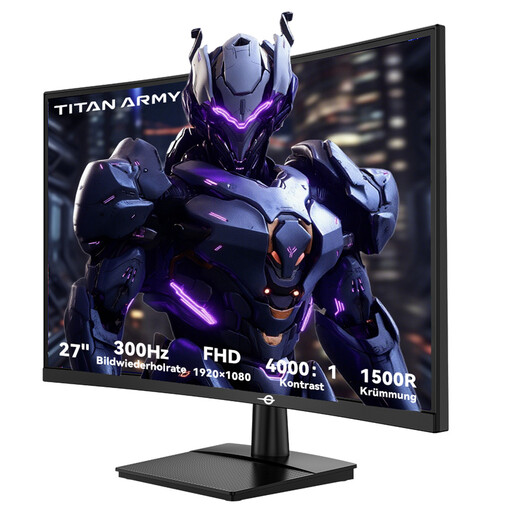
Why it suits this profile: The combination of Full HD, 300Hz, 1 ms GTG and Adaptive Sync is well suited to players of fast-paced esports and FPS games using a PC capable of delivering high frame rates.
According to the product information, the connection supports 48–300Hz via HDMI 2.0 and DisplayPort 1.4. Check that your PC and cable can actually achieve this setting.
27 inches, 1500R VA panel, 300Hz, 1 ms GTG, FreeSync Compatible and VESA 100 × 100 mm.
We have compiled a complete, up-to-date list of products that fully meet these strict selection criteria and the applicable European safety regulations.
A monitor with a VESA mount is easier to install on an arm, wall or ceiling. For smaller screens, the Neomounts FPMA-W830 and FPMA-W810BLACK are suitable for screens up to 27 inches and a maximum of 12 kg, with VESA 75 × 75 and 100 × 100 mm. The FPMA-W250BLACK supports screens up to 30 inches and also has an adjustable tilt and swivel function.
For large displays, the Neomounts CL35-440BL16L and CL35-440BL16XL are designed for screens from 37 to 70 inches. These models support a load of up to 50 kg, but require a suitable ceiling structure. Before installation, check the manual, the mounting surface and all VESA dimensions.
For many PC gamers, 144Hz is a practical choice. The image can appear smoother than at 60Hz, provided that the PC produces enough frames. Competitive players can choose 180Hz, 240Hz or 300Hz when their hardware and games are configured to support them.
According to the product specifications, an OLED gaming monitor can offer deep blacks and fast image transitions. With static images displayed for long periods, manufacturers warn that there is a risk of burn-in. Therefore, use the recommended screen protection features and check the manufacturer’s policy.
Power consumption depends on the screen size, brightness, panel type, HDR use and number of hours in operation. A larger or brighter screen will generally use more energy. Check the stated power consumption and energy rating, and switch the monitor off when you will not be using it for an extended period.
