
Vandaag of morgen in huis

Kwaliteit gegarandeerd

Welkomstaanbiedingen ontgrendelen: GRATIS bezorging | Tot 80% korting | Gratis 30 dagen JoyPlus-proefperiode
Download de app
Buying a new gaming monitor can feel like navigating a minefield of technical jargon and marketing promises. Manufacturers throw around specs like "1ms response time" and "HDR," but what do they really mean? Often, these vague claims lead to a purchase you'll later regret. As a Joybuy Product Recommendation Officer, I'll help you cut through the noise and make a choice that fits your use case and budget, without falling into the typical traps.
Before we dive into the specifications, it's crucial to recognise the most common marketing tricks that can cost you money.
Nearly every gaming monitor advertises a 1ms response time, but this is often misleading. Many manufacturers use the MPRT (Moving Picture Response Time) measurement, which is achieved by strobing the backlight. While this can reduce motion blur, it often introduces flicker and lower brightness. The more reliable standard is GTG (Grey-to-Grey), which measures the actual speed at which a pixel changes colour. A monitor with a low GTG value offers a genuinely sharp and smooth image without adverse side effects.
HDR (High Dynamic Range) promises more vibrant colours and higher contrast, but the term is frequently misused. A monitor labelled "HDR10" or "HDR Ready" but with a peak brightness of only 300 nits will not produce a noticeable HDR effect. For a true HDR experience, you need higher peak brightness and local dimming. Look for VESA DisplayHDR certifications like DisplayHDR 400, DisplayHDR 600, or higher. These guarantee a minimum level of performance.
A 4K monitor with a high refresh rate is impressive, but it's useless if your graphics card can't run games at that resolution and speed. The reverse is also true: a powerful RTX 5080 is a waste of money if you pair it with an outdated 1080p 60Hz PC monitor. Ensure your monitor's specifications are aligned with your system's performance. A 144Hz beeldscherm at 1440p requires a decent mid-range GPU, while a 240Hz monitor at 4K demands the most powerful cards available.
To avoid a bad purchase, focus on these three objective specifications.
Resolution determines the sharpness of the image. The typical choices are:
The refresh rate, measured in Hertz (Hz), indicates how many times the image is updated per second. A higher value results in a smoother picture.
The response time (ms) measures how quickly pixels can change colour. A low GTG value (1-4ms) is desirable to prevent 'ghosting'.
There are three main panel types, each with its own pros and cons:
Below are a few models that suit different user profiles, based on their objective specifications.
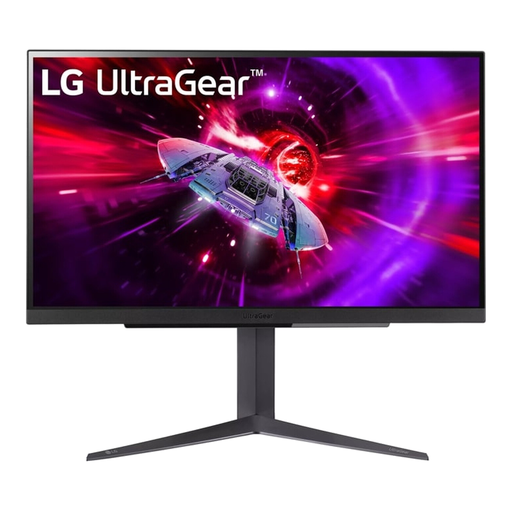
Why This Fits Their Persona: For esports players, responsiveness is everything. This screen combines a 240Hz refresh rate with a QHD resolution, delivering an extremely smooth yet razor-sharp image. Ideal for fast-paced shooters where you need to see every opponent instantly.
This model uses a 1ms GTG response time, not the misleading MPRT standard. You get the actual speed you're paying for, without flicker or reduced brightness.
The combination of a 240Hz monitor with a 27-inch QHD IPS panel offers an excellent balance between speed and image quality. Compatible with both G-Sync and FreeSync Premium.
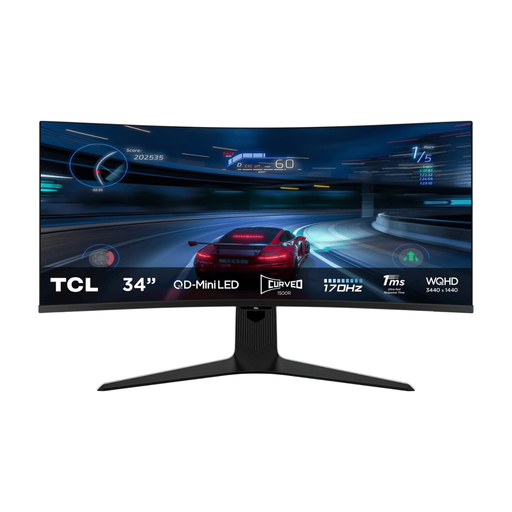
Why This Fits Their Persona: For those who want to be fully absorbed in the game world. The 34-inch ultrawide monitor format with a 1500R curve fills your field of view, perfect for adventure games, racing sims, and movies. The Mini-LED technology provides unprecedented contrast.
This screen bypasses the 'empty HDR promise' with a VESA DisplayHDR 1400 certification and Mini-LED with 1,152 dimming zones. This delivers an authentic HDR experience with deep blacks and a peak brightness of up to 1600 nits.
The combination of a curved screen, Mini-LED backlight, and a high 170Hz refresh rate offers a premium, immersive experience that few other monitors can match.
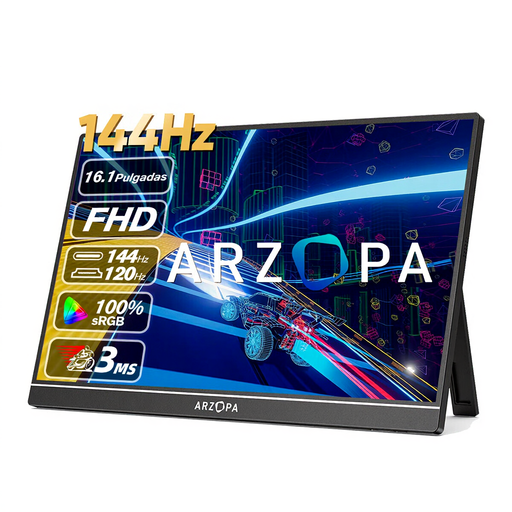
Why This Fits Their Persona: Perfect for those who want to be productive or game on the go. This screen functions as an ideal second screen for a laptop for work, but with its 144Hz refresh rate, it's also an excellent monitor for PS5 or Nintendo Switch while travelling.
Where many portable screens compromise on performance with a 60Hz panel, this model offers a 144Hz refresh rate. This avoids the pitfall of a slow, unusable monitor for gaming on the move.
Extremely light (780g) and thin, with a high refresh rate that is unique for a portable monitor. Connecting via USB-C or HDMI makes it highly versatile.
We have compiled a complete, up-to-date list of products that fully meet these strict selection criteria and local regulations.
Not necessarily. For a 1080p 144Hz beeldscherm, a mid-range graphics card is often sufficient to achieve high frame rates in many esports titles. For 1440p (QHD) or a 4K monitor at 144Hz, you will need a more powerful card, such as a model from the RTX 40 or 50 series. It's all about the balance between resolution and the games you play.
A curved beeldscherm has a slight curve intended to make your viewing experience more immersive, especially with larger or ultrawide monitor formats. It can also reduce eye strain by keeping the distance from your eyes to every part of the screen more consistent. A flat screen is often more practical for graphic design or tasks where straight lines are crucial. The choice is largely personal.
Always use the included HDMI 2.1 cable and connect it to an HDMI 2.1 port on your monitor for PS5. This is necessary to game in 4K at 120Hz. In the PS5 settings, go to 'Screen and Video' and ensure the output is set to 120Hz and that VRR (Variable Refresh Rate) is enabled if your monitor supports it.
