Choosing a new gaming monitor can feel like navigating a maze of specifications. Refresh rates, resolutions, panel types, and marketing terms are thrown at you from all directions. The wrong choice can lead to disappointing image quality or a lack of responsiveness in fast-paced games. This article is designed to be a practical guide. We focus on the factual parameters that matter, so you can make an informed decision that fits your type of games and budget.
Choosing a Gaming Monitor: The Key Specifications
Before we look at specific models, it's helpful to understand the most important specifications. These are the building blocks of any great monitor for PC gaming.
Resolution and Screen Size
Resolution determines the sharpness of the image, while screen size is the physical dimension of your display.
- Full HD (1920x1080): The standard for budget-friendly and competitive gaming. Requires less powerful hardware to achieve high framerates.
- QHD (2560x1440): The 'sweet spot' for many gamers. A QHD gaming monitor, often a 27-inch monitor, offers a noticeably sharper image than Full HD without the extreme system requirements of 4K.
- 4K (3840x2160): Delivers the highest visual detail, ideal for graphically impressive single-player games. Requires a very powerful graphics card.
- Ultrawide (e.g., 3440x1440): An ultrawide monitor provides a wider field of view, which significantly enhances immersion in many games.
Refresh Rate (Hz) and Response Time (ms)
These two specifications are crucial for the smoothness and responsiveness of your gaming experience.
- Refresh Rate (Hz): The number of times per second the screen refreshes the image. A standard monitor is 60Hz. A 144Hz monitor displays more than twice as many frames per second, resulting in a much smoother and more responsive image. For competitive gamers, 144Hz or higher is the norm.
- Response Time (ms): The time it takes for a pixel to change from one color to another. A 1ms monitor minimizes 'ghosting' (blurry trails behind moving objects), which is essential in fast-paced games.
Panel Type: IPS, VA, or TN
The type of panel affects color reproduction, viewing angles, and contrast.
- IPS (In-Plane Switching): An IPS monitor is known for its superior color accuracy and wide viewing angles. Modern IPS panels also have fast response times, making them a popular all-around choice.
- VA (Vertical Alignment): Offers the best contrast ratios, resulting in deeper blacks. A great choice for gaming in a dark room.
- TN (Twisted Nematic): Historically the fastest panels, but with poorer color reproduction and viewing angles. Today, fast IPS panels are often a better option.
Image Quality and Extras: HDR and Connectivity
Modern monitors offer additional features that can enhance the experience.
- HDR (High Dynamic Range): An HDR monitor can display a wider range of brightness and colors. This leads to more realistic and vibrant images, with brighter highlights and darker shadows. Look for certifications like DisplayHDR 400, 600, or 1000 for an indication of performance.
- Connectivity: Besides HDMI and DisplayPort, a monitor with USB-C is becoming increasingly popular. This allows a single cable to transmit video, data, and power (for charging a laptop).
Our Recommendations for Gaming Monitors in 2026
Based on the criteria above, we have made a selection of models that appeal to different types of gamers.
Iiyama G-MASTER G2745HSU-B2 Black Hawk
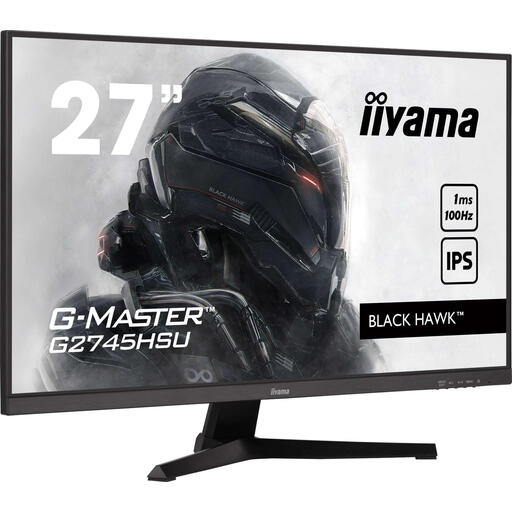
Why This Product This model from Iiyama provides a solid foundation for gamers looking to upgrade from a standard 60Hz monitor. It combines a popular size with an IPS panel and an increased refresh rate, without a high price tag.
Pros
- IPS Panel: Ensures good color reproduction and wide viewing angles.
- 100Hz Refresh Rate: A noticeable upgrade in smoothness compared to 60Hz monitors.
- Practical Extras: Built-in USB hub for easily connecting peripherals.
Who Is This For? This is a suitable monitor for entry-level PC gamers or players who mainly enjoy single-player games and less demanding esports titles. It's an affordable upgrade that offers a good balance between performance and functionality.
View product details on Joybuy.nl
Thunderobot 27-inch 2K 275Hz Fast IPS Gaming Monitor
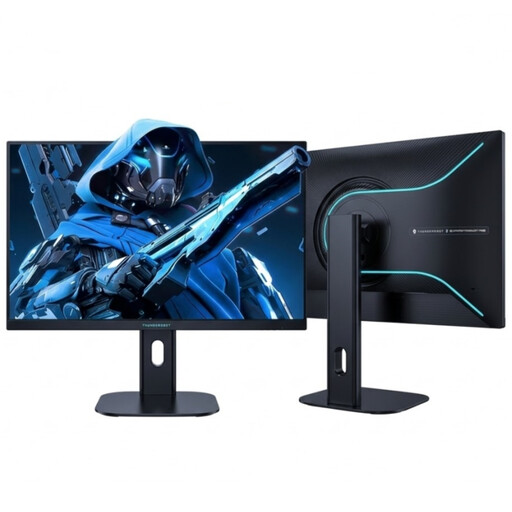
Why This Product This monitor from Thunderobot is purely focused on speed. The combination of a QHD resolution with an extremely high 275Hz refresh rate makes this an instrument for competitive players.
Pros
- Extreme Speed: With 275Hz and a fast response time, you won't miss a single frame in fast-paced shooters.
- Sharp and Colorful: The Fast IPS panel delivers both speed and great colors on a sharp 2560x1440 resolution.
- Ergonomic: The height-adjustable and swivel stand ensures a comfortable position during long gaming sessions.
Who Is This For? This monitor is designed for the serious and competitive esports player. Players of titles like Valorant, Counter-Strike, or Apex Legends will appreciate the exceptional smoothness and responsiveness.
View product details on Joybuy.nl
TCL 34R83Q 34-inch Ultra-Wide QHD Mini-LED Monitor
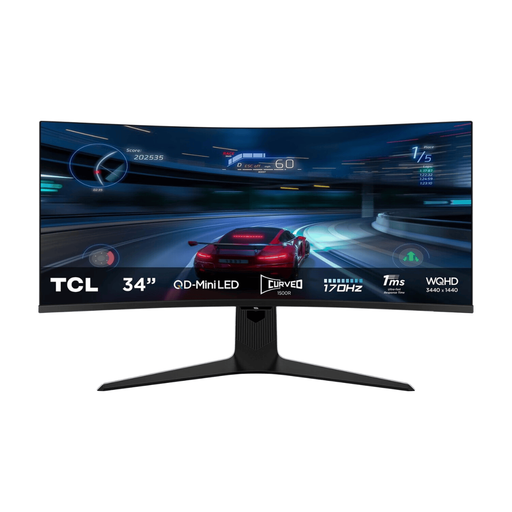
Why This Product The TCL 34R83Q aims for the ultimate visual experience. The combination of an ultrawide format, Mini-LED technology, and a high HDR certification delivers an image quality that few other monitors can match.
Pros
- Mini-LED with HDR 1400: With over 1100 dimming zones and a peak brightness of 1600 nits, this monitor delivers deep blacks and extremely bright highlights for an impressive HDR experience.
- Immersive Ultrawide Format: The 34-inch wide screen fills your field of view, which is ideal for cinematic games and multitasking.
- Modern Connectivity: The USB-C port with 90W Power Delivery enables a single-cable setup for video, data, and charging.
Who Is This For? This is a monitor for the high-end enthusiast seeking the most immersive and visually stunning experience in single-player games like Cyberpunk 2077 or Red Dead Redemption 2. It is also an excellent choice for content creators.
View product details on Joybuy.nl
Didn't Find What You Were Looking For?
The selection above covers various use cases, from budget-friendly to high-end. However, the gaming monitor market is large and diverse. You might be looking for a different size, have a specific brand preference, or a model with a different budget. For a broader overview of all available models, you can check out our main Computer and Monitor category.
Frequently Asked Questions about Gaming Monitors
Is a 144Hz monitor worth it for gaming?
Yes, for most gamers, the step up from 60Hz to 144Hz is one of the most noticeable upgrades you can make. On-screen motion is significantly smoother, which not only looks more pleasant but can also improve your reaction time in fast-paced games. Even navigating your desktop feels smoother.
What is the difference between an IPS, VA, and TN panel?
- IPS: Offers the best color reproduction and viewing angles. Ideal for gamers who also value visual quality.
- VA: Has the highest contrast, which provides deeper blacks. A good middle ground between IPS and TN.
- TN: Is traditionally the fastest in terms of response time but compromises on color and viewing angles. It is increasingly being replaced by fast IPS panels.
Written by: Joybuy Product Recommendation Officer


