
Competitive aim trainer
You practise fast target movements and want to compare motion clarity, refresh rate and input lag across models.


Focus your choice on what gets in the way most when you practise: motion blur, visibility in dark scenes or comfort during longer sessions. A fast TN or IPS monitor prioritises motion, while OLED combines deep blacks with fast pixel transitions. For each model, also check the picture mode, potential flicker and the effects of prolonged static images. None of these features guarantees better aim.
You practise fast target movements and want to compare motion clarity, refresh rate and input lag across models.
You often play in a dark room and want to assess dark scenes clearly, without distracting inconsistencies in black levels.
You also use your screen for other activities, so you consider viewing comfort at low brightness, image detail and maintenance.
First, check which resolution and refresh rate your PC can actually support. Then compare motion, black levels and viewing comfort on the exact model.
| What to consider | What to look for | Who should prioritise this? |
|---|---|---|
| Tracking moving targets | Compare independent motion tests, including pixel transitions and overshoot, and check whether your PC can handle the resolution and refresh rate you want. | If I want to track fast targets, I look beyond the Hz figure alone; around 36% of consumers prioritise motion clarity above all else. |
| Seeing dark scenes | Check the exact model’s black uniformity and contrast, and see whether bright objects cause distracting blooming. | When dark details matter for my practice sessions, I want to assess black levels rather than rely on an HDR label alone. Around 29% of consumers prioritise visibility in dark scenes. |
| Evening viewing comfort | Check how the monitor behaves at low brightness and whether any strobing mode works with your preferred VRR setting. | If I play for long periods with a dimmed screen, I pay particular attention to flicker and brightness; an estimated 21% of consumers prioritise viewing comfort above all else. |
| Versatility and maintenance | Compare the resolutions and picture modes you use. For OLED, read the maintenance and warranty terms for the exact version. | If you also use your screen for things other than aim training and are mindful of prolonged static images, it’s important to weigh up the bigger picture; around 14% of consumers prioritise versatility and maintenance. |
A GtG figure alone doesn’t tell you how the screen handles blur, overshoot and input lag at your frame rate.
Compare independent motion tests for the exact model and note which picture mode was used.
Motion strobing can reduce blur, but it can also cause flicker and lower brightness. It also doesn’t work with VRR on every model.
Compare the available modes on the exact model, and turn strobing off if the trade-off doesn’t feel right.
In a dark room, black uniformity, contrast and any blooming also matter.
Look at dark-scene tests for the exact model and weigh the results alongside its motion performance.
ACM ConsuWijzer explains that a commercial warranty doesn’t replace your statutory rights. If a product doesn’t meet reasonable expectations under normal use, the seller is responsible for providing an appropriate solution; there isn’t one fixed statutory warranty period for every monitor.
Read the manufacturer’s terms, but assess a fault separately in light of your statutory rights.
According to ZOWIE’s product specifications, the XL2566X+ is an esports-focused option with Fast TN, 400 Hz and DyAc 2.
Dell lists the AW2725DF as a QHD, 360 Hz QD-OLED model; the AW2725QF is an IPS model with 4K/180 Hz and Full HD/360 Hz modes.
LG lists the 27GX704A-B with a QHD OLED panel, 240 Hz and DisplayHDR True Black 400.
ASUS lists the XG27AQNGV with a 27-inch QHD IPS panel, 360 Hz and G-SYNC Pulsar.
AOC lists the 24G4X with a 23.8-inch Full HD Fast IPS panel and 180 Hz. The AG326UD is a separate 31.5-inch 4K QD-OLED model with 165 Hz.
These Joybuy gaming monitors offer different combinations of refresh rate, resolution and panel type to consider for aim training and playing in a dark room.
 Image unavailable
The stated 240 Hz is worth considering if you’re looking for a high refresh rate for aim training.
27 inches, WQHD (2560 × 1440), Rapid VA, 240 Hz, 0.5 ms, FreeSync Premium and HDR Ready.
 Image unavailable
The combination of OLED and 280 Hz is worth considering if dark-scene performance and a fast refresh rate matter to you.
27 inches, WQHD, OLED and 280 Hz. Prolonged use with static images carries a risk of burn-in with OLED; read the terms for this model.
 Image unavailable
This model is worth comparing if you’re looking for QD-OLED, 4K and a stated refresh rate of 240 Hz.
26.7 inches, 4K Ultra HD, QD-OLED, 240 Hz and G-SYNC compatibility. Prolonged use with static images carries a risk of burn-in with OLED; read the terms for this model.
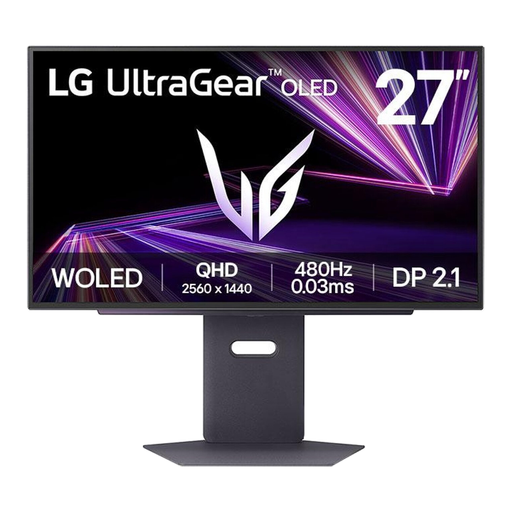 Image unavailable
The stated 480 Hz is worth considering if you’re looking for an OLED model with a high refresh rate for aim training.
QHD, OLED, 480 Hz and DisplayPort 2.1. Prolonged use with static images carries a risk of burn-in with OLED; read the terms for this model.
 Image unavailable
The Full HD resolution and 240 Hz are useful specifications to compare if you prioritise motion performance.
27 inches, Full HD (1920 × 1080), 240 Hz, AMD Adaptive Sync, HDR Ready and 0.5 ms.
No. Your PC and the selected picture mode need to support the stated refresh rate. Also compare pixel transitions, overshoot and input lag on the exact model; a higher Hz figure doesn’t guarantee better aim.
First check the active resolution and refresh rate on your PC and monitor. Then compare the motion modes on your model: strobing can reduce blur, but it can also lower brightness and introduce flicker.
A risk-free outcome isn’t guaranteed: prolonged exposure to static elements can cause burn-in on OLED. Read the maintenance and warranty terms for the specific model before you buy.
No. ACM ConsuWijzer distinguishes between commercial warranties and statutory rights. If a product doesn’t meet what you could reasonably expect under normal use, the seller is responsible for providing an appropriate solution; this doesn’t mean every monitor is covered for a fixed period under the same terms.
For displays covered by the applicable EU rules, the energy label provides information including the efficiency class and details for comparison. For the exact model, also check the product information sheet or EPREL data.