
Player of atmospheric adventure games
Wants to distinguish dark scenes from bright highlights and weigh up contrast against screen type and maintenance. RTINGS discusses HDR picture quality in gaming monitors.


Start by choosing a monitor that suits your PC or console, then check how audio will reach your headphones. OLED may be a good fit if contrast in dark scenes is your priority. With Mini-LED, 4K, high refresh rates and ultrawide screens, the benefits depend on the specific model, connection and game support. For example, PlayStation describes a test for 1440p output on supported displays, and says 120Hz output also depends on support from the game.
Wants to distinguish dark scenes from bright highlights and weigh up contrast against screen type and maintenance. RTINGS discusses HDR picture quality in gaming monitors.
Wants to know in advance which video signals their gaming platform supports, and whether their headphones connect to the monitor, console, controller or an adapter. PlayStation describes connecting certain wireless headsets to the console via a USB adapter.
Is looking for an ultrawide screen for games that support 21:9, while also considering the connection and available desk space. AOC describes the AG346UCD as a curved 34-inch 21:9 monitor.
| What to consider | What should you check? | Who should prioritise this? |
|---|---|---|
| HDR and dark scenes | Compare the panel type and any local dimming with independent findings on HDR performance for the exact model. An HDR label alone doesn’t tell you how dark scenes will look. | If atmosphere and visible detail in dark adventure games matter to me, I put contrast first. Around 28% of shoppers in this group prioritise HDR contrast. |
| Resolution and gaming platform | Check the resolution and refresh rate your PC or console supports through the input you plan to use. PlayStation offers a 1440p test for supported displays; 120Hz output also depends on the game and connected equipment. | If I want my console or PC to actually output the picture mode I’ve chosen, I first check that the game, display and connection work together. Around 22% of shoppers prioritise platform compatibility. |
| Headphone audio | Decide where you’ll connect your wired or wireless headphones, and check the output on the exact monitor model. PlayStation describes using a USB adapter connected to the console for certain wireless headsets. | If I play with headphones, I want to know before buying how audio will reach my headset. Around 22% of shoppers prioritise having a working headphone connection. |
| Cost and lifespan | Check the energy label and product information sheet for the exact model, and read the instructions for use and warranty terms. ACM ConsuWijzer explains that the retailer is your point of contact for your statutory guarantee. | If I care more about the overall cost and day-to-day use than extra picture features, I also check the energy information and maintenance requirements. Around 17% of shoppers prioritise cost and lifespan. |
| Ultrawide format | Check whether your games support 21:9, whether the screen will fit on your desk, and which input supports the picture mode you want. The Joybuy product listing for the AOC AG346UCD specifies 175 Hz via DisplayPort and 100 Hz via HDMI. | If I mainly play on a PC and my games support a wider view, ultrawide may make the extra screen width worthwhile. Around 11% of shoppers prioritise a wider view. |
HDR performance also depends on the panel and how the backlighting is implemented. So assess the exact model rather than relying on the HDR label alone.
Compare independent findings on HDR and, for LCD models, look specifically at local dimming.
The console, game, connection and monitor all need to support the output you want. PlayStation says that 120Hz output, for example, depends on support from the game.
Check your gaming platform’s settings and the supported combination of resolution, refresh rate and input.
A video connection doesn’t confirm that the display has a usable audio output. PlayStation describes using a USB adapter connected to the console for certain wireless headsets.
Before buying, check your headset’s connection and the complete audio route through the device you play on.
Depending on your headset and setup, you may need a suitable adapter or a different audio route.
Manufacturer terms and your statutory rights against the retailer have different legal bases. ACM ConsuWijzer says to contact the retailer if a product doesn’t meet expectations under normal use.
Read the terms for the exact model and keep the sales information. If you have a problem covered by your statutory rights, contact the retailer.
The ROG Swift OLED PG32UCDM Gen3 is an example of a 16:9 option with 4K QD-OLED and a specified refresh rate of 240 Hz.
The MPG 321URX QD-OLED is an example of a flat 31.5-inch 4K screen with a specified refresh rate of 240 Hz.
The AG346UCD is a curved 34-inch 21:9 QD-OLED option for PC games that support a wider view.
The AW3225QF is a curved 31.6-inch 16:9 QD-OLED model with 4K resolution.
This selection of Joybuy products includes OLED screens for 16:9 and ultrawide setups, a Mini-LED option, and models with 4K or QHD resolution.
 Image unavailable
A good fit if you’re looking for a 4K QD-OLED screen; the description also lists a headphone output for a compatible wired headset.
3840 × 2160; 165 Hz; DisplayHDR True Black 400. The product description advises against displaying static images at high brightness for extended periods, and recommends using OLED Care.
 Image unavailable
A Mini-LED LCD option if you want to factor local dimming into your choice of HDR display.
The description lists 1152 dimming zones and the modes 4K at 160 Hz and 1080p at 320 Hz. Check which mode suits your source and game.
 Image unavailable
A good fit if you want to combine QHD resolution with a flat QD-OLED screen.
2560 × 1440; 240 Hz; DisplayHDR True Black 400. The product description lists OLED features, but static images are still a consideration when choosing how to use the screen.
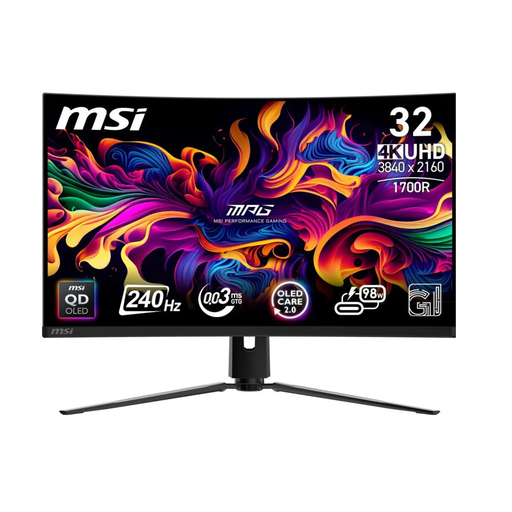 Image unavailable
A 16:9 QD-OLED option if you’re looking for a 4K picture and want to connect wired headphones via the analogue audio output.
3840 × 2160; 240 Hz; DisplayHDR True Black 400. OLED care features don’t remove the need to consider prolonged display of static elements.
 Image unavailable
A good fit for a PC setup with ultrawide games that support 21:9.
3440 × 1440; 175 Hz; DisplayHDR True Black 400. OLED Care 2.0 is listed; check the instructions for use and bear in mind that the game must support the wider view.
No, don’t assume they will. Check the audio output on the exact monitor model and the connection on your headset. PlayStation describes using a USB adapter connected to the console for certain wireless headsets.
Go to Settings > Screen and Video > Video Output to view information about the connected HDMI device. PlayStation offers a 1440p test for supported displays; 120Hz output also requires support from the game and connected equipment.
Check the care instructions and features for the exact model, and follow the guidance on displaying static images. MSI says OLED Care 2.0 reduces the risk of burn-in; that doesn’t mean burn-in is impossible.
For a monitor covered by EU rules, check the energy label and product information sheet. Consumer purchases also come with statutory rights if a product doesn’t meet what you could reasonably expect under normal use; ACM ConsuWijzer says to contact the retailer.
ACM ConsuWijzer says online consumer purchases generally have a statutory cooling-off period that ends 14 days after delivery, and also provides guidance on unboxing and trying out products. Check the applicable exceptions and return conditions; the cooling-off period is separate from your warranty.