
Player with limited mouse space
You have little room to move your mouse and want to check whether its shape, sensitivity settings and wireless connection will suit your desk.


Start with the space you have for moving your mouse and the actions you want to control in your game. A wireless mouse keeps a cable out of the way, while a wired model means you don’t have to recharge a battery. Extra buttons are most useful when they’re easy to reach and you can assign the actions you want to them.
You have little room to move your mouse and want to check whether its shape, sensitivity settings and wireless connection will suit your desk.
You want to keep frequently used actions within thumb’s reach, but you’ll need to match the number and position of the buttons to your grip and game settings.
You’re looking for a comfortable shape and practical features, such as cable routing or the need to charge a wireless mouse.
First, consider the space available for your mouse and the controls you want. Then decide whether a cable or a rechargeable battery better suits your desk and how you play.
Suitable for: a small gaming space and a limited number of actions controlled with the mouse. SteelSeries lists nine programmable buttons for the Aerox 5 Wireless.
Keep in mind: charging and your chosen connection. SteelSeries recommends using the 2.4GHz dongle for gaming; this is the manufacturer’s advice, not an independent test of your setup.
Suitable for: anyone who wants to keep a cable out of the way and have several actions within reach. Logitech G lists thirteen customisable controls for the G502 X LIGHTSPEED.
Keep in mind: the buttons need to suit your hand and grip. The number of buttons doesn’t mean that every game supports every assignment.
Suitable for: anyone who can route a cable along their desk and doesn’t want to charge a battery. Logitech G lists a customisable DPI shift button for the wired G502 X; Razer lists eleven programmable buttons for the Basilisk V3.
Keep in mind: a cable can take up space. Also check that the shape and button positions suit your hand.
Suitable for: anyone who wants to assign lots of separate actions to the mouse and can use the panel comfortably. Corsair lists sixteen programmable buttons for the SCIMITAR ELITE WIRELESS, including an adjustable side panel with twelve buttons.
Keep in mind: these specifications are for the US version consulted; they don’t confirm a Dutch version or its availability.
| What to consider | What should you check? | Who is this important for? |
|---|---|---|
| Movement space and aiming sensitivity | Measure the space next to your keyboard and adjust the sensitivity in your game; a high maximum DPI doesn’t, by itself, mean better control. | On my small desk, I want to be able to move the mouse without a cable crossing the available space. Movement space is the main buying concern for around 36% of consumers. |
| Buttons for in-game actions | Make a note of the actions you use most often, then check the button layout, software and in-game assignments. | I want to control frequently used actions quickly, but only if the buttons are easy to reach. Button controls are the main buying concern for around 29% of consumers. |
| Grip and button reach | Check which hand the mouse is designed for, its shape and button placement; assess the model using your usual grip. | During long gaming sessions, I want to reach the buttons without having to change my grip uncomfortably. Grip and reach are the main buying concern for around 21% of consumers. |
| Connection and maintenance | Check the connection, included receiver and charging method for the exact version. | I weigh up a cable that I can route out of the way against the need to charge the mouse and use a receiver. Connection and maintenance are the main buying concern for around 14% of consumers. |
A higher DPI setting moves the pointer further with the same mouse movement, but it doesn’t determine how accurately you can aim.
Compare the available settings and try adjusting the sensitivity in your game. Don’t just look at the highest number on the box.
A button is only useful if you can reach it easily and assign the action you want to it.
First, make a short list of the actions you actually use. Then check the button positions and available assignments.
Going wireless removes a cable from your desk, but you’ll need to consider the power supply and connection mode you choose.
Check the connection, receiver and charging method for the exact version.
Bear in mind that you’ll need to charge the mouse and, depending on the model, make room for a USB receiver.
The G502 X range includes a wired version and a wireless LIGHTSPEED version, with different control options.
The Aerox 5 Wireless is a wireless option with extra buttons.
The wired Basilisk V3 is worth considering if programmable buttons and scroll functions are important to you.
The SCIMITAR range is designed for anyone considering an extensive thumb-button panel.
This selection includes wired and wireless gaming mice for anyone weighing up movement space, customisable controls or extra buttons.
 No image available
A wired option if you can route the cable and adjust the mouse sensitivity to suit your gaming space.
The product name lists 25,600 DPI, a right-handed design and a black finish.
 No image available
A wired option if you can route a cable along your desk and want a mouse that, according to the product name, works with several gaming platforms.
The product name lists compatibility with PC, PS5, PS4, Xbox Series X|S and Xbox One.
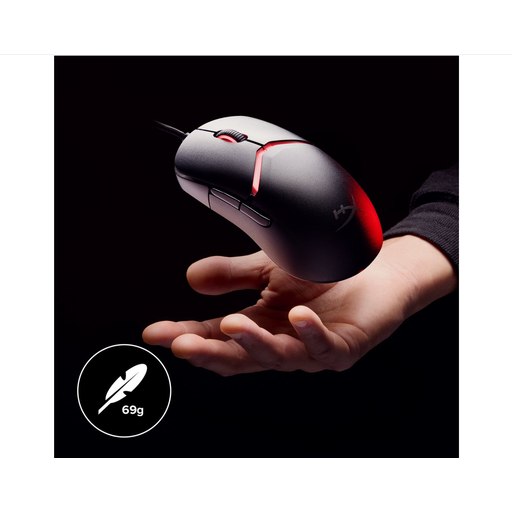 No image available
A wired option if you can route the cable and want a mouse with an adjustable grip configuration.
The product name lists 26,000 DPI and a black finish.
 No image available
A wireless option if you want to keep a cable out of your way and choose between different connections.
The product name lists BT, 2.4G and USB-C, 24,000 DPI and a weight of 63 g.
 No image available
A wireless option if you want cable-free mouse movement alongside programmable buttons.
The product name lists Bluetooth 5.0, 2.4G and USB-C, seven programmable buttons, up to 12,000 DPI and a weight of 67 g.
No. A higher DPI setting moves the pointer further with the same mouse movement. Adjust the sensitivity to suit the space available and the level of control you need in your game; the maximum DPI alone shouldn’t decide your choice.
Frontier Support recommends keeping a copy of the folder containing your custom bindings and testing after making changes to check that they still work. This advice applies to Elite Dangerous; check the settings for other games separately.
When you buy from a business at a distance, you’re entitled to a 14-day cooling-off period in many cases. The Dutch government also states that you’re entitled to a product that works properly, but there’s no fixed statutory warranty period in the Netherlands; if something goes wrong, contact the seller. Check which terms apply to your purchase.
The European Commission explains that the EU Radio Equipment Directive sets requirements for equipment that uses radio communications. CE marking is required when applicable EU rules stipulate it. Check the product information and markings for the exact version; don’t assume it complies just because of the brand name.