In a shared bedroom, a mouse with demonstrably quieter main buttons is a better choice if keeping the noise down for your room-mate matters more than having extensive in-game controls. Programmable gaming mouse buttons are more useful if you want to trigger actions quickly. Logitech says the left and right clicks on the MX Master 3S produce 90% less sound power than those on the MX Master 3, measured at 1 metre. This comparison is not against gaming mice, and it doesn’t tell you how quiet the scroll wheel or side buttons are.
Who is this choice for?
Night-time gamer sharing a room
You want to make repeated clicks as inaudible as possible for someone who is sleeping or working, even if that means choosing fewer specialist gaming controls. Logitech provides a sound comparison for the main buttons on the MX Master 3S; it doesn’t automatically apply to other mice or buttons.
Player with lots of ability shortcuts
You want to trigger actions with your thumb, so button placement and assignability matter. Razer describes interchangeable side plates for the Naga V3 Pro; Corsair lists an adjustable side panel with 12 buttons for the SCIMITAR ELITE WIRELESS.
Player who enjoys long sessions
You’re looking for a shape, weight and button position that suit your hand and grip, without choosing more buttons than you’ll use. SteelSeries lists the Aerox 5 Wireless at 66 g, with five side controls.
What should you look for when buying?
In a shared bedroom, click noise, quick in-game controls, comfort in the hand and connectivity all involve different trade-offs.
| What to consider |
What should you check? |
Who should prioritise this? |
| Click and scroll noise |
Check what a sound claim is being compared with, and assess the main buttons, wheel and side buttons separately. |
If I play late, I want to make repeated clicks as inaudible as possible for my room-mate. Around 36% of consumers prioritise click and scroll noise above all else. |
| Easy-to-reach gaming buttons |
Count the actions you want to assign, then check the button positions and compatibility with your game. |
If I want to trigger abilities quickly, I want buttons I can reach with my thumb and assign in a way that makes sense. Around 29% of consumers prioritise easy-to-reach gaming buttons. |
| Comfort during long sessions |
Compare the dimensions, weight, handedness, grip and thumb reach. |
If I play for a long time, I want to be able to reach the buttons comfortably with my hand and grip. Around 21% of consumers choose a mouse primarily for fit and button reach. |
| Connection and use |
Check which connections your computer supports and how the mouse is powered. |
When setting up my desk, I want to know whether a cable, wireless connection or power management suits the way I use my mouse. Around 14% of consumers prioritise ease of connection above all else. |
Common pitfalls
-
Applying a model-specific quietness claim to all gaming mice
Logitech says the left and right clicks on the MX Master 3S produce 90% less sound power than those on the MX Master 3, measured at 1 metre. This isn’t a comparison with every gaming mouse, and it says nothing about the noise made by every wheel or side button.
Keep the models and measurement basis together, and assess other buttons separately.
-
Choosing the largest thumb button grid without checking the layout
An adjustable panel or interchangeable side plate gives you options, but doesn’t guarantee that the buttons will suit your thumb or game.
First note which actions you want to assign, then compare the buttons’ positions and how easy they are to reach.
-
Assuming interchangeable switches are automatically quiet
ASUS describes different click feels for its switches; the final sound also depends on which compatible switch you choose.
Check the exact mouse model and which switches are compatible with it.
If you want to adjust the click feel, you may need to buy suitable, compatible switches.
Brands to consider
Quiet operation, extensive thumb controls and interchangeable switches are available on different models. Assess each model’s features rather than making assumptions about an entire brand.
Logitech
The MX Master 3S is a productivity mouse; the wired G502 X is a separate gaming option.
- Logitech says the left and right clicks on the MX Master 3S produce 90% less sound power than those on the MX Master 3, measured at 1 metre.
- The G502 X has a two-mode scroll wheel.
- The sound claim for the MX Master 3S doesn’t show that the G502 X clicks quietly.
Razer
The Naga range is designed for extensive MMO controls; the Pro Click Mini is a separate productivity mouse.
- Razer lists three interchangeable side plates for the Naga V3 Pro.
- Razer describes the Pro Click Mini’s switches as quiet.
- The description of the Pro Click Mini as quiet doesn’t prove that the Naga V3 Pro clicks quietly.
Corsair
The SCIMITAR ELITE WIRELESS is an option for players who want to assign lots of actions to an adjustable thumb panel.
- Corsair lists 16 programmable buttons, including 12 on the adjustable side panel.
- The specifications don’t compare click noise in a shared room.
SteelSeries
The Aerox 5 Wireless combines side controls with a low weight, according to the manufacturer.
- SteelSeries lists nine programmable buttons, five side controls and a weight of 66 g.
- These specifications don’t prove that the mouse clicks quietly or will suit every hand.
ASUS ROG
The ROG Gladius III Wireless is worth considering if you want to adjust the switch feel and connection type.
- ASUS describes interchangeable switches and three connection modes for the ROG Gladius III Wireless.
- Interchangeable switches don’t mean the mouse is quiet out of the box; check your chosen switch and its compatibility.
Joybuy products
This selection focuses on Joybuy gaming mice for players who value control via mouse buttons.
 No image available
AULA SC620 Wireless Gaming Mouse — White
Suits players who want to control in-game actions via mouse buttons; the product name lists seven programmable buttons and a Fire Button.
Connection: BT5.0/2.4G/USB-C; PixArt PAW3311 sensor; 12000DPI; 8KHz; 67g; 400 mAh battery.
Joybuy
 No image available
RAPOO VT9Pro 4K Wireless Gaming Mouse — BlackPurple
For players who want to assign several in-game actions to mouse buttons; the product name lists ten programmable buttons and macro support.
26000 DPI; PAW 3398 sensor; 4K polling; stated battery life: 180h.
Joybuy
 No image available
Razer Basilisk V3 X HyperSpeed
A gaming mouse to consider if you’re looking at the Basilisk V3 X HyperSpeed; check whether the button layout suits the actions you want to assign.
Joybuy
 No image available
Razer Basilisk V3 Pro 35K — Black
The product name describes a wireless gaming mouse; check that the connection and button controls you need work with your computer and game.
Joybuy
 No image available
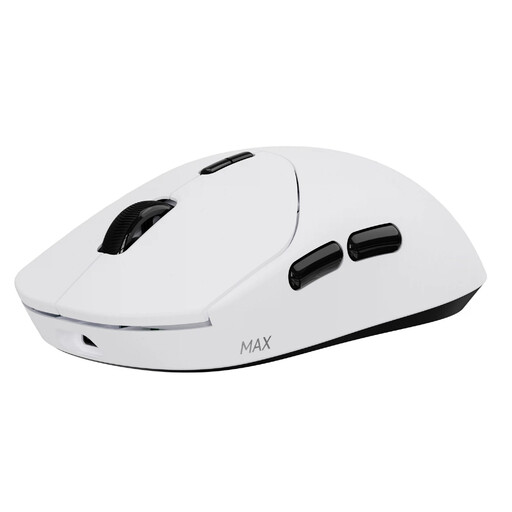
RAPOO VT2 MAX Wireless Gaming Mouse — White
Suits players who want to control in-game actions via mouse buttons; the product name lists ten programmable buttons and macro support.
53g; True 8K Wireless Polling Rate; stated battery life: up to 750 Hr; optical switch; Nordic nRF54L15 MCU.
Joybuy
Frequently asked questions
Do I need a high DPI for a tactical role-playing game?
Don’t choose based on the maximum DPI figure alone. Check whether you can adjust the sensitivity to a level that makes it comfortable to point at menus and targets.
How do I set up extra mouse buttons?
First check which button assignments your game supports. Then look up the exact model and your operating system to find out what configuration software and settings you need.
What can I do if a mouse button stops working?
If a product is faulty, contact the seller to seek a remedy under the Dutch statutory guarantee; the Dutch government states that there is no fixed statutory guarantee period for all products. ASUS describes replacing compatible switches on the ROG Gladius III, but this isn’t a universal fix for every faulty mouse button.
What cooling-off period applies to online purchases in the Netherlands?
For an online purchase from a business, you generally have 14 days to change your mind, according to the Dutch government. These rules don’t apply in the same way to online purchases from a private individual; the statutory guarantee is separate from any additional manufacturer’s warranty.


