
Racers with a tricky playing surface
You play in bright daylight and want the cursor or camera movement to remain reliable on your desk or mouse mat. For inconsistent tracking, Logitech Support also recommends trying a different surface.


Choose a gaming mouse based on how you use it in your racing game. Tracking on your playing surface, easy-to-reach buttons and a comfortable grip matter more than a high DPI figure or RGB lighting alone. Test the mouse on your own desk or mouse mat. If steering is your main priority, first check which input devices your game supports. For example, Forza Support describes mouse controls for the camera in Forza Horizon 5, with separate settings for a gamepad and racing wheel. This does not necessarily apply to other racing games.
You play in bright daylight and want the cursor or camera movement to remain reliable on your desk or mouse mat. For inconsistent tracking, Logitech Support also recommends trying a different surface.
You want to use buttons for actions your racing game actually supports, without pressing them by accident. Lenovo’s general advice on choosing a mouse emphasises that extra buttons are only useful if you can use them in your game.
You’re mainly interested in the shape, grip and weight, as well as how much room a cable or receiver takes up in your setup.
First, decide whether you’ll use the mouse for menus, camera controls or assigned actions, or mainly for steering. Then check how it tracks on your own playing surface and whether it feels right for your hand and desk.
| What to consider | What to look for when buying | Who it’s for |
|---|---|---|
| Tracking and surface | Try the mouse on your usual desk or mouse mat, and check that the sensor lens is clean. | If your cursor or camera stutters in bright daylight, you’ll want to know whether the surface is a factor. Around 36% of consumers prioritise tracking and surface. |
| Buttons and game support | Check your racing game’s input settings and make sure you can reach the buttons comfortably. | If you want to control racing actions with your fingers, first check that the game supports those inputs. Around 29% of consumers prioritise assigning actions. |
| Grip and weight | Consider the shape and button placement. Assess the complete model, not just its stated weight. | For longer sessions, you’ll want a shape and weight that suit your hand and grip. Around 21% of consumers prioritise grip and weight. |
| Wired or wireless | Check that you have a suitable USB port, and consider where a cable, receiver or charging cable will sit on your desk. | If you want more freedom of movement without a fixed cable, remember to factor in charging and any receiver. Around 14% of consumers prioritise a cable-free setup. |
Lighting effects or a high maximum DPI do not prove that a mouse will work better in bright daylight or on your desk.
Before choosing based on these features, test tracking on your usual surface and in the lighting conditions you play in.
Extra buttons are only useful if you can assign actions that your racing game supports and reach them comfortably.
First check your game’s input settings, then consider the number and placement of the buttons.
Versions with similar names can differ in their connections and charging methods. For example, HyperX lists separate wired and wireless Pulsefire Haste 2 models.
Compare the full model name and check the connection and charging details for the version you’re choosing.
The Dutch government states that the Netherlands has no fixed statutory warranty period. Your rights if a product develops a fault also depend on what you could reasonably expect from it.
If a product develops a fault, contact the seller and check exactly what any additional warranty covers.
The wired G502 X is worth considering if you’re looking for extra controls and a fixed connection.
The wired Basilisk V3 is an option if you want several assignable buttons and scroll functions.
The wired Rival 5 is worth considering if you want to control different actions with your thumb.
The Pulsefire Haste 2 range includes wired and wireless versions, so check which one you’re looking at.
The GXT 922 Ybar is a wired version with a simple button layout; the GXT 931 Ybar is a separate wireless range.
This Joybuy selection includes wired and wireless gaming mice with different button layouts. See which connection, grip and controls suit your desk and your racing game’s input settings.
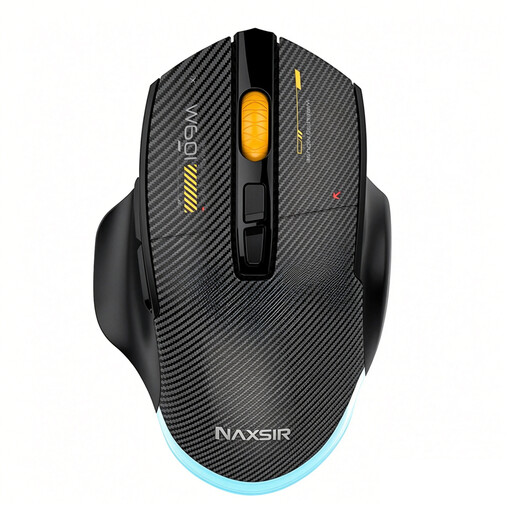 Image unavailable
Suited to a setup where you want to choose between a cable and wireless connections.
The product name lists wired, 2.4GHz and Bluetooth connectivity, 12800 DPI and seven programmable macro keys.
Check whether your racing game supports macro keys and whether the buttons are comfortable to reach.
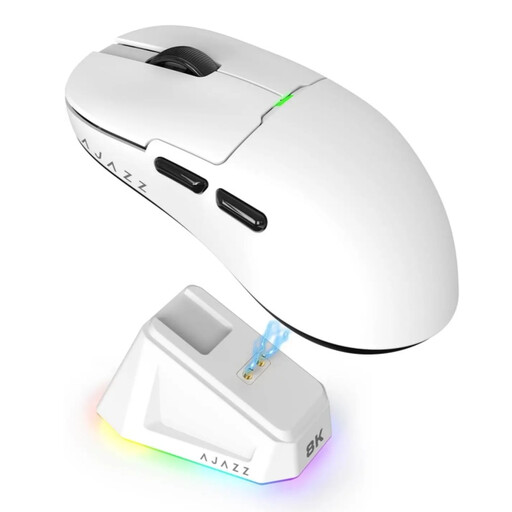 Image unavailable
Suited to a wireless setup if you’re considering the listed connection options and stated weight.
The product name lists a weight of 56 g, a PAW3395 sensor, 26K DPI and support for 2.4G, USB-C and Bluetooth.
The product description warns you to keep the magnetic charging dock at least 15 cm away from pacemakers.
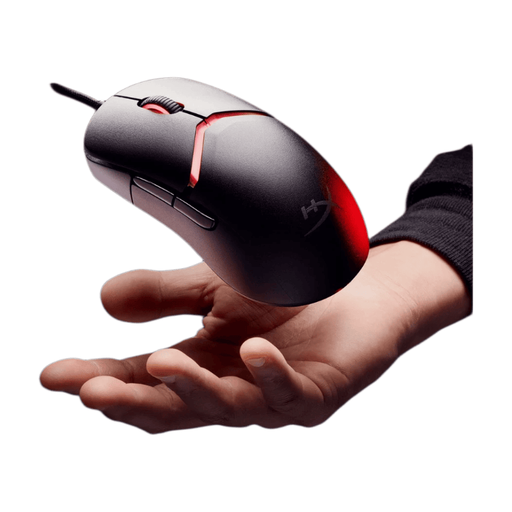 Image unavailable
Suited to anyone looking for a wired mouse with interchangeable grip components.
The product description lists a weight of 69 g, an optical sensor with adjustable DPI up to 26,000 and 16 possible grip combinations.
The mouse connects via USB, so remember to factor the cable into your setup.
 Image unavailable
Suited to anyone looking for a fixed USB connection and several programmable buttons.
The product details list a right-handed design, USB Type-A, an optical sensor up to 25600 DPI and 13 programmable buttons.
The cable may restrict movement on your desk. Also check that the buttons suit your hand and game.
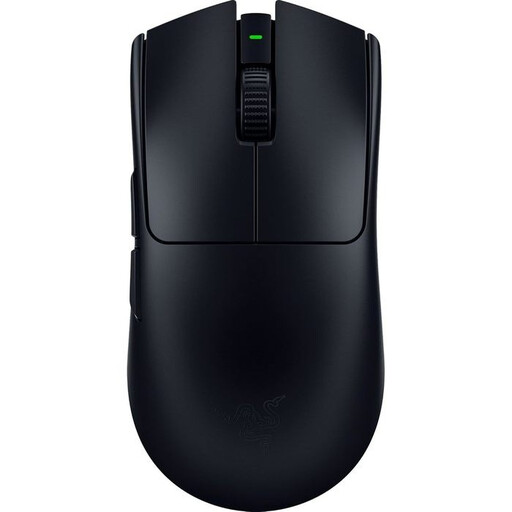 Image unavailable
Suited to anyone looking for a wireless mouse with a low stated weight and several adjustable buttons.
The product description lists a weight of 54 g, a 35K sensor, 8K HyperPolling and eight adjustable buttons.
Check which buttons your racing game supports; these specifications alone don’t tell you how the mouse will perform on your playing surface.
Not necessarily. First work out what the mouse does in your game and which sensitivity feels comfortable. For Forza Horizon 5, Forza Support describes a mouse option for camera controls while driving, with separate controls for a gamepad and racing wheel. Other racing games may work differently.
Check that the sensor lens is clean and try a different, clean surface. Logitech Support recommends these steps for inconsistent tracking; they don’t prove that a particular model is suitable for direct sunlight.
For each model, check whether it uses a USB receiver or Bluetooth, whether you need configuration software and how it charges. According to HyperX, the Pulsefire Haste 2 Wireless supports both a 2.4GHz receiver and Bluetooth, and can be used via a cable while charging.
For online consumer purchases from a business, you generally have a 14-day cooling-off period, subject to legal exceptions. The Dutch government also states that you’re entitled to a product that meets reasonable expectations, and that the Netherlands has no fixed statutory warranty period. If a product develops a fault, contact the seller.