Gaming mice on Joybuy
This selection focuses on gaming mice with customisable controls or lighting for playing in a dark room.
 No image available
Shark Velocity M71 Wireless Gaming Mouse
An option if you're looking for programmable controls and lighting.
The product description lists 2.4 GHz, wired and Bluetooth as connection options.
The product name mentions RGB lighting and a PAW3335 sensor.
Joybuy
 No image available
AJAZZ AJ159 PRO Wireless Gaming Mouse, White
An option if you're looking for programmable buttons and RGB backlighting.
The product name lists a PAW3395 sensor, 26K DPI, a magnetic base, 2.4G/USB-C/BT support, a 400 mAh battery and a weight of 56 g.
The product description warns you to keep the magnets in the charging base away from pacemakers and other medical implants.
Joybuy
 No image available
HyperX Pulsefire Saga wired gaming mouse
An option if you're looking for a wired gaming mouse with RGB lighting.
The product name lists 26,000 DPI and the colour black.
It has a wired connection.
Joybuy
 No image available
Razer Basilisk V3 X HyperSpeed
An option if you're looking for a wireless gaming mouse with customisable controls and lighting.
Check the power options and controls of the exact model to see whether they suit your setup.
Joybuy
 No image available
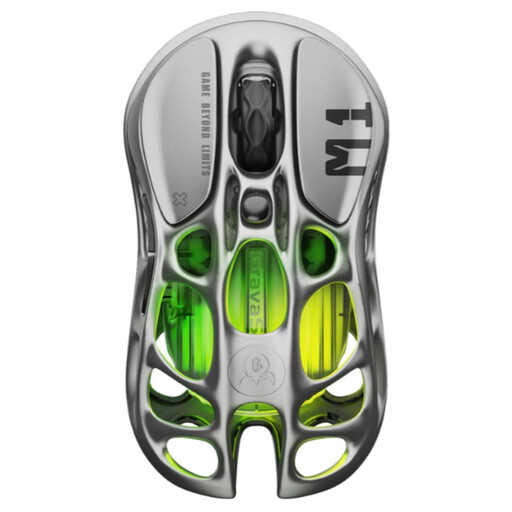
GravaStar Mercury M1 Wireless Gaming Mouse, Gunmetal
An option if you're looking for a gaming mouse with programmable buttons and customisable RGB modes.
The product name lists 5 programmable buttons, 26,000 DPI and a PAW3395 sensor.
According to the product description, a separately sold 4K receiver is required for 4,000 Hz.
Joybuy
Frequently asked questions
Does a gaming mouse need a CE mark in the Netherlands?
Devices covered by the relevant European CE rules must carry the appropriate CE mark. The Dutch Authority for Digital Infrastructure explains this requirement for electrical, electronic and radio equipment; check the marking on the version you buy.
How do you set up extra buttons and lighting?
First choose the actions you use most often, then assign them using the manual and software for the exact model. Razer lists Synapse for the Naga V3 Pro, while Corsair lists iCUE for the button and RGB settings on the Scimitar Elite Wireless; check that the software works on your system before you buy.
How long can you use a wireless mouse before it needs charging?
Battery life varies by model and settings. Trust lists up to 80 hours per charge for the GXT 929 Helox; check the conditions for your chosen model and whether you can keep playing while it charges.
What warranty and cooling-off period apply to an online purchase in the Netherlands?
For an online purchase, you generally have a statutory 14-day cooling-off period from the date the product is delivered. You are also entitled to a product that lasts as long as you can reasonably expect it to; ACM ConsuWijzer explains that there is no single fixed statutory period of two years. Contact the seller if the product is faulty.
Where can you dispose of an old gaming mouse?
Recycle a discarded electric mouse separately. According to the Dutch Government, when buying a similar new device, you can return the old one to the retailer; collection points and local council facilities are other options.


