
Player with few power sockets
You want to know whether a mouse needs its own power adapter, and whether charging, batteries or a USB connection will work with your setup.


First, decide how many in-game actions you want to control with your mouse. Then check which connection and power options suit your setup. A wired mouse needs a USB port and means you don’t have to manage a battery. A wireless mouse keeps a mouse cable off your playing area, but may need a receiver, batteries or time to recharge.
You want to know whether a mouse needs its own power adapter, and whether charging, batteries or a USB connection will work with your setup.
You want to map several spells or actions to your thumb, so you’re looking at the layout and reach of the side buttons, not just the total number of buttons.
You want the shape, weight and button positions to suit your hand and grip, even if the mouse has lots of features.
First, decide how many actions you really want to assign, then compare the mouse’s power options, connection and fit.
| What to consider | What to look for | Who is this most important for? |
|---|---|---|
| Power and interruptions | Check whether the mouse is rechargeable or uses replaceable batteries, and how you can charge it while using it. | I want to play without relying on an extra power socket or being caught out by a low battery. Around 36% of consumers put power and interruptions first. |
| Buttons for in-game actions | Count the actions you use often and check whether you can reach the buttons on the exact model with your thumb. | I want to control lots of spells or actions quickly without having to keep reaching for the keyboard. Around 29% of consumers prioritise accessible gaming buttons. |
| Grip and reach | Check the shape and stated weight, and see whether you can reach the buttons with your usual grip. | I want the mouse to suit my hand during longer sessions, with the buttons within reach without having to change my grip. Around 21% of consumers prioritise fit. |
| USB ports and receiver | Count your available USB ports and check whether the mouse supports Bluetooth if you’d rather not use a receiver. | I have few spare USB ports and want to know whether I can avoid using a receiver. Around 14% of consumers see USB connections as their main consideration. |
A wireless mouse may still need a USB port for a 2.4GHz receiver. It may also charge via USB.
Count power sockets and USB ports separately, and check which connection modes the exact model supports.
A high total doesn’t tell you how many buttons are under your thumb, or whether you can tell them apart while holding the mouse.
Decide which actions you want to assign and check the mouse’s physical layout before choosing a model.
Stated battery life can vary depending on the connection mode and settings. For example, Corsair’s stated 150 hours for the SCIMITAR ELITE WIRELESS SE via 2.4 GHz is based on RGB lighting being switched off.
Only compare battery life using the same mode and settings, and check how you can keep playing if the battery runs out.
The Naga range includes mice with a thumb button layout for players who want to assign lots of actions to mouse buttons.
The SCIMITAR ELITE WIRELESS SE is designed for players who want to assign lots of commands to an adjustable thumb panel.
The Aerox 9 Wireless combines a twelve-button side panel with a stated weight of 89 g, according to SteelSeries.
The GXT 923 Ybar Wireless is a simpler option if you only need a limited number of extra buttons.
The G502 X LIGHTSPEED is an alternative if you’d prefer several control buttons in different positions rather than a twelve-button thumb grid.
This selection includes wired mice that don’t need their own battery charging, as well as wireless models with different power and connection options. Compare the connection and button layout with your available USB ports and the actions you want to assign.
 Image unavailable
A good fit if you want to play wirelessly and prefer a replaceable battery to a fixed charging setup.
Features listed include a replaceable 300 mAh battery, a PAW3311 sensor and 24,000 DPI.
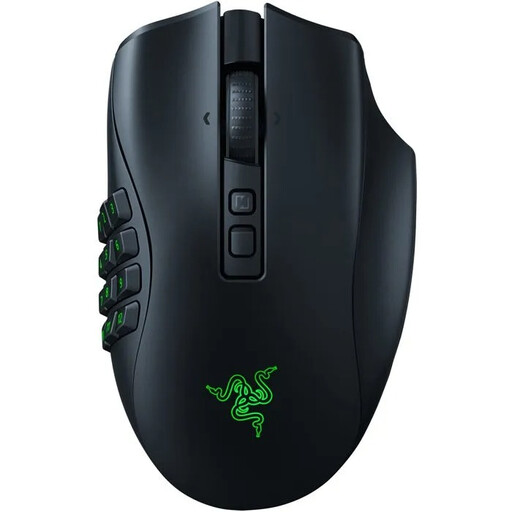 Image unavailable
An option to compare if you’re looking for a wireless MMO gaming mouse with plenty of buttons for in-game actions.
Before buying, check which button layout and charging options are available for this exact model.
 Image unavailable
A wired option if you want to avoid mouse batteries and charging breaks.
Allow for the cable and a free USB port; the product name lists 26,000 DPI.
 Image unavailable
A wired option if you want to avoid a battery and charging breaks.
The product name lists compatibility with PC, PS5, PS4, Xbox Series X|S and Xbox One; check that the connections and devices suit your setup.
 Image unavailable
A good fit if you want a wireless mouse with a charging dock; check which connection mode works with your computer and USB setup.
Features listed include Bluetooth, 2.4 GHz and USB-C; 63 g, a PAW3311 sensor and 24,000 DPI.
Not necessarily: according to Corsair, the SCIMITAR ELITE WIRELESS SE can be charged via a USB port and used while charging. You will need a spare port, though, and shouldn’t assume that every wireless mouse offers the same charging option.
Start with the actions you actually use, then check that the game and mouse software support button assignments. For the Corsair SCIMITAR ELITE WIRELESS SE, the manual explains how to slide the twelve-button panel into position and secure it using the supplied key.
In the Netherlands, you’re entitled to a product that is fit for purpose. According to the Dutch Government, there is no fixed statutory guarantee period for all products; report any fault to the seller. A manufacturer’s guarantee does not replace your statutory rights.
For online purchases from a business, the Dutch Government says you generally have a 14-day cooling-off period. Check the returns terms that apply to your purchase beforehand; purchases from a private seller aren’t covered by the same distance-selling rules.
For equipment with Bluetooth or a radio frequency module, the Dutch business portal refers to the Radio Equipment Directive. Depending on the applicable requirements, CE marking and an EU Declaration of Conformity may be required; this does not, on its own, confirm that a particular mouse meets those requirements.