
Vandaag of morgen in huis

Kwaliteit gegarandeerd

Welkomstaanbiedingen ontgrendelen: GRATIS bezorging | Tot 80% korting | Gratis 30 dagen JoyPlus-proefperiode
Download de app
A gaming setup is more than just a desk with a computer. It's your command center, your studio, your arena. The right atmosphere can make the difference between an ordinary gaming session and a fully immersive experience. Good gaming lighting is an essential part of that. But with so many options, from smart LED strips to modular wall panels, it can be difficult to choose.
As a Joybuy Product Recommendation Officer, my job is to help you make an informed choice. In this article, we'll look at the different types of ambient lighting and provide practical tips so you can find the lighting that perfectly suits your room and style.
Before you make a choice, it's helpful to consider a few things. These key points will help you find the lighting that meets your needs.
Think about the purpose of the lighting. Do you want to illuminate the wall behind your monitor, functionally light your desk, or make an artistic statement?
Modern gaming lighting is often 'smart'. This means you can adjust the colors and effects via an app or even with your voice. Pay attention to compatibility with systems you already use, such as Google Assistant, Amazon Alexa, or Apple HomeKit. Smart lights that connect via Wi-Fi and Bluetooth typically offer the most flexibility and the ability to sync the lighting with your games or music.
You'll often come across the terms RGB and RGBIC.
Based on specifications, functionality, and ease of use, we've curated a selection of popular choices that represent different needs and styles.
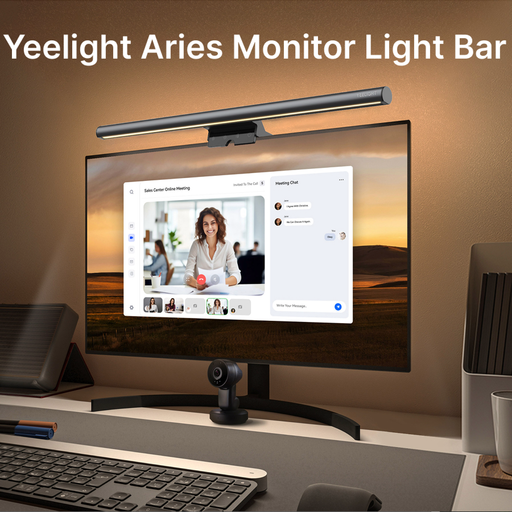
Why It Stands Out The Yeelight Aries Pro is a monitor light bar that is both functional and atmospheric. It features an asymmetric optical design that illuminates your desk without causing reflections on your screen. At the same time, a rear-facing RGB light provides an atmospheric glow on the wall behind your monitor.
Pros
Who Is It For? For the gamer or remote worker who prioritizes functionality. If you spend long hours in front of your screen and want to combine a well-lit workspace with a subtle touch of ambiance, this is an excellent choice.

Why It Stands Out With the Govee Glide Hexa panels, your wall becomes a canvas. These modular hexagonal panels can be clicked together in any pattern you desire. Thanks to RGBIC technology, each panel can display multiple colors simultaneously, resulting in spectacular, fluid animations.
Pros
Who Is It For? Perfect for the creative gamer, streamer, or content creator who wants to use their wall lighting to make a visual statement. If you're looking for personalization and a 'wow factor', these panels are a popular option.

Why It Stands Out Philips Hue is an established name in the world of smart lights. This 5-meter RGB LED strip is a reliable and versatile choice. Its strength lies in its seamless integration within the extensive Hue ecosystem, ensuring stability and endless expansion possibilities.
Pros
Who Is It For? Ideal for anyone looking for a simple, reliable, and expandable solution. If you already use other smart home products or plan to build a complete smart lighting system, the Philips Hue strip is a solid starting point.
Every gaming setup is unique, and the perfect lighting is highly personal. Are you looking for different shapes, sizes, or specific light bars? There are many more options to illuminate your space.
? Check out our full collection of Light Bars for more inspiration.
What is the difference between RGB and RGBIC lighting? Simply put, an RGB light strip can only display one color at a time. An RGBIC light strip has multiple chips, allowing different segments of the strip to display different colors simultaneously. This enables fluid, dynamic effects like a rainbow or flowing colors.
How can I sync my gaming lighting with games or music? Many smart lighting systems, such as those from Govee and Philips Hue (via the Hue Sync app), offer software for your computer. This software analyzes the colors on your screen or the audio from your computer and adjusts the lighting in real-time. This creates a highly immersive experience.
Is a monitor light bar useful? A monitor light bar illuminates the area directly in front of your screen, such as your keyboard and desk. This reduces the contrast between the bright screen and the dark surroundings. Some users find this contributes to a more comfortable viewing experience, especially during long gaming or work sessions in a dark room.
