Start by deciding between a laptop with a large built-in screen and one that you connect to an external monitor. Then compare the processor, memory and graphics card in the exact configuration with your games’ requirements. If you’re using an external screen, also check that the laptop’s port supports the video output you need. A Full HD test is not a performance guarantee at a higher resolution.
Who is this choice relevant to?
Players using a large external monitor
Do you usually play at home and want to watch battles on a separate, large screen? Check that the video output on the exact laptop configuration is compatible with your monitor. ASUS warns that not every USB-C port supports video, while Microsoft Support explains how to set up multiple screens in Windows.
Players who want a large laptop screen
If you want a spacious view for gaming without extra peripherals, compare the screen size and resolution with your preferences, as well as how often you’ll take the laptop with you. HP lists a 17.3-inch Full HD screen for the OMEN 17-db1630nd.
Players tackling lengthy campaigns
For campaign games, the processor and memory can be just as important as the graphics card. Paradox Interactive lists 16 GB of RAM as the minimum and 32 GB as the recommended amount for Europa Universalis V on Windows.
What should you consider when choosing?
Large built-in laptop screen
Best for: gaming on a spacious screen without a separate monitor.
Consider: balancing screen size and resolution with the portability you need.
Large external monitor
Best for: a large display that you mainly need at home.
Consider: checking the video output on the exact laptop configuration, and ensuring it works with your monitor and cable.
| What to consider |
What should you check? |
Who should pay particular attention? |
| Screen and connection |
Check the screen size and, if you’re using an external monitor, whether the port on the exact configuration supports video. ASUS notes that USB-C does not always support video output. |
If I play at home on a large separate monitor, I want to know in advance whether the laptop supports the connection I have in mind. Around 31% of consumers give screen size and connectivity top priority. |
| Processor and memory |
Compare the full laptop configuration with the requirements of the campaign game you play most. For Europa Universalis V, Paradox Interactive lists 16 GB of RAM as the minimum and 32 GB as the recommended amount on Windows. |
For lengthy campaigns, I want the processor and memory to suit the game I play most. Around 25% of consumers prioritise the requirements of campaign games. |
| Graphics performance |
Look for a test covering the game, laptop configuration, resolution and settings you intend to use. Tweakers reports more than 60 fps in Total War: Pharaoh at 1920 × 1080 and Ultra on the RTX 5060 laptops it tested; this does not predict performance at a higher monitor resolution. |
If I want to play battles at my chosen resolution, I look for results that match those settings. Around 25% of consumers prioritise graphics performance at their intended resolution. |
| Configuration and aftercare |
Compare the full model number, configuration and keyboard layout. ACM ConsuWijzer explains that your statutory guarantee depends on what you can reasonably expect from the product. |
When I buy, I want to be sure which configuration I’m ordering and who to contact if something goes wrong. Around 19% of consumers prioritise the configuration and aftercare. |
Which purchasing mistakes can you avoid?
-
Assuming a Full HD test guarantees QHD or 4K performance
A test at 1920 × 1080 and Ultra describes performance at that resolution and those settings. It does not automatically tell you how the laptop will perform on a larger screen with a higher resolution.
Look for results covering the game, resolution, settings and laptop configuration you’re actually considering.
-
Assuming every USB-C port can connect to a monitor
ASUS warns that not all USB-C ports support video. The connection on your chosen laptop may therefore work differently from what you expect.
Before buying, check the video specifications for the port on the exact configuration.
You may also need a suitable cable for the connection you choose.
-
Mistaking a similar model name for the same laptop
Products in the same range can have different model identities or configurations. A similar series name does not prove that the memory, screen or ports are the same.
Compare the full model number and check the RAM, storage, screen and keyboard layout for each configuration.
Which brands are useful points of comparison?
HP
Among the OMEN configurations reviewed, HP lists both a 17.3-inch Full HD model with an RTX 5060 and a 16-inch WQXGA model with an RTX 5070.
- The examples show different options for screen size and resolution.
- These are HP’s stated specifications, not independent performance measurements. Check availability of the exact configuration.
Lenovo
According to Lenovo, the Legion Pro 5i 83NN004DMH is a specific point of comparison, with a 16-inch WQXGA screen, 32 GB of RAM and an RTX 5060.
- The full model code helps distinguish this configuration from other Legion versions.
- Lenovo lists an English (EU) keyboard for this configuration, so check that the layout suits you.
MSI
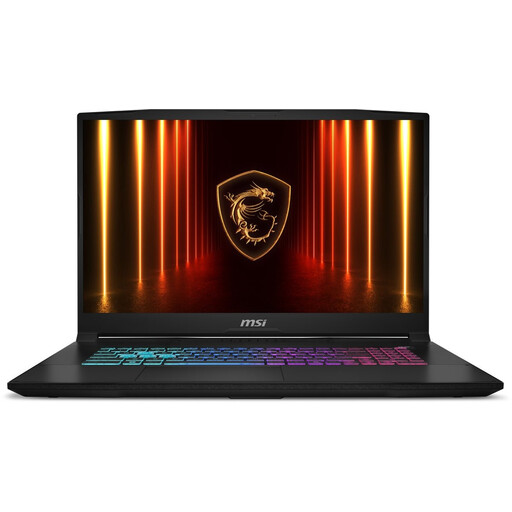
According to MSI, the Katana 15 HX C14W series includes versions with Full HD and QHD screens and different laptop GPUs.
- The series offers different screen and GPU configurations to compare by version.
- Series specifications do not automatically apply to every configuration; check the full version code.
THUNDEROBOT
The Joybuy listing for the Storm 17, model 911X17, specifies a 17.3-inch QHD screen, RTX 5060, 16 GB of RAM, 1 TB SSD and HDMI.
- The listed specifications give you specific details to compare, including the screen, memory and ports.
- These are seller specifications for one model, not an independent performance test; check monitor connectivity for the exact configuration.
Gaming laptops on Joybuy
These gaming laptops all have built-in screens, making them suitable if you want to play without a separate monitor.
 No image available
MSI Crosshair 17 HX AI D2XWFKG-071NL
The built-in 17-inch QHD+ display is a good fit if you want to game on a large screen without a separate monitor.
17-inch QHD+ at 240 Hz; Intel Core Ultra 7 255HX; NVIDIA GeForce RTX 5060 8 GB; 32 GB DDR5; 1 TB SSD; Windows 11 Home.
Paradox Interactive recommends 32 GB of RAM for Europa Universalis V on Windows.
Joybuy
 No image available
THUNDEROBOT 16-inch gaming laptop, Intel Core i7-14700HX
The built-in 16-inch screen is an option if you want to play without an external monitor.
16-inch 2560 × 1600 IPS screen at 240 Hz; Intel Core i7-14700HX; RTX 5070; 32 GB RAM; 1 TB SSD.
Paradox Interactive recommends 32 GB of RAM for Europa Universalis V on Windows.
Joybuy
 No image available
ASUS ROG Strix G18 G814PM-S9012W
The built-in 18-inch screen is ideal if you want a large gaming view on the laptop itself.
Ryzen 9 8940HX; RTX 5060; 16 GB RAM; 1 TB SSD; QWERTY keyboard.
For Europa Universalis V on Windows, Paradox Interactive lists 16 GB of RAM as the minimum and 32 GB as the recommended amount. The charger for this configuration must be purchased separately.
Joybuy
 No image available
MSI Katana 17 HX B14WFK-021NL
The built-in 17.3-inch screen is a good fit if you want a spacious gaming view without a separate monitor.
QHD IPS screen at 165 Hz; RTX 5060; 16 GB RAM; 1 TB SSD; QWERTY keyboard.
For Europa Universalis V on Windows, Paradox Interactive lists 16 GB of RAM as the minimum and 32 GB as the recommended amount.
Joybuy
 No image available
THUNDEROBOT Radiant S16
This 16-inch gaming laptop has a built-in QHD+ screen, so you can play without an external monitor.
QHD+ screen at 240 Hz; AMD Ryzen 7 7745HX; NVIDIA GeForce RTX 5060; 16 GB DDR5 RAM; 1 TB SSD.
For Europa Universalis V on Windows, Paradox Interactive lists 16 GB of RAM as the minimum and 32 GB as the recommended amount.
Joybuy
Frequently asked questions
How do you connect a large external monitor?
First, check that the port on the specific laptop configuration supports video and is compatible with your monitor’s input. ASUS warns that not every USB-C port supports video output; you can then set up the screen in Windows.
Is 16 GB of RAM enough for Europa Universalis V?
For Windows, Paradox Interactive lists 16 GB of RAM as the minimum and 32 GB as the recommended amount. Also compare the processor and other game requirements with the exact laptop configuration.
What can you do if a laptop breaks down too soon?
Contact the seller. According to ACM ConsuWijzer, your statutory guarantee depends on what you could reasonably expect from the product; a two-year manufacturer’s warranty does not automatically determine when your statutory rights end.
Do you have a cooling-off period when buying online in the Netherlands?
According to ACM ConsuWijzer, a standard online consumer purchase usually comes with a 14-day cooling-off period after delivery. Check the terms and any exceptions that apply to your purchase.


