If you mainly play on the laptop itself, compare both the screen size and resolution. For a fixed setup, a laptop with a suitable video output and an external monitor could be an alternative. Then match the configuration to the system requirements of the games you play: Steam Support also lists Intel HD Graphics for Bloons TD 6 on Windows, so that game alone is no reason to choose a more powerful graphics card. This doesn’t tell you what other games require or which settings you’ll want to use.
Who is this relevant to?
Player without an external monitor
Wants to see the playing area on the built-in screen, so weighs up screen size against resolution and weight. The HP and SKIKK models reviewed have 17.3-inch and 18-inch screens respectively; HP Store Netherlands and SKIKK list these specifications.
Player with a monitor at their desk
Wants to connect a laptop to an external screen, so checks the video ports on the exact model. Lenovo PSREF lists HDMI and USB-C with DisplayPort for the Legion Pro 5 16ADR10 product family.
Player with a limited selection of games
Wants to match the configuration to the games they actually play. For Bloons TD 6 on Windows, Steam Support also lists Intel HD Graphics; this doesn’t determine what other games require.
What should you look for?
Large built-in screen
A good fit if: you want to play without an external monitor and view the playing area on your laptop screen. The HP OMEN reviewed has a 17.3-inch FHD screen; the SKIKK Odin 18 has an 18-inch Quad HD+ screen.
Consider: a larger screen doesn’t automatically mean a higher resolution or easier portability. SKIKK lists the Odin 18 reviewed as weighing 3.9 kg.
16-inch screen with higher resolution
A good fit if: the stated resolution matters more to you than having the largest screen. The Lenovo Legion Pro 5 83LT004SMH reviewed has a 16-inch screen with a resolution of 2560 × 1600 pixels.
Consider: the screen is physically smaller than the 17.3-inch and 18-inch models reviewed; a higher resolution isn’t the same as a bigger picture.
Laptop with an external monitor
A good fit if: you usually play in one place and mean a separate monitor when you say you want a large screen. Lenovo PSREF lists HDMI and USB-C with DisplayPort for the Legion Pro 5 16ADR10 product family.
Consider: check the ports on the exact model, as well as the resolutions and refresh rates supported by both the laptop and monitor.
| What to consider |
What to look for |
Who is it most relevant to? |
| Clear view on the built-in screen |
Compare the screen size and resolution of the exact model separately. Also check whether the built-in screen is large enough for you without an external monitor. |
I usually play without an external monitor and want to follow the playing area clearly on my laptop screen. Around 36% of consumers prioritise screen visibility. |
| Suitability for your games |
Note the minimum and recommended system requirements for each game, then compare them with the laptop’s operating system, memory and graphics hardware. |
If I mainly play my own games, I want to match the configuration to them rather than automatically choosing more powerful graphics hardware. Around 29% of consumers prioritise game compatibility. |
| Right-sized configuration |
Check which components are included in the model on offer and work out which features your games actually need. |
I don’t want to choose components my games don’t need, so I weigh up the full configuration against how I’ll use it. Around 21% of consumers prioritise avoiding unnecessary specifications. |
| Portability or an external screen |
Think about where you usually play. If you use a separate monitor, check the ports on the exact model and the monitor’s connection options. |
I switch between taking my laptop with me and playing with an external monitor, so the setup needs to suit how I use it. Around 14% of consumers prioritise portability or an external-monitor setup. |
Common selection mistakes
-
Assuming a bigger screen is automatically sharper
The HP OMEN reviewed has a 17.3-inch screen with a resolution of 1920 × 1080 pixels; the Lenovo Legion Pro 5 reviewed has a 16-inch screen with a resolution of 2560 × 1600 pixels. Screen size and resolution are different specifications.
Compare both figures for the exact model before deciding which screen best suits your needs.
-
Assuming every tower defence game needs a powerful GPU
According to Steam Support, the Windows system requirements for Bloons TD 6 also list Intel HD Graphics. That doesn’t tell you what other games or your preferred settings require.
Start by checking the requirements for the games you want to play, then compare them with the laptop’s configuration.
-
Choosing a configurable laptop without checking the final specification
SKIKK says you can customise components in the Odin 18 and lists the model reviewed as weighing 3.9 kg.
Check the complete specification before choosing, and consider how often you’ll want to move the laptop.
Brands to compare
HP
The HP OMEN 17-db1630nd is a model reviewed with a 17.3-inch built-in screen. HP Store Netherlands lists FHD, 16 GB RAM and an RTX 5060 for this model.
- The model mentioned combines a 17.3-inch screen with FHD resolution.
- These specifications apply to this particular OMEN model and don’t, on their own, tell you how it will perform in a specific game.
Lenovo
The Lenovo Legion Pro 5 83LT004SMH reviewed has a 16-inch screen with a resolution of 2560 × 1600 pixels. Lenovo PSREF lists HDMI and USB-C with DisplayPort for the Legion Pro 5 16ADR10 product family.
- The model reviewed has a higher stated resolution than the 17.3-inch HP model mentioned.
- Check the ports on the exact model on offer; product family specifications don’t automatically apply to every configuration.
SKIKK
According to SKIKK, the SKIKK Odin 18 with RTX 5080 reviewed has an 18-inch matt Quad HD+ screen and weighs 3.9 kg. Memory, storage and operating system can be configured.
- Its screen size makes it a large built-in-screen option for playing without an external monitor.
- Check the final configuration and make sure the weight suits how you’ll use it. Steam Support also lists Intel HD Graphics for Bloons TD 6 on Windows; that doesn’t determine what hardware other games need.
Joybuy products
These Joybuy products are gaming laptops with built-in screens measuring 17.3 or 18 inches, for anyone who wants to play tower defence without an external monitor. Also make sure the configuration meets the system requirements of the games you play.
 Image unavailable
ASUS TUF Gaming A18 FA808UM-S8132W
The built-in 18-inch screen is a good match for playing without an external monitor.
18-inch WUXGA, 1920 × 1200, 144 Hz; AMD Ryzen 7 260; RTX 5060 Laptop GPU with 8 GB; 16 GB DDR5; 512 GB SSD; Windows 11 Home; QWERTY; Jaeger Gray.
Before buying, check whether the power adapter is included; the product description contains conflicting information about this.
View at Joybuy
 Image unavailable
MSI Titan 18 HX AI A2XWJG-492NL
The built-in 18-inch screen suits anyone looking for a large playing area without a separate monitor.
18-inch UHD+ (3840 × 2400), Mini LED, 120 Hz; Intel Core Ultra 9 285HX; 64 GB DDR5; 6 TB SSD; NVIDIA GeForce RTX 5090 with 24 GB; Windows 11 Pro; black.
Compare the graphics requirements of your games with this configuration before making your choice.
View at Joybuy
 Image unavailable
Acer Nitro 18 AI AN18-61-R25V
The built-in 18-inch screen is an option if you want to play without an external monitor.
18-inch WQXGA (2560 × 1600), 165 Hz, IPS; AMD Ryzen AI 7 350; GeForce RTX 5060 with 8 GB GDDR7; 16 GB DDR5; 1 TB SSD; Windows 11 Home; QWERTY; Obsidian Black.
Keep the air vents clear and make sure there’s plenty of ventilation while you’re gaming.
View at Joybuy
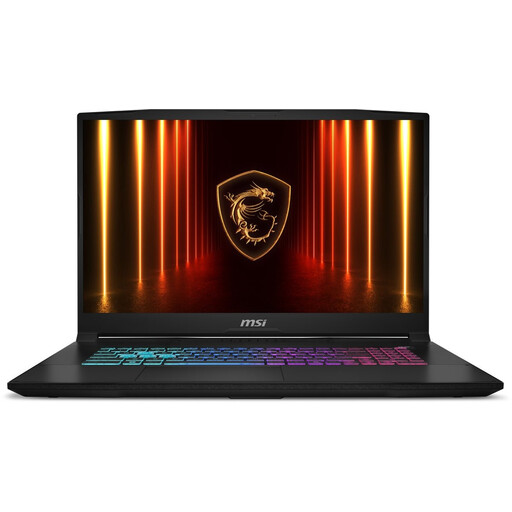 Image unavailable
MSI Katana 17 HX B14WFK-021NL
The built-in 17.3-inch screen is worth considering if you don’t want to use an external monitor.
17.3-inch QHD, 144 Hz; RTX 5060 graphics; 16 GB RAM; QWERTY keyboard.
The product description notes that the laptop may get warm during intensive gaming and that the battery may run down faster.
View at Joybuy
 Image unavailable
Thunderobot Storm 17 5060
The built-in 17.3-inch screen is an option for playing without an external monitor.
17.3-inch QHD, 165 Hz; Intel Core i7-13620H; GeForce RTX 5060; 16 GB DDR5; 1 TB SSD; QWERTY keyboard.
Use the laptop on a hard, flat surface and keep the air vents clear. The product description states that the device is not waterproof.
View at Joybuy
Frequently asked questions
Do I definitely need a laptop with a dedicated graphics card for Bloons TD 6?
Not according to the published Windows system requirements alone: Steam Support also lists Intel HD Graphics. Check the requirements for other games and the settings you want to use; system requirements don’t guarantee a specific frame rate.
How do I connect a larger monitor to my gaming laptop?
Check the video port on the exact laptop model and the connection on your monitor. Lenovo PSREF lists HDMI and USB-C with DisplayPort for the Legion Pro 5 16ADR10 product family. Also check that your laptop and monitor support the resolution and refresh rate you want to use together.
How can I keep my laptop working well during longer gaming sessions?
HP recommends leaving space around the air vents, cleaning the laptop regularly and using it on a hard, flat surface. This is maintenance advice from HP, not a performance guarantee for a specific model.
What are my rights when buying online in the Netherlands?
Online consumer purchases in the Netherlands generally come with a 14-day cooling-off period, starting the day after you receive the product, although exceptions apply, such as to custom-made items. Products must also meet the statutory requirements for conformity; a commercial guarantee does not replace these rights, according to Business.gov.nl.


