
Evening gamer in a dark room
You want to see the game and the keys clearly without an uncomfortably bright screen. Check the brightness settings and whether the exact model has a backlit keyboard.


Start by choosing a screen with brightness settings you find comfortable, and check whether the exact model has a backlit keyboard. Then compare the system requirements of the tower defence games you play. Extra graphics power is mainly useful if you also want to play more demanding games; it won’t automatically make the screen more comfortable or the laptop quieter.
You want to see the game and the keys clearly without an uncomfortably bright screen. Check the brightness settings and whether the exact model has a backlit keyboard.
You mainly want to play your own games, rather than paying for a more powerful GPU you may not need. Compare those games’ requirements with the laptop’s full specifications.
If you also play more graphically demanding games, compare the GPU, screen resolution, storage and cooling of the exact model.
For gaming in the dark, start with screen brightness and keyboard backlighting. Then compare the full specifications with the games you actually play.
| What to consider | What to look for when buying | Who is this important to? |
|---|---|---|
| Screen and keyboard visibility | Check the brightness settings and keyboard backlighting on the exact model; if possible, try using the screen at a low brightness. | When I play in a dark room, I want to be able to read the screen and see the keys without an uncomfortably bright setting. Around 36% of consumers put visibility in the dark first. |
| Suitable for the games you play | Compare the published requirements of your games with the CPU, GPU, RAM and operating system of the exact model. | If I mainly want to play my tower defence games, I compare the full specifications with those titles rather than going by the GPU name alone. Around 29% of consumers prioritise suitability for the games they play. |
| Comfort during long sessions | Look for information on noise levels and performance of the exact configuration under a similar gaming workload; check which performance modes are available. | During longer gaming sessions, I want screen settings and fan noise that I find comfortable. Around 21% of consumers make comfort during long sessions their top priority. |
| Other games and installations | Compare the requirements of any additional games with the specifications, and check the SSD capacity and included power adapter. | If I play other games as well as tower defence, I look at the specifications and storage needed for them. Around 14% of consumers prioritise versatility for other games. |
A high maximum brightness doesn’t tell you how comfortable the lowest setting will be in low ambient light.
Check the available low-brightness settings and adjust the screen to suit the room. Microsoft Support explains how to adjust brightness manually in Windows.
Specifications can vary between models in the same laptop range. For example, Lenovo lists keyboard backlighting for specific LOQ configurations, but that doesn’t automatically apply to every model.
Check the full model or manufacturer code and the keyboard specifications of the one being offered.
What’s in the box and which adapter you need can vary by model. For the TUF Gaming A16 model reviewed, ASUS states that the power adapter is not included and that a 380 W adapter is required.
Check what’s included with the exact model and which adapter it needs.
For this specific ASUS model, you may need to buy a suitable adapter separately.
The Dutch LOQ models reviewed differ in their keyboard backlighting and specifications.
The Nitro V 15 can be compared by checking the exact model code, such as ANV15-52 NH.QZAEH.00Q.
The TUF Gaming A16 model reviewed is worth comparing if you also play more demanding games.
The Victus 15-fb3611nd can be used as a reference when comparing components in a specific configuration.
The Katana 15 HX B14W family includes several configurations, each of which needs to be checked individually.
Explore these Joybuy gaming laptops as points of comparison for screen, keyboard and GPU specifications. Check whether each model’s configuration suits your games and how you plan to use it.
 No image available
The listed RGB keyboard backlighting may be useful if you want to see the keys in low light.
16″ QHD+ screen with 240 Hz; AMD Ryzen 7 7745HX; 16 GB DDR5; 1 TB SSD; NVIDIA GeForce RTX 5060.
 No image available
The listed RGB keyboard backlighting and storage capacity are worth considering if you play in low light or want to install several games.
18″ UHD+ Mini LED screen with 120 Hz; Intel Core Ultra 9 285HX; 64 GB DDR5; 6 TB SSD; NVIDIA GeForce RTX 5090 with 24 GB; Windows 11 Pro.
 No image available
Compare the listed GPU and other specifications with the requirements of your games, and check that the keyboard layout suits you.
Intel Core Ultra 7 255HX; NVIDIA GeForce RTX 5070; 16 GB RAM; 512 GB SSD.
Check whether the power adapter is included with this model.
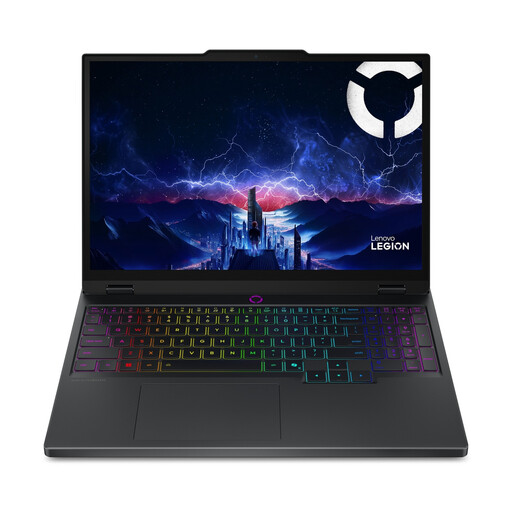 No image available
Compare the listed GPU and other specifications with the requirements of your games, and check that the keyboard layout suits you.
Intel Core Ultra 7 255HX; NVIDIA GeForce RTX 5060; 16 GB RAM; 512 GB SSD.
Check whether the power adapter is included with this model.
 No image available
The listed RGB keyboard backlighting may be useful if you want to see the keys in low light.
15.3″ WQXGA OLED screen with 165 Hz; AMD Ryzen 7 250; 16 GB DDR5; 512 GB SSD; NVIDIA GeForce RTX 5060; Windows 11 Home.
Not just because of the genre. Compare the requirements of the specific games you want to play with the laptop’s full specifications. Extra GPU power is mainly useful if you also want to play more demanding games.
Adjust the screen brightness to suit the room; Microsoft Support explains how to change it manually in Windows. The American Academy of Ophthalmology says that using a computer in the dark won’t damage your eyes, but can cause eye strain.
Don’t assume it does without checking. For the TUF Gaming A16 model reviewed, ASUS states that the adapter is not included and that a 380 W adapter is required; check what’s included with the specific listing.
Check the requirements for the exact model and product category. According to the European Union’s Your Europe website, CE marking is required when applicable harmonised EU rules say so; a brand name alone doesn’t confirm that a specific model on offer complies with the rules.