
Player with a dedicated gaming spot
Wants to view the game world and interface on a large built-in screen, so compares both screen size and resolution. The Dutch ASUS and Acer models examined both have 18-inch screens, but their resolutions differ.


If you usually play in one place and want to see more of the game world on your laptop screen, compare 17–18-inch models by both screen resolution and overall configuration. A 16-inch laptop may suit you better if you often move between places to play. In either case, check the requirements of the games you play: screen size and refresh rate alone don’t tell you what frame rate to expect.
Wants to view the game world and interface on a large built-in screen, so compares both screen size and resolution. The Dutch ASUS and Acer models examined both have 18-inch screens, but their resolutions differ.
Compares the requirements of their games with the GPU, RAM and available SSD space. For Baldur’s Gate 3, Larian Studios lists, among other things, 16 GB RAM, a GPU with 8 GB or more VRAM, and 150 GB of available SSD space in its recommended Windows specifications.
Weighs screen space against portability. A 16-inch model, such as the Lenovo Legion Pro 5 examined, has a smaller screen than the 18-inch models compared here.
A good fit if: you mainly play on the laptop itself and a larger built-in screen matters to you.
The trade-off: a higher resolution displays more pixels, but may demand more from the graphics hardware. The ASUS TUF Gaming A18 model has WUXGA; the Acer Nitro 18 AI examined has WQXGA.
A good fit if: you regularly move between places to play and are happy with a smaller built-in screen.
The trade-off: you get less physical screen space than with an 18-inch model. The Lenovo Legion Pro 5 examined has a 16-inch WQXGA screen.
| What to consider | What should you look for? | Who is it important to? |
|---|---|---|
| Screen space and readability | Check the diagonal size, native resolution and aspect ratio; also check your game’s scaling settings. | If I mostly play in one place, I want to see the game world and interface clearly; around 36% of consumers put screen space and readability first. |
| How well the game runs | Compare the requirements of your own games with the complete configuration; don’t look at the GPU name alone. | I want to know in advance whether my RPG will run well on the laptop, without mistaking a high refresh rate for a guaranteed frame rate; around 29% of consumers give playability top priority. |
| Portability and size | Compare the dimensions and weight of the exact model, along with the equipment you’ll be taking with you. | If I move my laptop often, I want to know whether 16 inches gives me enough room for my game interface; around 21% of consumers put portability first. |
| Available storage and what’s included | Work out how much free SSD space you’ll need and check what’s included with the specific model. | I want enough space left for games and to know what’s in the box beforehand; around 14% of consumers give storage and a complete purchase top priority. |
Larian Studios lists 150 GB of available SSD space for Baldur’s Gate 3. Remember to allow for the operating system and other software too; specifications alone can’t predict the frame rate on a particular laptop.
Specifications and included items can vary by model code. For example, the Joybuy listing for the ASUS TUF Gaming A18 FA808UP-S8011W states that it has 16 GB RAM and that the charger must be bought separately, while the Dutch ASUS model examined lists 32 GB RAM.
Before buying, compare the full model and part numbers, memory, screen and box contents.
Larian Studios lists 150 GB of available SSD space for Baldur’s Gate 3. Other games and software also use storage.
Check how much space will remain after installing the operating system and your other software.
The screen’s refresh rate doesn’t tell you what frame rate a particular game will achieve on that laptop.
First, choose the screen size and resolution that suit you; then look up performance for the game and the exact laptop configuration.
According to ASUS specifications, the Dutch TUF Gaming A18 model examined has an 18-inch WUXGA screen, RTX 5070, 32 GB RAM and a 1 TB SSD.
According to Acer specifications, the Nitro 18 AI NH.QYKEH.001 examined has an 18-inch WQXGA screen, RTX 5070, 32 GB RAM and a 1 TB SSD.
According to Lenovo, the Legion Pro 5 83LT004QMH examined is a 16-inch alternative with WQXGA, RTX 5060, 32 GB RAM and a 1 TB SSD.
According to MSI, the Katana 17 HX B14W series includes 17.3-inch models with, among other options, FHD and QHD screens.
HP describes the OMEN 17 AMD as a gaming laptop with a 17-inch screen, between the 16- and 18-inch sizes examined here.
This selection focuses on gaming laptops with built-in 17–18-inch screens, for players who prioritise screen space when playing tactical RPGs.
 No image available
An 18-inch model to compare if you want extra screen space on the laptop itself.
18 inches; WQXGA 2560 × 1600; AMD Ryzen 9 8940HX; RTX 5060; 16 GB DDR5; 1 TB SSD.
According to the product description, the charger must be bought separately.
 No image available
An 18-inch option with a generous stated SSD capacity; compare its configuration with your games’ requirements and storage needs.
18-inch UHD+ Mini LED 120 Hz; Intel Core Ultra 9 285HX; RTX 5090 24 GB; 64 GB DDR5; 6 TB SSD; Windows 11 Pro.
The stated weight is 3.6 kg, which is worth considering if you often take the laptop with you.
 No image available
An 18-inch model to compare if screen space matters to you; the listed specifications aren’t a gaming performance test.
18-inch WQXGA 2560 × 1600 IPS 165 Hz; AMD Ryzen AI 7 350; RTX 5060 8 GB GDDR7; 16 GB DDR5; 1 TB SSD; Windows 11 Home.
According to the product description, the charger must be bought separately.
 No image available
A 17-inch model for anyone looking for a large built-in screen and wanting to compare the exact configuration with their own games.
17-inch QHD+ 2560 × 1600 240 Hz; Intel Core Ultra 7 255HX; RTX 5060 8 GB; 32 GB DDR5; 1 TB SSD; Windows 11 Home.
 No image available
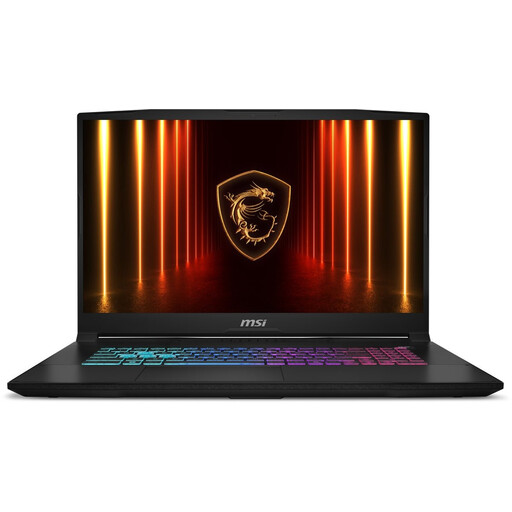
A 17.3-inch model to include when comparing laptops for gaming in one place.
17.3-inch QHD; RTX 5060 8 GB; 16 GB RAM; 1000 GB SSD; QWERTY keyboard.
The product description notes that the laptop may get warm during intensive gaming.
No. An 18-inch screen gives you more physical space than a 16-inch screen, but also check the resolution and whether the laptop’s full configuration meets your game’s requirements. Screen and GPU specifications aren’t measured frame rates.
Larian Studios lists 150 GB of available SSD space for the Windows version. Check how much space is free after installing the operating system and other software; other games may have different requirements.
No, check the details for the exact model. The Joybuy listing for the ASUS TUF Gaming A18 FA808UP-S8011W says that the charger must be bought separately; this doesn’t automatically apply to other A18 models.
According to ACM ConsuWijzer, online product purchases generally come with a statutory cooling-off period of up to 14 days after delivery, subject to exceptions. You’re also covered by the statutory guarantee if, under normal use, the product doesn’t meet what you could reasonably expect; the seller is responsible. A manufacturer’s warranty doesn’t replace this statutory right.