Start with the games you actually play, then check how the laptop performs in the mode you plan to use when your housemate is around. A quieter mode can reduce noise, but it may also limit the power available. So check playability, space requirements and included accessories for each configuration.
Who is this choice relevant to?
Evening gamer with a sleeping housemate
You want to avoid disturbing your shared room with fan noise and lighting. A quieter mode may limit the power available, and it won’t tell you how noisy the laptop will be in every game. ASUS explains this trade-off for supported ROG laptops.
Player of more demanding tactical RPGs
You want to compare the requirements of your own games with the exact memory, storage and graphics configuration. For Baldur’s Gate 3 on Windows, Larian recommends 16 GB RAM and specifies an SSD with 150 GB of free space.
Player short on space
You share a desk or want to put your laptop away after playing. Screen size, chassis, power adapter and peripheral connections all affect whether your complete setup will fit.
What should you look for?
| What to consider |
What should you check? |
Who is this important for? |
| Fan noise |
Check whether the specific configuration has a quiet mode, then assess noise levels and playability in your own game and settings. Keep the vents clear. |
If I play while my housemate is asleep, I want to minimise noise without making the game unpleasant to play. Around 36% of consumers put quiet operation first. |
| Game compatibility |
Compare your games’ system requirements with the full model code, RAM, GPU and available SSD space. For Baldur’s Gate 3 on Windows, Larian specifies an SSD with 150 GB of free space and recommends 16 GB RAM. |
If I want to play more demanding tactical RPGs, I want to know first whether the exact configuration is suitable for those games. Around 29% of consumers prioritise compatibility with the games they play. |
| Space and setup |
Compare the screen size and chassis dimensions with your desk and storage space. Also decide where the adapter and cables will go, and keep the air vents clear. |
If I share a desk or need to put the laptop away after use, I want the complete setup to fit. Around 21% of consumers cite limited space as their main consideration. |
| Complete configuration |
Check the full model code, included accessories and RAM configuration. Only compare offers once you’ve confirmed that the configuration and box contents match. |
If I want to avoid unexpected purchases, I want to know what’s in the box beforehand and whether the configuration suits my games. Around 14% of consumers put the total purchase cost first. |
Common purchasing mistakes
-
Taking ‘Silent’ to mean completely inaudible gaming
ASUS describes a quiet mode as a trade-off that makes less power available. The mode’s name doesn’t tell you how much noise a laptop will make while you play your game.
Assess the specific laptop with the game, settings and mode you actually plan to use.
-
Assuming all turn-based games have the same system requirements
Requirements vary from game to game. For Baldur’s Gate 3 on Windows, Larian recommends 16 GB RAM and specifies an SSD with 150 GB of free space. The Lenovo LOQ Essential 15IRH11 configuration reviewed has 8 GB RAM.
Check your games’ requirements first, then compare them with the full model code and configuration.
-
Assuming a power adapter is always included
For the ASUS TUF Gaming A16 configuration reviewed, ASUS eShop Netherlands states that the power adapter is not included.
Check the box contents for the specific offer before comparing configurations. You may need to buy an adapter separately for this configuration.
Brands worth comparing
ASUS
The TUF Gaming A16 is a relevant range to consider when comparing configurations with a 16-inch screen and gaming hardware. ASUS describes adjustable sound and performance modes for compatible ROG laptops; check whether these features are available on each model.
- The Dutch TUF Gaming A16 configuration reviewed lists a Ryzen 7 260, RTX 5060, 16 GB RAM and 1 TB SSD.
- ASUS eShop Netherlands states that a power adapter is not included with this specific configuration. A ROG mode is not automatically available on every TUF model.
Acer
The Nitro V 15 is a specific 15.6-inch configuration to compare against your games and the space you have available.
- The Dutch ANV15-51 configuration reviewed, with manufacturer code NH.QNBEH.00C, lists 16 GB RAM, 512 GB SSD and an RTX 4050.
- Assess the fan noise of the specific configuration while playing your own game; the listed specifications alone won’t tell you how loud it is.
Lenovo
The LOQ Essential range is worth considering if you want to compare a lighter configuration with the requirements of the games you actually plan to play.
- The Dutch 15IRH11 configuration reviewed, with item number 83Y9CTO1WWNL1, lists a 15.3-inch screen, 512 GB SSD and RTX 3050.
- This configuration has 8 GB RAM; Larian recommends 16 GB for Baldur’s Gate 3 on Windows. This doesn’t necessarily apply to other LOQ configurations.
Gaming laptops on Joybuy
These Joybuy models are gaming laptops you can compare by configuration and screen size for playing in a shared bedroom. Check the requirements of your games, your preferred mode and the space available for each configuration.
 No image available
ASUS TUF Gaming F16 FX610JM-TU005W, 16-inch gaming laptop
A configuration worth comparing if you want to match the specifications to your games’ system requirements.
Listed specifications: Core i7-14650HX, RTX 5060, 16 GB RAM, 1 TB SSD and a 16-inch screen. QWERTY keyboard.
Joybuy
 No image available
Lenovo Legion 5 15AHP11, 15.3-inch configuration, AZERTY keyboard
A configuration worth comparing if screen size and suitability for your games are key considerations.
Listed specifications: 15.3-inch WQXGA OLED screen with 165 Hz, AMD Ryzen 7 250, 16 GB DDR5, 512 GB SSD and GeForce RTX 5060. Windows 11 Home; Belgian AZERTY keyboard.
Joybuy
 No image available
MSI Stealth 16 AI+ B3WF-011NL, 16-inch gaming laptop
A configuration worth comparing if you want to weigh the screen size and listed gaming specifications against your own requirements.
Listed specifications: Intel Core Ultra 9 386H, NVIDIA GeForce RTX 5060, 16 GB DDR5, 1 TB SSD and a 16-inch QHD+ OLED screen with 240 Hz. Windows 11 Home; QWERTY keyboard.
Joybuy
 No image available
ASUS ROG Zephyrus G14 GA403UM-QS024W, 14-inch gaming laptop
A configuration worth comparing if you’re looking for a smaller screen for a shared workspace.
Listed specifications: Ryzen 9 270, RTX 5060, 16 GB RAM and 1 TB SSD. 14-inch screen; QWERTY keyboard.
Joybuy
 No image available
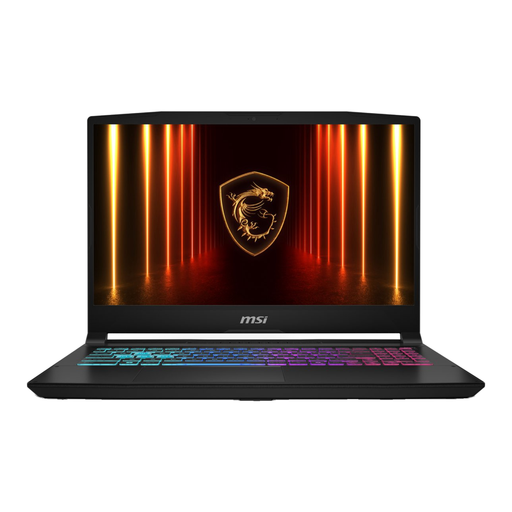
MSI Crosshair A16 HX D8WGKG-007NL
A configuration worth comparing for its listed memory and storage specifications, and the accessories included.
Listed specifications: 16 GB RAM and 1 TB SSD. QWERTY keyboard. According to the product description, the power adapter must be purchased separately.
Joybuy
Frequently asked questions
Is a quiet mode enough to game without disturbing my housemate?
No. A quiet mode doesn’t guarantee completely silent gaming. ASUS describes Silent mode as a trade-off that makes less power available, so assess the specific laptop with your own game, settings and placement.
How can I position a gaming laptop safely on a small desk?
Position the laptop so that its vents remain clear. ASUS warns that blocked airflow can affect cooling and cause performance issues, so check where the vents are on the model you choose.
Do I need to buy a power adapter as well as the laptop?
It depends on the exact configuration. ASUS eShop Netherlands states that the power adapter isn’t included with the TUF Gaming A16 configuration reviewed; don’t assume this applies to every A16 model.
What are my rights when buying online in the Netherlands?
According to the Dutch government, when you buy at a distance, you generally have a 14-day cooling-off period, although there are exceptions. You’re also entitled to a product that works properly; if there’s a problem, the seller must provide a solution. Check the terms that apply to your purchase.


