What should you look for?
Start with the requirements of the game you actually play. Then consider which operating mode, screen size and setup will work in your shared bedroom.
| What to consider |
What should you check? |
Who is this important for? |
| Fan noise |
Check which modes are available on the exact specification and whether your game runs well in them. Keep the air vents clear. |
I sometimes play while my roommate is resting, so I want to take noise into account without making the game unplayable. Fan noise is the top buying priority for around 36% of consumers in this situation. |
| Suitability for your game |
Compare the game’s requirements with the processor, graphics card, RAM and available storage of the exact specification. EA publishes separate recommended system requirements for The Sims 4; these don’t automatically apply to other games. |
If I play different games or add-ons, I want to follow the requirements of the titles I play rather than choosing more powerful hardware without a reason. Around 29% of consumers prioritise suitability for the games they play. |
| Screen and desk space |
Measure the space available for the laptop and power adapter, then compare it with the dimensions and screen size of the model. |
I want to see building objects clearly, but I also need the laptop to fit on our shared desk. Around 21% of consumers give screen size and available space their highest priority. |
| Total costs and terms |
Compare the full specification and check what’s included. Read what any optional extended warranty adds to your statutory rights. |
I don’t want to pay for specifications or additional services I don’t need. Total cost is the most important buying criterion for around 14% of consumers. |
Brands to consider
The examples below apply to the named product ranges or specific models, not every model from each brand.
Lenovo
LOQ and Legion may be worth considering if you’re thinking about operating modes and keeping your shared bedroom tidy.
- Lenovo describes the LOQ Gen 9 (15-inch AMD) as having a thermal design focused on cooling and quiet operation.
- This is Lenovo’s description, not a noise measurement or a guarantee for every model. Check the exact model and how it performs in the mode you want to use.
HP
OMEN and Victus are worth looking at if you want to consider how performance mode affects fan noise.
- HP states that fan speed increases under heavier loads in performance mode.
- According to HP, performance and fan controls are only available on certain models. Check which options are available on the model you’re considering.
ASUS
The TUF Gaming range includes several gaming models, so check the specifications of the exact model.
- ASUS lists a configuration with 16 GB RAM, a 1 TB SSD and a 165 Hz WUXGA screen for the TUF Gaming A16 (2025).
- Use these figures only for the model named; general information about the range may refer to other configurations.
MSI
The Katana 15 HX is worth comparing if a 15.6-inch gaming laptop will fit in your available space.
- MSI lists Cooler Boost 5 and configurations of up to an RTX 5070 for the Katana 15 HX.
- ‘Up to an RTX 5070’ doesn’t describe every model. Check the full model number and specification.
Acer
The Predator Helios Neo 16 is worth comparing if your game or preferred screen size calls for a larger model.
- Acer specifies a 16-inch, 2560 × 1600 screen, 16 GB RAM and an RTX 4070 for the PHN16-72-9036.
- These specifications apply to this model and don’t show that your game needs that level of graphics performance.
Gaming laptops at Joybuy
This selection at Joybuy includes gaming laptops with screens from 14 to 16 inches. Compare the exact specification with your game’s requirements and the space you have available.
 Image unavailable
ASUS V16 FX3607VP-RP061W
An option if you’re looking for a 16-inch screen; check that the specification suits your game.
Intel Core 7 240H, NVIDIA GeForce RTX 5070 8 GB, 16 GB DDR5 and a 1 TB SSD. The WUXGA screen has a 144 Hz refresh rate.
View at Joybuy
 Image unavailable
MSI Stealth 16 AI+ B3WF-011NL
An option if you’re looking for a 16-inch screen; compare the graphics specification with your game’s requirements.
Intel Core Ultra 9 386H, NVIDIA GeForce RTX 5060, 16 GB DDR5 and a 1 TB SSD. The QHD+ OLED screen has a resolution of 2560 × 1600 pixels and a 240 Hz refresh rate.
View at Joybuy
 Image unavailable
ASUS ROG Zephyrus G14 GA403UM-QS024W
An option if you’re looking for a 14-inch screen and want to put the laptop away after use; check your game’s system requirements.
Ryzen 9 270, RTX 5060, 16 GB memory and a 1 TB SSD. The OLED screen has a resolution of 2880 × 1800 pixels and a 120 Hz refresh rate. The stated weight is 1,50 kg.
View at Joybuy
 Image unavailable
MSI Cyborg 15 B13WFKG-804NL
An option if you’re looking for a 15.6-inch screen; compare the specification with the game you play.
Intel Core i7, RTX 5060, 16 GB DDR5 and a 512 GB SSD. The Full HD IPS screen has a 144 Hz refresh rate. The stated weight is 2,1 kg. According to the product description, the power adapter must be purchased separately.
View at Joybuy
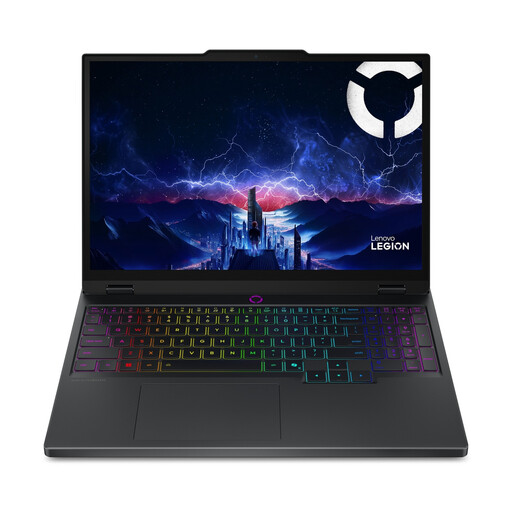 Image unavailable
Lenovo Legion 5 15IAX10 83FQ00ASMH
An option if you’re looking for a 15.1-inch OLED screen; check your game’s requirements and what’s included with this model.
Intel Core Ultra 7 255HX, RTX 5060, 16 GB DDR5 and a 512 GB SSD. The screen has a resolution of 2560 × 1600 pixels and a 165 Hz refresh rate. The stated starting weight is 1,9 kg. According to the product description, the power adapter must be purchased separately.
View at Joybuy
Frequently asked questions
Do I need a powerful graphics card to furnish a virtual home?
Not just for that activity. First, look up the system requirements for the game you play. If it’s The Sims 4, you can check EA’s minimum and recommended PC requirements; these don’t automatically apply to other games or every graphics setting you might want to use.
How can I take fan noise into account while gaming?
Check whether the exact laptop has a quieter mode in which your game runs well. HP states that performance mode increases fan speed; you should also keep the air vents clear.
What do I need to play The Sims 4?
Compare your laptop’s specification with the system requirements EA publishes for The Sims 4. EA lists a keyboard and mouse or trackpad as input devices and says that an internet connection is required for activation and sometimes for updates. Also check that you have enough storage space before installing the game.
Am I always entitled to exactly two years’ statutory warranty on a laptop in the Netherlands?
No. According to the Dutch government, there is no fixed statutory warranty period in the Netherlands: you’re entitled to a product that meets legal standards, depending on what you can reasonably expect from it. A manufacturer’s warranty or an extended warranty you buy separately is distinct from this statutory right.
Can I return a laptop bought online?
For eligible distance sales from a business, the Dutch government says that in many cases you have a 14-day cooling-off period. Before buying, check the seller’s information about your order and the returns process. An online purchase from a private seller doesn’t fall under the same definition of a distance sale.


