What should you consider when choosing?
Large built-in screen
Choose this if: you want plenty of screen space even without an external monitor.
The trade-off: compare screen size with portability. A larger screen doesn’t, by itself, tell you anything about gaming performance.
Large external monitor
Choose this if: you mainly play in one place but also want to take your laptop with you.
The trade-off: check the laptop output, monitor input and cable you’ll need. The presence of a port alone doesn’t confirm which display settings are possible.
Paradox Interactive and Ubisoft publish requirements for each game, so use the requirements for your most demanding title as a starting point. The percentages below show how consumers in different scenarios might prioritise their main buying concern.
| What to consider |
What should you check? |
Who should pay particular attention? |
| Performance in your most demanding game |
Compare your game’s requirements with the processor, GPU, RAM and available storage of the exact configuration. Paradox Interactive recommends 16 GB RAM and 60 GB of available storage for Cities: Skylines II. |
If I mainly play a demanding title such as Cities: Skylines II, I want to match the configuration to that game. Around 31% of consumers prioritise suitability for their most demanding simulation game. |
| Large built-in screen |
Check the screen size, resolution and weight of the exact configuration. |
If I play in different places, I want plenty of screen space without a separate monitor. Around 31% of consumers give a large built-in screen top priority. |
| Memory and storage |
Check the installed RAM, SSD capacity and documented upgrade limit for the same model. |
If I want to keep several games installed or upgrade later, I want to know what’s actually included. Around 23% of consumers prioritise flexibility in memory and storage. |
| External monitor |
Compare the laptop’s video output with the monitor input and the display settings you want. Also check whether USB-C supports video on that configuration. |
If I mainly play at a desk on a large screen, I want to make sure my laptop and monitor are compatible. Around 15% of consumers give an external-monitor setup top priority. |
Gaming laptops at Joybuy
These models have large built-in screens and are designed for playing economic simulations on a laptop display.
 Image unavailable
ASUS TUF Gaming A18 FA808UP-S8011W
The built-in 18-inch screen is ideal for playing without a separate monitor.
Ryzen 7 260; RTX 5070 Laptop GPU; 16 GB RAM; 1 TB SSD; WUXGA 1920 × 1200.
View at Joybuy
 Image unavailable
ASUS TUF Gaming A18 FA808UM-S8132W
A built-in 18-inch screen is ideal for enjoying a large display without an external monitor.
Ryzen 7 260; RTX 5060 8 GB; 16 GB DDR5; 512 GB SSD; WUXGA 144 Hz.
View at Joybuy
 Image unavailable
MSI Titan 18 HX AI A2XWJG-492NL
The listed configuration pairs an 18-inch screen with generous specified memory and storage.
Core Ultra 9 285HX; RTX 5090 Laptop GPU; 64 GB DDR5; 6 TB SSD; 18-inch UHD+ Mini LED 120 Hz.
View at Joybuy
 Image unavailable
MSI Crosshair 17 HX AI D2XWFKG-071NL
The built-in 17-inch screen is an option if you want a large display without a separate monitor.
Core Ultra 7 255HX; RTX 5060 Laptop GPU; 32 GB RAM; 1 TB SSD; QHD+ 240 Hz.
View at Joybuy
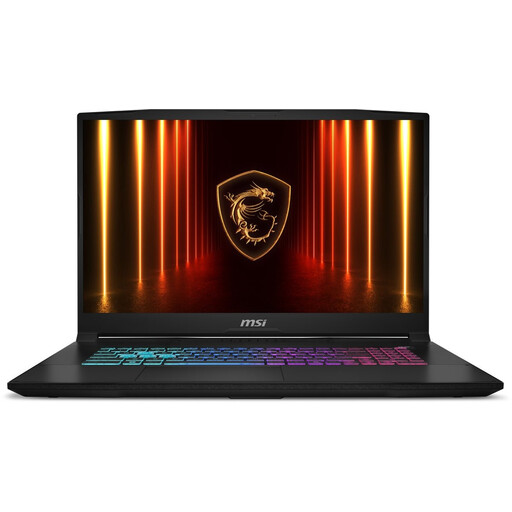 Image unavailable
MSI Katana 17 HX B14WFK-021NL
The 17.3-inch screen is worth considering if you want a large display on the laptop itself.
Core i7; RTX 5060 with 8 GB of video memory; 16 GB RAM; 1 TB SSD; 17.3-inch QHD screen.
View at Joybuy
Frequently asked questions
Can I use Anno 1800’s system requirements to choose a laptop for Cities: Skylines II?
No. Use the requirements for the most demanding game you want to play. Ubisoft and Paradox Interactive publish requirements for each title, but meeting the published requirements doesn’t guarantee a particular frame rate on your laptop or at your chosen settings.
How do I connect a large external monitor?
Compare the video output on the exact laptop with the input on your monitor, then choose a compatible cable. Check specifically whether any USB-C port supports video. You can then set your preferred display layout in Windows.
What should I check if I want to upgrade the memory later?
Check the documentation for the exact model and compare the installed RAM with the maximum supported capacity. For the Acer configuration reviewed, 32 GB is the maximum; 16 GB is installed.
Should I buy an extended warranty in the Netherlands, and do I have a cooling-off period for online purchases?
An extended warranty is only worthwhile if its terms add to the rights you already have. According to the Dutch government, there’s no fixed statutory warranty period in the Netherlands, and the seller must provide a solution if the product isn’t fit for purpose. For many online distance purchases from a business, you have 14 days to change your mind. Check the relevant terms and exceptions.


