
Player with one available socket
You want to play farming simulators without plugging in a separate monitor as well. Compare laptops with a built-in screen and check which adapter comes with the specific model.


If you want to play without a separate monitor, compare gaming laptops: the built-in screen means you won’t need to plug in a monitor as well. Just check the game’s requirements and make sure the right adapter is included with the laptop. If you already have a suitable monitor and a permanent gaming setup, a desktop could also work for you. Remember to include the monitor and any other devices, and connect everything safely.
You want to play farming simulators without plugging in a separate monitor as well. Compare laptops with a built-in screen and check which adapter comes with the specific model.
You already have a monitor and are weighing up a desktop against a laptop. With a desktop, remember to factor in the monitor’s power supply and any other devices in your setup.
You want to install other games as well as farming simulators. Compare the graphics card, memory and available storage for each specific model.
A good fit if: you don’t want to connect a separate monitor or need to move your computer between gaming locations.
Bear in mind: the screen, graphics card and supplied adapter vary by model; having a built-in screen says nothing about gaming on battery power.
A good fit if: you have a permanent gaming setup and a suitable monitor already.
Bear in mind: include the monitor separately in your power setup; the maximum power rating is not a measure of power consumption while gaming.
| Buying concern | What should you check? | Who is this important to? |
|---|---|---|
| Connections and setup | Count the computer, monitor and any other devices that use power. Brandweer Nederland advises using undamaged extension leads and not connecting extension leads to one another. | I want to connect as few separately powered devices as possible and set up my equipment sensibly. Around 36% of consumers prioritise limiting the number of connections and having a safe setup. |
| Suitability for the game | Compare the requirements of your chosen game with the full configuration. GIANTS Software warns that the minimum requirements for Farming Simulator 25 don’t cover every configuration. | I want to check first that the computer model is suitable for the farming simulator I play. Around 29% of consumers prioritise suitability for their chosen game. |
| Storage and upgrades | Check the SSD capacity and available connections on the exact model; the specifications of a product family don’t necessarily apply to every model. | I want space for several games or the option to adapt my setup later. Around 21% of consumers prioritise storage space and the ability to make changes. |
| Required components and power consumption | Check what’s included with the model, such as the laptop adapter. If you wish, measure actual power consumption with an energy meter; a power supply specification isn’t a consumption measurement. | I want to know which components I still need and how much power the complete setup uses. Around 14% of consumers prioritise having everything they need and knowing the power consumption. |
Having more sockets doesn’t remove the risks posed by damaged equipment or an unsuitable connection.
Count the connected devices, use undamaged equipment and don’t connect extension leads in a chain. Advice about high-power appliances doesn’t mean that every gaming PC automatically falls into that category.
The adapter varies by model and offer. For some models, you’ll need to check whether a suitable adapter is included.
Check what the offer includes and the adapter specifications for the exact model before making your choice.
A desktop’s stated maximum power supply rating doesn’t tell you how much power the complete setup uses while you’re gaming.
If you wish, measure consumption with an energy meter. If you have a desktop, include the monitor in your measurement too.
Models within a product range can differ. GIANTS Software also warns that the minimum requirements for Farming Simulator 25 don’t cover every configuration.
Compare the full model code with the requirements of the game you want to play. Don’t assume you’ll get your preferred graphics settings just because it’s labelled a gaming PC.
The Nitro V 15 laptop and Nitro 20 desktop are examples of the two different setup options.
Victus and OMEN are laptop ranges to compare if you want a built-in screen.
The LOQ range is worth comparing if you’re looking for a gaming laptop with a dedicated graphics card.
The Katana 15 HX B14W range offers different laptop models to compare screen and graphics card options.
The TUF Gaming A16 range is worth considering if you want to compare screen options and upgrade potential.
These gaming laptop picks have built-in screens, so you don’t need to connect a separate monitor.
 Image unavailable
A laptop with a built-in screen for gaming without a separate monitor. The title lists a Ryzen 9 9955HX, RTX 5070 Ti, 16 GB of memory and a 1 TB SSD; the charger must be purchased separately.
 Image unavailable
A laptop with a built-in screen for anyone who doesn’t want to connect a separate monitor. The title lists a Ryzen 9 8940HX, RTX 5060, 16 GB of memory and a 1 TB SSD; the charger must be purchased separately.
 Image unavailable
A gaming laptop with a built-in screen, designed for a setup without a separate monitor. The title lists an i7-14700HX, RTX 5070, 32 GB of memory, a 1 TB SSD and a 16-inch screen with a resolution of 2560 × 1600.
 Image unavailable
A laptop with a built-in 18-inch screen, so you don’t need a separate monitor for a basic setup. The title lists 16 GB of DDR5 memory, a 1 TB SSD and an RTX 5060 with 8 GB of GDDR7 memory.
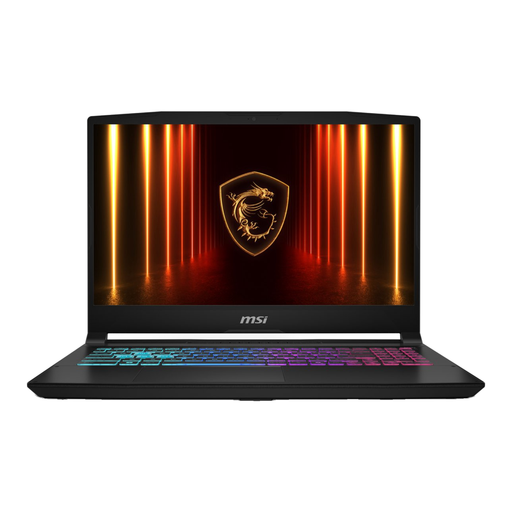 Image unavailable
A gaming laptop with a built-in screen for a setup without a separate monitor. The title lists 16G of memory and a 1 TB SSD; according to the product information, the charger must be purchased separately.
GIANTS Software lists a supported 64-bit operating system, 8 GB of RAM and 45 GB of available storage among the minimum requirements. For Windows, the publisher also lists a GTX 1050 Ti or RX 470 or better, with at least 3 GB of VRAM and DX12 support. Compare these requirements with the exact model; GIANTS Software warns that the minimum requirements don’t cover every configuration.
Yes. If you use a laptop’s built-in screen, you won’t need to connect a separate monitor for a basic setup. Just check that the right laptop adapter is included with the model.
Brandweer Nederland advises against connecting extension leads to one another and recommends using approved, undamaged extension leads. This is safety advice, not confirmation of a specific legal ban on gaming PCs.
If you wish, measure actual consumption with an energy meter plugged in between the device and the socket. If you have a desktop, include the monitor too; the power supply’s maximum rating isn’t a measure of consumption while gaming.
For a qualifying distance purchase by a consumer, you usually have a 14-day cooling-off period, according to the Dutch government. You’re also covered by the statutory guarantee: if a product doesn’t perform as you could reasonably expect under normal use, the seller is responsible for providing an appropriate solution. ACM ConsuWijzer states that there is no general fixed two-year guarantee period in the Netherlands.