You don’t automatically need a dedicated gaming GPU for lightweight deckbuilders: Steam lists integrated graphics as the minimum requirement for Balatro. If you also play more demanding games or use intensive applications, compare the laptop’s full specifications with the requirements of your most demanding task. For working from home, the screen, connections and ventilation matter too.
Who is this buying guide for?
Player of lightweight deckbuilders
You mainly play titles such as Balatro or Slay the Spire and want to know first whether you need a dedicated gaming GPU. Steam lists integrated graphics as the minimum requirement for Balatro; check the requirements for every game you want to play.
Working from home and gaming too
You use the same laptop at your desk every day, so you also need to consider screen space, connections and ventilation. Lenovo describes HDMI and USB-C display output for the LOQ 15IRX9; check the connections on the specific configuration.
Player of a variety of games
You also play titles with higher system requirements, such as Monster Train 2, or other demanding games. Steam lists higher memory requirements for Monster Train 2 than for Balatro, so compare the exact laptop configuration with the requirements of your most demanding game.
What should you look for?
Laptop with integrated graphics
Choose this if: you mainly play lightweight deckbuilders and the laptop’s full specifications meet the requirements of those games.
Consider: check other games and demanding work applications separately; the requirements of one lightweight game won’t tell you everything about those tasks.
Gaming laptop with a dedicated GPU
Choose this if: you also play more demanding games or need a specific configuration for other applications.
Consider: a more powerful GPU label alone doesn’t mean a laptop is necessary for lightweight deckbuilders; the screen, memory and connections vary by configuration.
Start with the requirements of the games you actually play, then assess the laptop as a place to work. Steam lists integrated graphics as the minimum requirement for Balatro, while Monster Train 2 has different minimum and recommended requirements. Don’t compare those levels as if they meant the same thing.
| What to consider |
What should you check? |
Who is this most important for? |
| Game requirements |
Compare the operating system, processor, memory and graphics of the exact laptop with the requirements of each game. |
If I play several deckbuilders, I want to know whether one configuration will work for all of them. Around 36% of consumers considering this choice put game compatibility first. |
| Screen and connections |
Check the screen size, resolution and the HDMI and USB connections your workspace requires. |
If I also use the laptop for documents and an external screen, workspace and suitable connections are important. For around 29% of consumers, the home working setup is their main concern. |
| Memory and storage |
Check the supplied RAM and SSD storage; don’t assume they can be upgraded unless this has been confirmed for the configuration. |
If I use work applications and games on the same laptop, I want to choose the right capacity for both. Around 21% of consumers prioritise this combination of uses. |
| Heat and ventilation |
Look for information specific to the model about noise if quiet operation is essential, and keep the vents clear. |
If I work at the same desk for long periods, I want to know how the laptop can be positioned there and what’s known about its noise levels. For around 14% of consumers, quiet desk use is their main concern. |
Pitfalls to avoid
-
Using the lightest deckbuilder as a benchmark for every game
Published requirements vary: Steam lists integrated graphics as the minimum for Balatro, while Monster Train 2 has different minimum and recommended requirements.
Make a list of the games you want to play and check the requirements for each one. Don’t treat minimum and recommended requirements as the same threshold.
-
Choosing based only on the series name or GPU label
Configurations within a product range can vary. Lenovo, for example, notes that GPU power can also depend on the power adapter.
Compare the full model number and the supplied configuration, including the screen, memory, ports and adapter.
-
Confusing the manufacturer’s warranty with your full legal rights
A commercial warranty period doesn’t automatically determine how long your legal rights apply. ACM ConsuWijzer explains that Dutch statutory warranty doesn’t have a fixed term of exactly two years.
Keep your proof of purchase and contact the seller if you think a product may be faulty.
Brands to consider
HP
Victus is a gaming range alongside HP’s higher-specification OMEN range. Assess the full model and configuration; a higher-specification model isn’t automatically necessary for lightweight deckbuilders.
- The Dutch HP store lists gaming models in a range of configurations.
- Check the screen, memory and GPU for each configuration; the range name doesn’t tell you how loud the fans are in testing.
Acer
The Nitro V 16 AI ANV16-42-R85B is one configuration to consider if screen space and desk use are important to you.
- For this configuration, Acer lists a 16-inch screen with a resolution of 2560 × 1600, 32 GB RAM, a 1 TB SSD and HDMI.
- These specifications apply to the model named and don’t indicate fan noise or the specifications of other Nitro configurations.
Lenovo
The LOQ 15IRX9 range may suit you if you use external screens and want configurable gaming hardware.
- Lenovo documents HDMI and USB-C display output for the range.
- The GPU and its power can vary by configuration, so check the full model number and corresponding specifications.
MSI
The Thin 15 B13V range is worth comparing if you’re looking for a relatively slim chassis.
- MSI lists configurations in the range with up to a Core i7-13620H and RTX 4050.
- ‘Up to’ doesn’t apply to every configuration; manufacturer claims about performance or efficiency aren’t independent measurements of noise or battery life.
Joybuy products to consider
This selection features gaming laptops with a dedicated GPU. Compare each configuration with the requirements of your games and the screen space you want for working from home.
 No image available
ASUS ROG Strix G18 G814PM-S9012W
The 18-inch configuration may suit you if you want a large built-in screen for desk use.
Ryzen 9 8940HX; RTX 5060; 16 GB RAM; 1 TB SSD; 18-inch screen; QWERTY keyboard. The product description states that the charger must be purchased separately.
View at Joybuy
 No image available
Acer Nitro 18 AI AN18-61-R25V
This configuration may suit you if you want a large built-in screen and a dedicated GPU for gaming alongside working from home.
AMD Ryzen AI 7 350; GeForce RTX 5060 8GB GDDR7; 18-inch WQXGA 165Hz IPS screen; 16GB DDR5; 1TB SSD; Windows 11 Home; QWERTY keyboard.
View at Joybuy
 No image available
MSI Katana 15 HX B14WFK-046NL
A 15.6-inch configuration to compare if you’re looking for a gaming laptop for desk use.
Core i7; RTX 5060; 15.6-inch Full HD IPS screen with 144 Hz; 1000 GB SSD; QWERTY keyboard.
View at Joybuy
 No image available
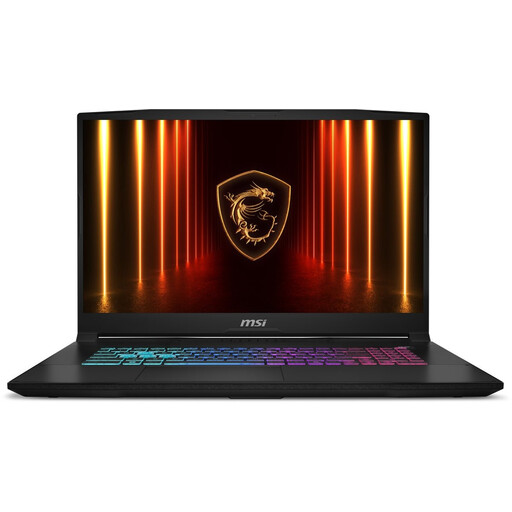
MSI Katana 17 HX B14WFK-021NL
The 17.3-inch configuration may appeal if you mainly want a larger built-in screen for your desk.
QWERTY keyboard. The product description states that the laptop can get hot during intensive gaming and the battery may run down faster.
View at Joybuy
 No image available
Lenovo Legion 5 15IAX10
The 15.1-inch configuration may suit you if you want a gaming laptop with a built-in 16:10 screen for work and gaming.
Core Ultra 7 255HX; RTX 5070; 16 GB RAM; 512 GB SSD; 15.1-inch OLED screen with a resolution of 2560 × 1600 and 165 Hz; QWERTY keyboard. The product description states that the charger must be purchased separately.
View at Joybuy
Frequently asked questions
Do I need a dedicated graphics card for Balatro?
No. Steam’s published minimum requirements for Windows also list compatible integrated graphics. Check the other requirements too, and don’t assume the same applies to other games.
Can I use the laptop on a soft surface while gaming?
HP recommends using its notebooks on a hard, flat surface, as dust or a cushion can block the vents. Check where your model’s air intake and exhaust are, and follow the relevant care instructions.
Do I have a cooling-off period for online purchases in the Netherlands?
Consumers generally have a statutory 14-day cooling-off period after delivery for online purchases, as explained by ACM ConsuWijzer. Check which exceptions apply and read the seller’s returns information.
Is the statutory warranty on a laptop always exactly two years?
No. According to ACM ConsuWijzer, Dutch statutory warranty doesn’t have a fixed term of exactly two years. What matters is what you could reasonably expect from the product with normal use; if it’s faulty, contact the seller.


