
Team player who values quick reactions
You’re choosing a laptop for fast-paced co-op action and want to compare your game’s requirements with the exact configuration.


Start with the system requirements of the co-op shooters you play, and the resolution and settings you want to use; a 165 Hz display doesn’t guarantee 165 fps. OLED is worth considering if deep blacks in a dark room are your priority. With an IPS laptop, check the exact screen specification and gaming performance; if you choose OLED, also consider the risk of static HUD elements remaining visible for long periods.
You’re choosing a laptop for fast-paced co-op action and want to compare your game’s requirements with the exact configuration.
You often play in a darkened room and want to weigh up whether black levels and contrast matter more to you than the potential drawbacks of OLED.
You want to play together without any surprises about storage, ports, the power adapter or what’s included with the laptop.
Choose this option if: black levels in a dark room are a priority and the laptop’s full configuration meets your games’ requirements.
Bear in mind: a glossy screen may reflect light, and static game elements can be at risk of remaining visible after long periods. Lenovo Netherlands specifies OLED for the Legion 5 83M0CTO1WWNL1.
Choose this option if: you’re looking for an alternative to OLED or want to compare an IPS model with your games’ requirements.
Bear in mind: RTINGS.com describes IPS as having less deep blacks than OLED. Check the panel on the exact configuration; specifications for a product family don’t automatically apply to every model.
Choose this option if: the resolution and settings you want to play at suit your games and you don’t need an OLED screen.
Bear in mind: the Dutch model and full model code. MSI specifies a 144 Hz FHD screen for the B2RWEKG family; that isn’t a measurement of your game’s frame rate.
Compare your screen choice with the full configuration and the way you plan to use the laptop. The RTINGS.com comparison covers monitor screen technologies; it isn’t a stress test of the laptops mentioned here.
| What to consider | What to look for | Who is this important for? |
|---|---|---|
| Gaming performance | Compare the game, resolution and settings with the CPU and GPU in the exact configuration. PlayStation and Epic Games publish requirements for specific games; these aren’t benchmarks of a laptop. | If I want my shooters to run smoothly, I need to know what my chosen game and settings demand. Around 36% of consumers put action performance first. |
| Picture quality in the dark | Check the panel type and screen coating on the configuration. With OLED, also consider a HUD that stays in the same place for a long time, as well as possible reflections. | If dark levels are mainly about black levels for me, I weigh that against how much I use fixed game elements. Around 29% of consumers prioritise image quality in dark scenes. |
| Playing together | Check the storage, available ports and keyboard backlighting on the exact configuration; make sure the network and audio connections suit your own equipment. | If I play with others, I want to use my games and headset easily without making assumptions about ports or connectivity. Around 21% of consumers put practical team play first. |
| Configuration and extras | Check the full model code, what’s included and the seller’s warranty terms. A similar product name doesn’t automatically mean it’s the same configuration. | If I want to understand my purchase and what I’ll need afterwards, I also check the power adapter and warranty. Around 14% of consumers make the total cost of purchase and use their top priority. |
The game requirements published by PlayStation for Helldivers 2 vary by resolution and graphics settings. They aren’t a frame-rate measurement for a specific laptop.
First compare the game, resolution and settings you want to use, then look at benchmarks for the full laptop configuration.
Configurations within a product family can differ in screen, GPU, storage or bundle.
Compare the full model code and specifications of the exact configuration you want to buy.
One of the Legion 5 configurations mentioned is listed as not including a charger as standard.
Check what’s in the box and which compatible adapter you’ll need for the configuration on offer.
If the adapter isn’t included, you’ll need to buy it separately.
A commercial warranty period doesn’t automatically remove your statutory rights against the seller.
Keep your proof of purchase and contact the seller if there’s a fault covered by your statutory rights.
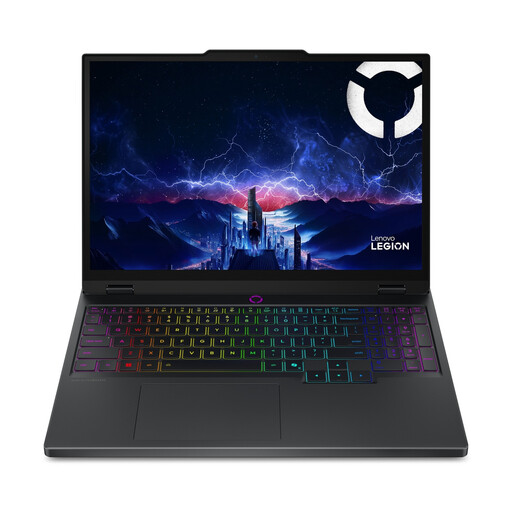
Legion is worth considering if you’re looking for an OLED configuration for dark scenes; LOQ offers different configurations that you’ll need to assess individually.
The TUF Gaming A16 is a product family with different screen options to compare across configurations.
The Cyborg 15 is an FHD configuration to compare with the requirements of your own games.
OMEN 16 is another product line to consider when comparing configurations and practical features.
This selection of Joybuy products includes OLED and IPS gaming laptops to compare for co-op shooters in a dark room. Check the screen features, game requirements and included accessories for each configuration.
 No image available
The OLED configuration listed may suit you if black levels in dark scenes matter; check that the Belgian AZERTY keyboard layout works for you.
15.3-inch WQXGA 165 Hz OLED screen; AMD Ryzen 7 250; RTX 5060; 16 GB DDR5; 512 GB SSD; Windows 11 Home; Belgian AZERTY keyboard.
 No image available
The OLED configuration listed is worth comparing if dark scenes matter to you; bear in mind the glossy screen and check whether a power adapter is included before buying.
15.1-inch 165 Hz OLED screen with 2560 × 1600 pixels; Intel Core Ultra 7 255HX; RTX 5070; 16 GB; 512 GB SSD; QWERTY keyboard. According to the product description, the charger must be bought separately.
 No image available
This OLED configuration is worth comparing if black levels are a priority for you; bear in mind the glossy screen and that the charger must be bought separately.
15.1-inch 165 Hz OLED screen with 2560 × 1600 pixels; Intel Core Ultra 7 255HX; RTX 5060; 16 GB; 512 GB SSD; QWERTY keyboard. According to the product description, the charger is not included.
 No image available
The IPS-level configuration listed is an alternative to compare with OLED; according to RTINGS.com, IPS offers less deep blacks than OLED.
18-inch 144 Hz anti-glare IPS-level screen; Ryzen 7 260; RTX 5070; 16 GB; 1 TB SSD; backlit QWERTY keyboard.
 No image available
This IPS-level configuration is worth comparing with OLED if you also want to compare a high stated screen refresh rate; that rate alone doesn’t predict a game’s frame rate.
18-inch 240 Hz IPS-level screen with 2560 × 1600 pixels; Ryzen 9 8940HX; RTX 5060; 16 GB; 1 TB SSD; RGB backlit QWERTY keyboard; Wi-Fi 6E.
No. OLED can display deeper blacks, but there’s a risk of burn-in if static elements remain on screen for a long time. Also compare the game requirements and the exact laptop configuration; the RTINGS.com comparison mentioned here covers monitor panels, not these laptops.
Place the laptop on a flat, hard surface and keep the air vents clear. Lenovo warns that soft or uneven surfaces can block ventilation areas.
No. According to ACM ConsuWijzer, your statutory rights apply alongside a seller’s or manufacturer’s warranty; the law doesn’t set a fixed statutory warranty period of two years. If there’s a fault covered by your statutory rights, the seller is responsible for providing a solution.
For an applicable online consumer purchase, ACM ConsuWijzer says you generally have 14 days from delivery to change your mind. Check which exceptions and return terms apply to your purchase.
No. PEGI gives a recommended minimum age based on a game’s content, not its difficulty or hardware requirements. The rating alone doesn’t establish a general legal age limit for buying a gaming laptop.