
Vandaag of morgen in huis

Kwaliteit gegarandeerd

Welkomstaanbiedingen ontgrendelen: GRATIS bezorging | Tot 80% korting | Gratis 30 dagen JoyPlus-proefperiode
Download de app
Buying a gaming laptop seems straightforward until you start comparing specifications. A high model number, a fast refresh rate and a large number of gigabytes don’t tell you everything. The combination of processor, graphics card, screen, cooling and upgrade options determines how well your laptop performs in everyday use.
Gamers, students and content creators often fall into three common traps:
Also check which accessories are included. Several models in this guide state that the charger is not included as standard and must be purchased separately. Always check the product page before placing your order.
The graphics card has a major impact on how a game looks. An RTX 5050 laptop is suitable for many modern games at Full HD, while an RTX 5060 laptop offers more graphics headroom for higher settings, ray tracing and creative software.
Don’t just look for “RTX 5050” or “RTX 5060”. Also check:
For example, the Lenovo Legion 5 models with RTX 5060 specify a TGP of up to 115W. Some versions of the MSI Cyborg 15 with RTX 5050 specify a TGP of 45W. This difference matters when comparing models from the same GPU family.
A powerful gaming laptop needs more than just a suitable GPU. The processor handles game logic, background tasks, streaming and editing software, among other things.
For everyday gaming and multitasking, 16GB RAM is a practical starting point. The same applies to a laptop for gaming and content creation. Be sure to check whether the memory can be upgraded:
So a gaming laptop with 16GB RAM isn’t automatically future-proof. The option to upgrade later can matter more than a small difference in clock speed.
A laptop with a 144Hz screen is a good choice for fast-paced games. The MSI Cyborg 15 and 17 models combine a Full HD IPS-level screen with a 144Hz refresh rate. Also check the brightness: these models are specified at 250 cd/m². That’s suitable for gaming indoors, but a brighter screen may be more comfortable in a very bright room.
The Lenovo Legion 5 models have a WQXGA OLED screen with a 165Hz refresh rate, 2560 × 1600 pixels and a wide colour gamut, according to the product specifications. This makes them suitable not only for gaming, but also for photo and video editing. However, an OLED panel may be a different choice from a matte IPS display; compare reflections, colour reproduction and your working environment.
A gaming laptop with a 512GB SSD starts up quickly and loads programmes promptly. However, 512GB can be limiting if you store several large games, video projects and media files. Check whether there’s a second M.2 slot, or plan to use an external SSD. An internal SSD such as the Lexar NM790 512GB NVMe may be an upgrade option for compatible desktops or laptops, but check the form factor, interface and available slots first.
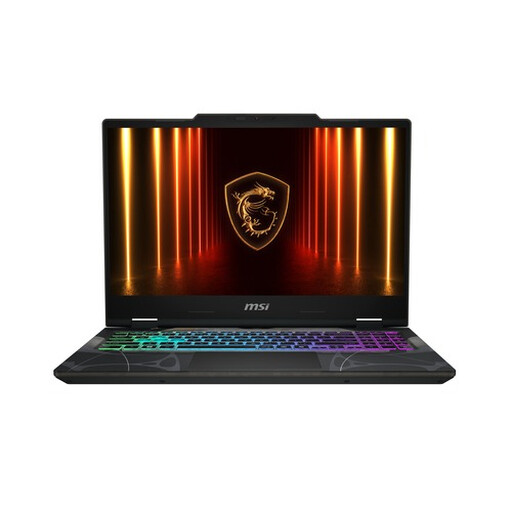
Why it suits this profile: This 15.6-inch gaming laptop combines an Intel Core i5-13420H, RTX 5050, 16GB DDR5 and a 512GB SSD in a straightforward Full HD configuration.
The product information clearly specifies 8GB of video memory, 144Hz and two memory slots. That means you don’t have to rely on marketing terms alone.
RTX 5050 with 8GB GDDR7, 16GB DDR5, 512GB PCIe Gen4 SSD and Wi-Fi 6E.
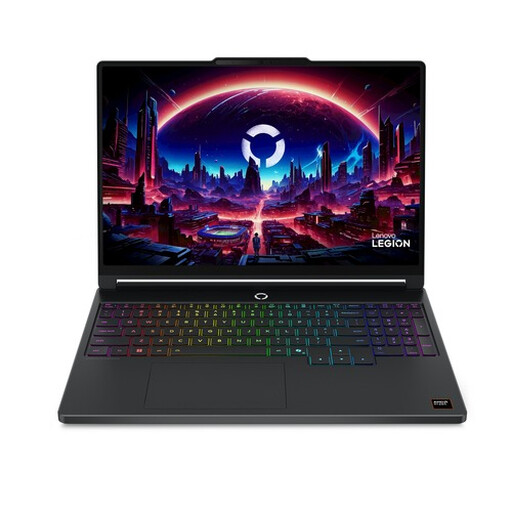
Why it suits this profile: This Lenovo Legion gaming laptop is designed for gamers and creators who value high screen resolution, OLED technology and a powerful combination of CPU and GPU.
Alongside the RTX 5060, the specifications list a 115W TGP, 165Hz and 2560 × 1600 pixels. This gives you a clearer idea of what the hardware and screen actually offer.
OLED display, 165Hz, RTX 5060 with 8GB GDDR7, Ryzen 7 250 and 16GB DDR5.
Why it suits this profile: This version is aimed at users who combine gaming, streaming and creative software with a powerful Core 9 processor.
The combination of 14 cores, 20 threads, RTX 5060 and two SO-DIMM slots makes it easier to assess whether it’s suitable for heavy multitasking and future memory upgrades.
Intel Core 9 270H, RTX 5060 with 8GB GDDR7, 144Hz screen and support for up to 96GB RAM.
We’ve put together a complete, up-to-date list of products that meet these strict selection criteria and comply with the applicable European safety regulations.
For many games, studying and everyday multitasking, 16GB RAM is a good starting point. More memory can be useful if you’re streaming, editing video and running several demanding programmes at the same time. If you want to upgrade later, choose a model with free SO-DIMM slots if possible.
An RTX 5050 laptop can be suitable for Full HD gaming. Your experience will depend on the game, graphics settings, cooling and TGP. So check the full product specifications rather than looking only at the GPU number.
How long it remains useful depends on maintenance, heat, battery use and future system requirements. A model with upgradeable RAM, a replaceable or upgradeable SSD and enough graphics headroom may remain practical for longer. Keep the ventilation openings clear, and use the laptop on a hard, stable surface when playing demanding games.
