
Vandaag of morgen in huis

Kwaliteit gegarandeerd

Welkomstaanbiedingen ontgrendelen: GRATIS bezorging | Tot 80% korting | Gratis 30 dagen JoyPlus-proefperiode
Download de app
A gaming laptop needs to offer more than a striking design and the promise of a high frame rate. For gamers, students and content creators, it’s the combination of processor, graphics card, screen, cooling and upgrade options that matters. A laptop that looks powerful on paper can disappoint in practice if it has limited storage, a dim screen or inadequate cooling.
A gaming laptop RTX 5060 sounds appealing, but performance also depends on the graphics power limit, processor and cooling. As a result, two laptops with the same GPU can perform differently. So don’t just check which RTX card it has: look at the TGP, processor and cooling system too.
A gaming laptop RTX 5050 can be a good choice for Full HD gaming if you set your expectations accordingly. For higher resolutions, ray tracing or demanding content creation, an RTX 5060 configuration is generally the more logical choice based on the listed hardware.
A 144Hz gaming laptop displays motion more smoothly than a standard 60Hz screen, provided the laptop can generate enough frames per second. A 165Hz gaming laptop offers a slightly higher refresh rate, but the difference won’t be decisive for everyone.
Pay attention to resolution, panel type, brightness and colour coverage too. A WQXGA or OLED screen can be a worthwhile upgrade for games, films and photo editing, while Full HD puts less strain on the GPU and is often a more budget-friendly option.
16GB RAM is a practical starting point for modern games, browsing, streaming and everyday productivity. If you game, edit video and use several programmes at once, you may need more memory later. Check how many memory slots the laptop has and its maximum capacity.
When it comes to storage, 1TB SSD is often more convenient than 512GB. Modern games and video projects take up space quickly. A smaller SSD will work, but you’ll need to delete files or use an external drive sooner.
The GPU is largely responsible for graphics performance. NVIDIA RTX models support features such as ray tracing and DLSS, but the experience you get still depends on game settings, resolution and laptop power. You should also consider the processor. A modern Core or Ryzen chip with multiple cores and threads helps with multitasking, streaming and content creation.
For a laptop used for gaming and content creation, balance is important. A fast GPU paired with a less capable processor may not be ideal for video editing, while a powerful processor without a suitable GPU offers little benefit in graphically demanding games.
A 15-inch model is easier to take to lectures, the office or a LAN party. An 18-inch laptop gives you more screen space, but takes up more room and is less suited to everyday travel. Check the keyboard too: a QWERTY layout may differ from the layout you’re used to in the Netherlands.
For competitive gaming, 144Hz or 165Hz are useful specifications to look for. For creative work, resolution, colour coverage and panel type are just as important. An OLED screen, for example, can deliver deep blacks, but always compare the full product specifications rather than relying on the screen name alone.
A powerful gaming laptop generates heat during demanding tasks. Use it on a hard, flat surface and keep the vents clear. Also check that it has the ports you need, such as HDMI, USB-C with DisplayPort, Ethernet and enough USB ports.
A model with two SO-DIMM slots or extra storage options gives you more flexibility. Consider the weight and power adapter too: a laptop weighing around two kilograms is still portable, but you’ll need to carry the adapter as well.
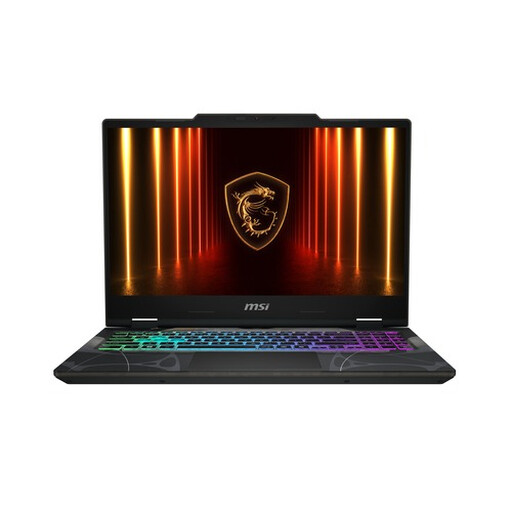
Why it suits this user: This 15.6-inch laptop pairs an RTX 5050 with 16GB DDR5 and a Full HD 144Hz screen. It’s a good fit if you want to game, study and stream without choosing a larger 18-inch model.
The specifications list more than just the RTX 5050: you also get 16GB DDR5, a 144Hz screen and two SO-DIMM slots supporting up to 96GB. However, the 512GB SSD will need regular clearing if you have a large game library.
2,10 kg, Wi-Fi 6E, Gigabit LAN, HDMI 2.1 and USB-C with DisplayPort. The Full HD resolution is a good match for the graphics performance.
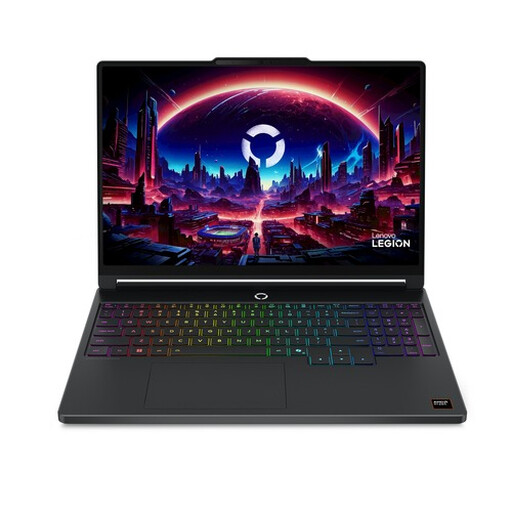
Why it suits this user: The combination of an RTX 5060, Ryzen 7, 15.3-inch WQXGA OLED screen and 165Hz refresh rate is a good fit for gamers and creators who value picture quality.
Alongside the GPU, the specifications list the resolution, 100% DCI-P3 colour coverage, 16GB DDR5 and an 80Wh battery. The maximum memory capacity is 32GB, so there’s a clear limit to how far you can upgrade.
OLED, WQXGA 2560 × 1600, 165Hz, RTX 5060 with 115W TGP and a starting weight of 1,87 kg.
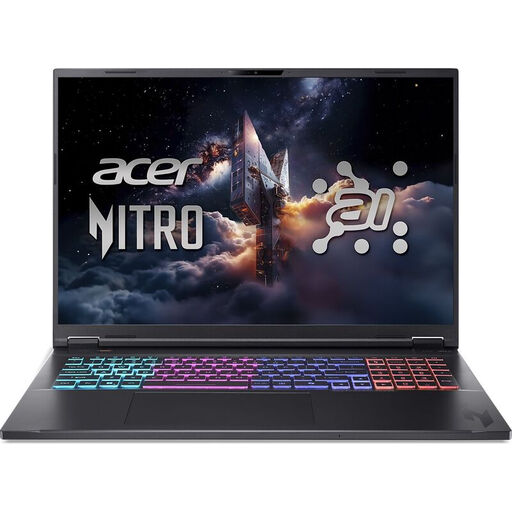
Why it suits this user: The 18-inch screen gives you extra room for gaming, video editing and multitasking. The RTX 5060, Ryzen AI 7 and 1TB SSD are designed for users who put their laptop through its paces.
There’s 1TB of storage, and the screen combines WQXGA resolution with a 165Hz refresh rate. Do check that the size and US International keyboard layout suit your needs.
18-inch IPS, 2560 × 1600, RTX 5060 at 115W, Wi-Fi 6E, Killer Gigabit Ethernet and a 1TB PCIe Gen4 NVMe SSD.
We’ve put together a complete, up-to-date list of products that meet these strict selection criteria and the applicable European safety regulations.
For gaming, browsing and everyday streaming, 16GB RAM is a good starting point. For demanding video editing, virtual machines or extended multitasking, 32GB may be more practical. Check in advance whether the memory can be upgraded.
It depends on your game library and work files. A 1TB SSD gives you noticeably more space for games, videos and programmes than 512GB. If you only play a few games and use cloud storage, you could start with 512GB, but you’ll need to be more selective about which files you keep on your laptop.
Its lifespan depends on heat, maintenance, battery use and the demands of new games. Keep the vents clear, install updates and use the supplied adapter. A model with upgradeable RAM or extra storage may remain suitable for longer as your needs change. Also check the statutory warranty and any additional manufacturer’s warranty listed for the specific product.
