
Players who want to identify keys in the dark
You want to be able to distinguish important keys without turning on the room light. Corsair, HyperX and SteelSeries describe different types of keyboard lighting in their product specifications.


For playing tactical role-playing games in a dark room, a keyboard with lighting that makes the keys you use easy to identify is a sensible place to start. Then choose based on whether you prefer dedicated macro keys, quieter keystrokes or a compact size. Five lighting zones and per-key lighting offer different customisation options; also check the exact switch type, keyboard layout and software requirements.
You want to be able to distinguish important keys without turning on the room light. Corsair, HyperX and SteelSeries describe different types of keyboard lighting in their product specifications.
You want to access frequently used commands easily, so you’re comparing dedicated macro keys with reprogrammable keys. Corsair and Razer describe models with dedicated macro keys.
You want less typing noise, more desk space or both. The switch type and keyboard layout matter here; SteelSeries and HyperX describe compact TKL models.
| What to consider | What to look for | Who is this important for? |
|---|---|---|
| Identifying keys in the dark | Compare per-key lighting with zone lighting and check that the symbols on your chosen layout are easy to distinguish. | If I want to find the right keys quickly while playing, I look at both the lighting and how readable the key legends are. Around 33% of consumers put visibility first. |
| Accessing shortcuts | Check how many dedicated macro keys there are, what configuration software is required and whether macros are allowed under the game’s rules. | If I’d rather assign commands to dedicated keys, I compare how they work with the number of keys my game requires. Around 27% of consumers prioritise dedicated command keys. |
| Typing noise | Check the exact switch type. A manufacturer’s description such as ‘quiet’ is not comparable with an independent noise measurement. | In a shared room, I want to consider how much noise I make while playing and check which switch type I’m buying. Around 20% of consumers put quiet keys first. |
| Desk space and layout | A TKL model leaves out the separate number pad; check whether you need those keys for your game bindings. | If I need space beside my keyboard, I weigh up a compact size against the keys I use every day. Around 20% of consumers prioritise desk space. |
The Corsair K55 RGB PRO has five lighting zones; HyperX describes the Alloy Origins Core as offering per-key lighting that can be customised. The options therefore vary by model.
Compare the type of lighting and the key legends on the exact model, rather than looking only for the term ‘RGB’.
Razer describes the Green and Yellow switches on the BlackWidow V4 X differently in terms of feel and sound; the version on offer determines which one you get.
Check the full variant name. If noise is a deciding factor, look for a suitable independent sound comparison.
A TKL keyboard doesn’t have a separate number pad, so those keys aren’t immediately available.
Check your game bindings and preferred keyboard layout before choosing a compact model.
According to Corsair’s specifications, the K55 RGB PRO has six dedicated macro keys and five customisable RGB zones.
According to Razer, the BlackWidow V4 X combines mechanical switches, RGB lighting and six dedicated macro keys.
According to HyperX, the Alloy Origins Core is a mechanical TKL keyboard with customisable per-key lighting.
SteelSeries describes the Apex 3 TKL as a compact keyboard with RGB lighting and Whisper Quiet switches.
According to Logitech G, the G213 Prodigy combines a full-size layout with five lighting zones, media controls and an integrated wrist rest.
This selection includes keyboards with lighting for playing in the dark, with options for dedicated macro keys, a compact size and different switch types.
 Image unavailable
Per-key lighting and a compact TKL size suit anyone who wants to highlight keys and keep desk space free.
The product information lists per-key RGB lighting, customisable profiles and macros. This model has a BE AZERTY layout; check that it suits your preferred keyboard layout.
 Image unavailable
The six programmable macro keys give you dedicated places for frequently used commands.
The product information lists RGB lighting and Yellow linear switches. Razer describes the Yellow version as smooth and quiet; this is not an independent sound measurement. According to the product information, Razer Synapse is required to customise the lighting and macros.
 Image unavailable
The 60% size is a compact option for anyone with limited desk space who can do without the missing keys.
The product information lists per-key lighting, profile memory and a detachable USB-C cable. The description names Razer Synapse 3 for customising the lighting and keys.
 Image unavailable
The compact 60% layout with adjustable RGB brightness is designed for anyone who wants to save desk space and customise the lighting.
The description specifies a membrane keyboard with a mechanical feel and lighting modes controlled using the function keys. There’s no number pad. The USB connector itself is not waterproof, according to the description.
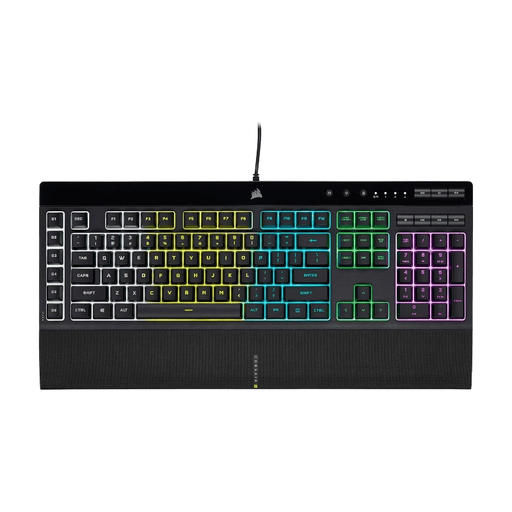 Image unavailable
The six dedicated macro keys give you space for frequently used commands; the five lighting zones can be customised if you don’t need per-key lighting.
This model has rubber dome membrane keys and a full-size layout. Corsair lists iCUE for configuration; the lighting can be customised by zone, not for each individual key.
No. Corsair describes five customisable zones for the K55 RGB PRO, while HyperX describes per-key lighting for the Alloy Origins Core through NGENUITY. Also check that the key legends on your chosen version are easy to read.
According to Corsair, the K55 RGB PRO uses iCUE; HyperX says the Alloy Origins Core uses NGENUITY for customisation. Before buying, check that the required software is available for your system and that the game allows macro use.
For a standard online consumer purchase, there is usually a cooling-off period that, according to ACM ConsuWijzer, ends 14 days after delivery, subject to legal exceptions. In addition, if you use the product normally, you’re entitled to a product that meets what you could reasonably expect; Dutch statutory warranty law does not set a fixed two-year period for every keyboard.
A CE mark is required when specific applicable EU rules require it for the product, not simply because it is a gaming keyboard. According to the European Commission, electrical and electronic products may fall under such rules; the applicable requirements need to be determined for the specific version. A CE logo is not, in itself, proof of independent testing.
According to the Dutch government, as a private customer you can hand in your old electrical appliance of a similar type to the retailer free of charge when buying a new one under the old-for-new scheme, including for an online purchase. The Dutch government also lists collection points and options provided by local councils.