
Support player who uses lots of key commands
You practise abilities and communication, and want to find or set up frequently used keys easily. Check whether macros are allowed in the game you play.


Start with the layout: choose a keyboard that makes it easy to find both your in-game commands and the keys you use for everyday work. A compact membrane model may suit you if noise and desk space are priorities. Mechanical or more fully featured models offer different customisation options, but always check the exact version, connection and software before choosing.
You practise abilities and communication, and want to find or set up frequently used keys easily. Check whether macros are allowed in the game you play.
You use the same space for work and gaming, and prioritise quiet operation and comfortable everyday typing over extra gaming features.
You want room to move your mouse while keeping the keys you need for work or practice. A TKL layout, for example, has no number pad.
First, check the layout and the keys you need for work and practice. Then compare the sound profile, connection options and customisation features of the exact version.
| What to consider | What should you check? | Who is this important for? |
|---|---|---|
| Keys for abilities and communication | Check which keys you can assign and what software is needed. Check your game’s rules before using macros. | I want to access frequently used commands quickly, without assuming automation is allowed. Around 25% of consumers prioritise easy-to-reach gaming commands. |
| Noise during work and play | Check whether the version has membrane or mechanical switches, and which type of switch is included. | I share my workspace and want to know how the version I choose will sound in my own room. Around 25% of consumers prioritise a suitable sound profile. |
| Desk space versus available keys | Compare the physical layout with the space available and the keys you need. TKL has no number pad. | I want room for my mouse without accidentally losing access to important keys. Around 19% of consumers prioritise desk space. |
| Layout for everyday work | Check the physical key layout, key positions and whether it has a number pad. | I want to keep the familiar keys I use at work, for example for entering figures. Around 19% of consumers prioritise a layout suited to everyday work. |
| Connecting and switching between devices | Check whether the exact version connects by cable, wireless receiver or Bluetooth, and whether the required software is compatible. | I want to know how to connect the keyboard and whether I can switch between devices. Around 12% of consumers prioritise connection flexibility. |
The wired Logitech G515 TKL and wireless G515 LIGHTSPEED TKL are separate versions. A product listing may also contain conflicting information about the connection.
Before buying, check the full model name and the connection details for the version you select.
TKL has no number pad. On more compact layouts, the position of other keys may also differ from what you’re used to.
Compare the physical layout with the keys you use for work and practice.
The sound profile described for the Razer BlackWidow V4 X varies by switch version: the Green version is clicky, while Razer describes the Yellow version as quiet.
Check which switch version is actually on offer; don’t base your choice on the model name alone.
The Dutch Government states that the Netherlands has no fixed statutory warranty period. A manufacturer’s warranty is not the same as your legal rights if a product does not meet the terms of the sale.
Keep your purchase and product information, and contact the seller if there’s a fault.
The K55 CORE TKL is a compact, wired membrane option for typing and gaming.
The G515 TKL and G515 LIGHTSPEED TKL offer wired and wireless options respectively, both with a low-profile mechanical design.
SteelSeries describes the Apex 3 TKL as designed for a compact set-up with quiet keys.
The BlackWidow V4 X is an option if you’re looking for dedicated macro keys and media controls.
The V1 Max is a compact option if you want to customise keys or switches.
These Joybuy picks include compact TKL and 75% layouts, as well as a compact 96% version with a number pad, for practice and everyday typing.
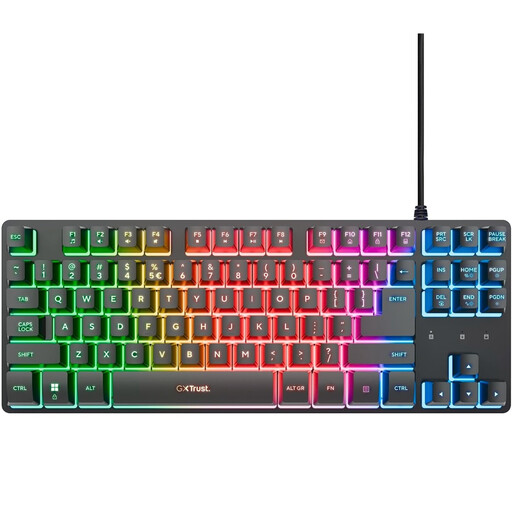 No image available
The TKL layout may suit you if you want to make room for your mouse and don’t need a number pad.
The product description lists membrane keys, media keys, a USB connection and anti-ghosting for up to 10 simultaneous key presses. The layout has no number pad.
 No image available
This compact membrane version is an option if you’re looking for a TKL layout and quiet keys for typing and gaming.
The product description lists a wired USB connection, 12-key rollover, key remapping via CORSAIR iCUE and four dedicated media keys. TKL has no number pad.
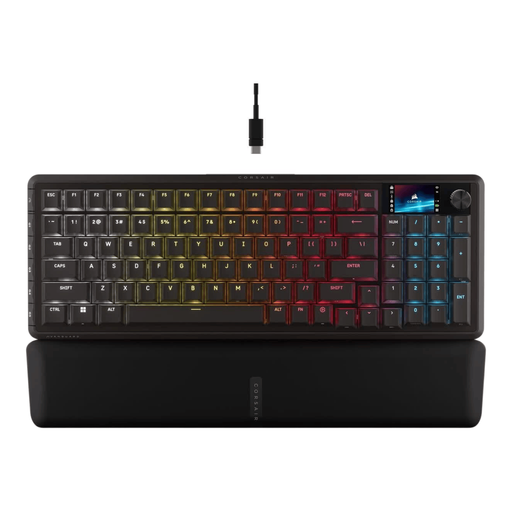 No image available
This version may suit you if you want a number pad and dedicated programmable keys.
The product description lists a 96% layout, six programmable G-keys, tri-mode connectivity and sound-dampening layers. Check which connection method and software suit the way you use it.
 No image available
A 75% layout may suit you if you’re looking for a more compact arrangement and the available keys meet your work needs.
The title lists hot-swappable switches. The product description mentions tri-mode connectivity, a volume knob, 82 keys and built-in memory for macros and key functions.
 No image available
This tenkeyless version may suit you if you want a compact layout and customisable keys; it has no number pad.
The product description lists optical switches, wireless connectivity, Bluetooth, programmable keys and macro recording. Check that the connection and software compatibility meet your needs.
It can be, if you don’t need a number pad: TKL leaves more space next to the keyboard. If you often use a number pad for work, first check whether a layout without one will meet your needs.
First, check the connection and system compatibility of your exact model. Logitech recommends G HUB for key assignment on the wired G515 TKL; for other models, refer to the relevant software and manual. Don’t assume that a stated level of spill resistance means a product is waterproof.
No. According to the Dutch Government, the Netherlands has no fixed statutory warranty period. Your legal rights depend, among other things, on what you could reasonably expect from the product; a manufacturer’s warranty is a separate promise.
For a distance sale from a business, the Dutch Government says you’ll often have a 14-day cooling-off period. Check the applicable terms; the government’s guidance cited here distinguishes this from buying online from a private seller.