
Player in a bright room
You want to be able to distinguish the key legends in your desk lighting. Don’t look at RGB lighting alone: visibility also depends on the keycaps and the conditions in your room.


Start with the keys you use in your strategy game and check how easy their legends are to read in your desk lighting: RGB lighting alone won’t tell you whether they’re easy to see during the day. Then choose a layout with the keys you need and decide whether adjustable actuation matters to you. Magnetic switches offer extra adjustment, but that doesn’t prove they give you an advantage in ranked strategy games.
You want to be able to distinguish the key legends in your desk lighting. Don’t look at RGB lighting alone: visibility also depends on the keycaps and the conditions in your room.
You use lots of in-game commands and want the keys in your custom hotkey profile to be easy to reach. Age of Empires Support explains that you can remap hotkeys individually in Age of Empires IV.
You want to choose between a fixed mechanical keystroke and adjustable actuation, for example to decide when a key registers. Check how your settings perform in the game you play.
Start with your hotkeys and how easy the keys are to read in your own gaming space. Then compare the size and switch type, so extra adjustment options don’t take priority over the keys you actually need.
| What to consider | What should you check? | Who is this important for? |
|---|---|---|
| Easy-to-read key legends | Check the keycaps and legends on the exact version, with the lighting on and off. Also consider how they look in similar ambient lighting. | If I want to recognise keys quickly in bright daylight, I look beyond the RGB features. For around 29% of consumers, readability in a bright room is the top priority when choosing. |
| Hotkeys and layout | Check that the function row, arrow keys and any other keys you need are present and match your language layout and hotkey profile. | If I use in-game commands frequently during a match, I want to know whether the keys I need are within easy reach. Around 23% of consumers prioritise hotkey access above all else. |
| Actuation and keystroke | Check whether the version has fixed mechanical or adjustable magnetic switches. Try a setting that suits your typing style to spot any unintended inputs. | If I want to choose when a keystroke registers, I look for adjustable actuation and check how it behaves in my game. For around 18% of consumers, control over the actuation point is the top priority. |
| Size and desk space | Compare the dimensions with your desk and check which physical keys the chosen size does or doesn’t have, such as a number pad. | If I want to keep space free for my mouse without losing any keys I need, I compare the layout with my gaming setup. Around 18% of consumers put desk space at the top of their list. |
| Keystroke feel and sound | Check the switch type of the specific version and, where possible, try the feel and sound for yourself. | If I play for long sessions, I want a keystroke feel and sound level that suit my preferences. For around 12% of consumers, this balance is the top priority. |
Lighting and keycap construction are features of a particular version, but they don’t automatically tell you how visible the legends will be in your desk lighting.
Check the exact keycaps and layout, and assess visibility with the lighting off or in similar ambient light.
A model may be available in different sizes and layouts. For example, the CORSAIR K70 CORE TKL with BE AZERTY isn’t the same version as the full-size K70 CORE.
Before buying, check the full model name, size, language layout and switch type.
With adjustable switches, you can change the actuation point, but a sensitive setting may register unintended keystrokes with your typing style.
Adjust the keys carefully and test whether you make any unintended keystrokes while playing.
In the Netherlands, the legal guarantee applies alongside any manufacturer’s or seller’s warranty. An additional warranty doesn’t replace your legal rights.
Read the terms of any additional cover and contact the seller if a fault develops. ACM ConsuWijzer explains the difference between the legal guarantee and additional warranties.
The Wooting 80HE is a wired 80% keyboard with magnetic switches and adjustable actuation.
The K70 CORE is a full-size mechanical model with per-key programmable lighting.
The PRO X TKL Wireless is a TKL model with LIGHTSPEED, Bluetooth and a choice of switch variants.
The Apex Pro Gen 3 range includes several sizes and versions with adjustable magnetic switches.
The BlackWidow V4 X is a full-size mechanical keyboard with dedicated programmable keys.
These keyboards include TKL, compact and full-size layouts, with both fixed and adjustable switch options to suit different hotkey needs.
 No image available
A TKL layout is worth considering if you don’t need a separate number pad.
The product description lists membrane switches, adjustable RGB lighting and anti-ghosting for up to 10 simultaneous keystrokes.
 No image available
This TKL model may suit you if you want adjustable magnetic switches and don’t need a number pad.
The product description lists adjustable actuation, Rapid Trigger, full anti-ghosting and a wired USB connection. This version has a US QWERTY layout.
 No image available
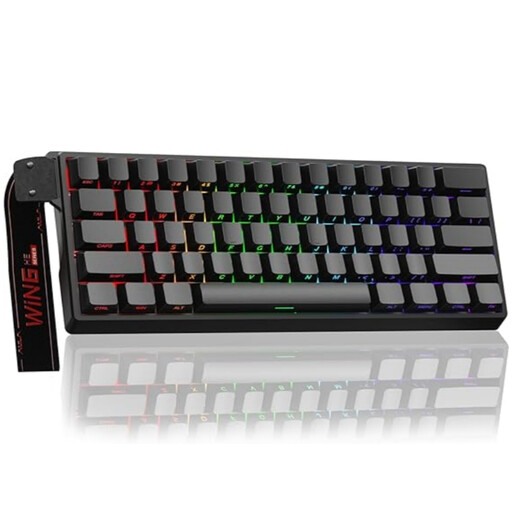
A 60% layout is a compact option. Check in advance that the missing dedicated keys will work with your hotkey profile.
The product name lists a wired connection, adjustable actuation, Rapid Trigger, RGB and an 8K polling rate.
 No image available
A full-size layout may suit you if you want to keep the number pad.
The product description lists 104 mechanical keys, adjustable per-key RGB lighting, anti-ghosting and full N-key rollover. The title specifies USB and English QWERTY.
 No image available
This TKL version may suit you if you don’t need a number pad and want a BE AZERTY layout.
The product description lists linear mechanical switches, programmable per-key RGB lighting and full N-key rollover with anti-ghosting. The cable is detachable and has a USB-C connection.
No. Start with the hotkeys you use and the keystroke feel you prefer. Magnetic switches let you adjust the actuation point, but that doesn’t automatically give you a specific advantage in ranked strategy games.
First, make a note of your current commands and check that the new keyboard’s physical keys suit them. According to Age of Empires Support, you can remap keys individually in Age of Empires IV’s Fully Remappable mode. If you play a different game, check its settings.
For a consumer purchase in the Netherlands, the legal guarantee may apply if the product doesn’t last as long as you could reasonably expect under normal use. If so, contact the seller. ACM ConsuWijzer also explains that online purchases generally come with a 14-day cooling-off period after delivery, subject to legal exceptions.
A CE mark is required when the applicable harmonised EU product rules require it for that specific version. According to Your Europe, the mark isn’t an independently issued quality certificate. Check the requirements that apply to the specific wired or wireless model.
That depends on the rules of the specific game or tournament. A programmable key doesn’t by itself confirm that automated sequences of actions are allowed, so check the rules that apply to your competition.