
Player with a roommate who’s trying to sleep
Wants to play in a shared bedroom and prioritises key noise over pronounced mechanical feedback.


For turn-based strategy games in a shared bedroom, first compare membrane keyboards with mechanical models that have genuinely dampened switches. Then choose between a more compact layout and the extra space for a number pad or dedicated macro keys. Manufacturer claims such as ‘quiet’ are not comparable sound measurements, and don’t mean a keyboard is silent.
Wants to play in a shared bedroom and prioritises key noise over pronounced mechanical feedback.
Wants to find game commands quickly or assign them to dedicated keys, and may be happy to use a larger keyboard to do so.
Has limited space for a keyboard and mouse and may be able to do without a number pad.
Start with the key type and any sound dampening. Then decide how much space you have and what controls you need while playing.
| What to consider | What to look for | Who is this important for? |
|---|---|---|
| Key noise | Check the switch type and whether it’s dampened; if possible, assess the sound on your own desk. | If I’m playing while a roommate is resting, I want to know how noticeable repeated keystrokes will be. Around 38% of consumers put key noise first. |
| Shortcuts | Check whether the model has dedicated macro keys and whether you need software to set them up. | If you want to assign commands in a strategy game, dedicated controls may be useful, and you may be happy to use a larger keyboard. Around 23% of consumers prioritise shortcuts or macros. |
| Desk space | Measure the available space and decide whether you want to keep the number pad. | If space for a keyboard and mouse is limited, I’d check whether I really need a number pad. Around 23% of consumers let desk space guide their choice. |
| Layout and visibility | Check the physical language layout and key legends; see whether the lighting can be adjusted. | If I want to type comfortably and identify keys quickly, I check the physical layout and lighting. Around 16% of consumers prioritise layout and visibility. |
A manufacturer may describe specific models as quiet, but the keystroke, rattling and keyboard case also affect the sound you hear.
Compare the switches and features of the exact model. Where possible, try the keyboard on the surface you plan to use it on.
A TKL layout leaves out the number pad. This can free up space, but it may be inconvenient if you use those keys often.
Before buying, think about which keys you want to keep for gaming and other uses.
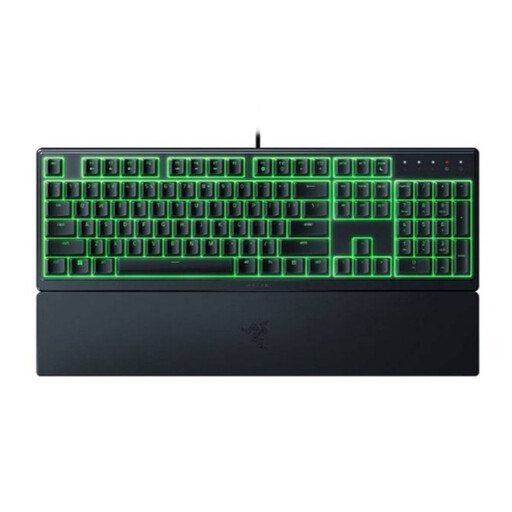
The Razer Ornata V3 X is a membrane model that Razer describes as quiet; Razer describes the Ornata V3 as clicky. The physical layout can also vary between versions.
Check the full model name, language layout and key legends of the version you’ve chosen.
The Apex 3 TKL is worth considering if you’re looking for a more compact setup and the manufacturer’s quietness claim matters to you. The standard Apex 3 is larger.
The Ornata V3 X is a low-profile membrane option for anyone looking for a softer keystroke.
The K55 RGB PRO is worth considering if dedicated macro keys and media controls matter more to you than a small footprint.
The G213 Prodigy is a full-size gaming keyboard with a wrist rest and media keys.
These keyboard picks include compact layouts and models with a full-size layout. Check each model to make sure its features and layout suit your game and desk.
 No image available
A TKL option to consider if you want to free up desk space and can manage without a number pad.
The product title specifies US QWERTY; check that this physical layout suits you.
 No image available
Worth considering if you want to keep the number pad and are looking at a mechanical model.
The product title specifies a full-size layout with 108 keys, tri-mode wireless and silent tactile switches. This switch description is not a comparable sound measurement; the full-size layout needs plenty of space.
 No image available
A compact layout to consider if you want to save desk space and don’t need a number pad.
The product title specifies 75%, 83 keys, linear switches, a volume knob and US QWERTY.
 No image available
A membrane option to consider if you’re looking for low-profile keys. Razer describes the membrane keys as quiet, but this is not a comparable sound measurement.
The product title specifies a US layout. The product description notes that it has a full-size layout, so low-profile doesn’t mean compact here.
 No image available
A very compact layout to consider if desk space matters and you can manage without a number pad.
The product title specifies 60%, 61 keys and US QWERTY. Check that the physical layout includes the keys you need.
No. Linear switches don’t automatically make a keyboard quiet. CHERRY describes MX Silent Red as having built-in sound dampening; RTINGS also points out that factors such as the case and stabilisers affect sound. Check the switches on the exact version and, if possible, assess the sound in your own setup.
Available settings vary by model. Logitech specifies adjustable brightness for the G213 Prodigy; Corsair notes that iCUE can be used for more advanced macros on the K55 RGB PRO. Check which customisation options are supported by the version you’re considering.
For an online purchase in the Netherlands, ACM ConsuWijzer states that the 14-day cooling-off period ends 14 days after delivery; check the terms for trying and returning the product. Your statutory guarantee is separate from any manufacturer’s warranty. If there’s a fault, contact the seller.
The Dutch government’s Ondernemersplein outlines the relevant European product and safety requirements for electrical and electronic devices placed on the market. Additional rules may apply to devices with Bluetooth or a radio-frequency module; check which features the version you’ve chosen has.