In a shared home office, start by choosing the key sound you find comfortable. Razer says the Ornata V3 X has quiet membrane switches, while RTINGS rates the specific SteelSeries Apex 3 as quiet enough for office use. If you want a mechanical feel or a compact keyboard, compare the exact switch variant, layout and connection. Logitech describes sound-dampening features on the G515 TKL, but that does not automatically mean the keyboard is quiet.
Who is this keyboard advice for?
The quiet-playing home worker
You game in the same place you work, or where others can hear your keystrokes, so key noise is your first consideration. Razer describes the Ornata V3 X as having quiet membrane switches; RTINGS rates the specific SteelSeries Apex 3 as quiet enough for office use.
The stealth gamer who also types a lot
You want a key feel that works for both gaming and everyday typing, without automatically opting for a clicky keyboard. Logitech describes the G515 TKL as offering a choice of linear and tactile switches, with a sound-dampening design.
The player with limited desk space
You share your desk with work equipment or a mouse, and need to weigh a compact layout against the convenience of extra keys. The models covered range from TKL and 75% layouts to a full-size keyboard with macro keys.
What should you look for when choosing?
Quiet membrane keyboard
Choose this if: audible keystrokes in your home office are your main concern. Razer describes the Ornata V3 X as having quiet membrane switches; RTINGS calls the specific Apex 3 quiet enough for office use.
Bear in mind: check the model variant and keyboard layout; this option does not automatically provide a mechanical feel or a compact layout.
Compact mechanical keyboard with sound-dampening
Choose this if: you type a lot, do not need a number pad and want a mechanical feel. Logitech describes the wired G515 TKL as having a sound-dampening design and a choice of linear or tactile low-profile switches.
Bear in mind: sound-dampening is not the same as being quiet. Consider the sound of the exact variant and choose between linear and tactile switches carefully.
Full-size keyboard with extra controls
Choose this if: you need a number pad, macro keys or media controls alongside your regular keys.
Bear in mind: a full-size keyboard takes up more desk space. The Corsair K55 RGB PRO specification discussed here is for model CH-9226765-NA.
Customisable mechanical keyboard
Choose this if: you want to be able to change the switches and keyboard layout. Keychron says the V1 Max has a hot-swappable 75% layout.
Bear in mind: the standard switches are not specified as quiet; according to Keychron, the barebone version does not include switches or keycaps.
Use the table to match the key considerations with a specific check to make before buying.
| Consideration |
What should you check? |
Who should prioritise this? |
| Audible key noise |
Check the switch type and exact variant. If possible, listen to the whole keyboard, including the space bar. |
If I game in a shared room, I want to avoid disturbing others with my keystrokes. Around 36% of consumers prioritise a quiet gaming experience. |
| Key feel and control |
Check whether the supplied variant is linear, tactile, membrane or clicky; do not rely on the model range alone. |
If I use the same keyboard for stealth games and everyday typing, I want a key feel that works well for both. Around 29% of consumers prioritise key feel and gaming control. |
| Desk space and layout |
Check whether you need a number pad and whether any keys are missing or arranged differently. Also check whether the layout is US or another variant. |
If I use a mouse and work equipment on the same desk, I want to know which keys I really need. Around 21% of consumers prioritise desk layout and available space. |
| What’s included and customisation |
Check what is in the box, which switches are compatible and whether the features you need require additional settings. |
If I want to customise the switches or keys later, I want to know in advance whether my chosen variant is complete. Around 14% of consumers prioritise what’s included and customisation. |
Which buying mistakes can you avoid?
-
Assuming ‘sound-dampened’ means ‘quiet’
Sound-dampening in the design and quiet membrane switches are different product descriptions. The stated features do not provide directly comparable sound measurements.
Compare the switch type and the exact variant. If possible, listen to the whole keyboard, including the larger keys.
-
Choosing the wrong variant in a model range
A model name can refer to different connections or switch variants. Check that the specific version matches what you are looking for.
Before buying, confirm the full model code, connection, switch variant and keyboard layout.
Choosing the wrong variant could mean extra hassle arranging an exchange or return.
-
Assuming a barebone or hot-swappable keyboard is a complete, quiet keyboard
Hot-swappable means you can change the switches, not that the keyboard comes with quiet switches as standard. According to Keychron, the barebone version also comes without switches and keycaps.
Check what is included and which switches are compatible with the version you have chosen. Buy any missing parts separately if you want a complete keyboard.
You may need to buy switches and keycaps separately to complete the setup.
Which brands are worth considering?
Razer
The Ornata V3 X is an option if you are looking for a membrane keyboard that the manufacturer describes as quiet.
- Razer describes the Ornata V3 X as having quiet membrane switches.
- This is not an independent sound comparison; the variant discussed has a US layout.
Logitech G
The wired G515 TKL is designed for gaming and typing in a compact layout, with a choice of two switch feels.
- Logitech describes a choice of linear or tactile low-profile switches and a sound-dampening design.
- Sound-dampening does not automatically mean the keyboard is quiet. Check that you choose the wired version and the switch variant you want.
SteelSeries
The Apex 3 is an alternative with rubber dome keys and a full-size layout.
- RTINGS rates the specific Apex 3 as quiet enough for office use.
- That rating applies to this model and is not a sound comparison with the other keyboards discussed.
Corsair
The K55 RGB PRO is worth considering if extra controls matter more to you than a compact desk footprint.
- Corsair describes rubber dome keys and six macro keys for model CH-9226765-NA.
- The specification quoted is for a North American version; check the model code and layout of the specific variant.
Keychron
The V1 Max is a customisable 75% option for anyone who wants to be able to change the switches.
- Keychron describes the keyboard as hot-swappable and lists compatible Silent Switches for the V Max series.
- The standard switches are not specified as quiet; the barebone version does not include switches or keycaps.
Joybuy keyboards for gaming and working from home
This range includes quiet membrane keyboards, compact layouts and mechanical options for gaming and everyday typing at a shared desk.
 No image available
Corsair K55 CORE TKL Gaming Keyboard, US QWERTY
Suited to anyone looking for a compact membrane keyboard for gaming and everyday typing.
The product description mentions quiet, responsive membrane keys, media keys, 12-key rollover and an adjustable stand. The stated layout is US QWERTY.
View at Joybuy
 No image available
AJAZZ AK820 MAX 75% Wireless Mechanical Gaming Keyboard
Suited to anyone considering a compact mechanical layout with customisable switches.
The product title lists tri-mode connectivity, Flying Fish switches, a volume knob, hot-swap and a US QWERTY layout. The description mentions a sound-dampening design; this is not a comparative sound measurement.
View at Joybuy
 No image available
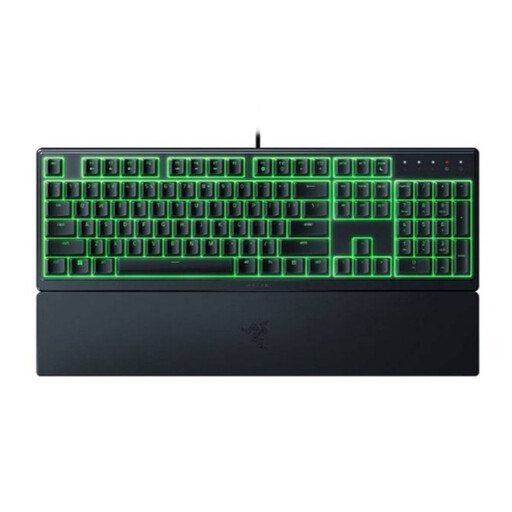
Razer Ornata V3 X Low Profile Gaming Keyboard, US Layout
Suited to anyone looking for a membrane keyboard that Razer says has quiet switches.
Razer describes the Ornata V3 X as having quiet membrane switches. The version listed has a US layout; the product description also mentions programmable keys and a wrist rest.
View at Joybuy
 No image available
RK ROYAL KLUDGE RK61 60% Gaming Keyboard, Quiet Red Switch
Suited to anyone considering a very compact mechanical layout with replaceable switches.
The product title lists 61 keys, hot-swap, tri-mode and Quiet Red Switch. That switch description is not an independent sound assessment; also check that the layout suits the keys you use.
View at Joybuy
 No image available
MageGee TS91 60% Wired Gaming Keyboard, US QWERTY
Suited to anyone looking for a compact, wired membrane keyboard with a mechanical feel.
The description lists 61 keys, RGB lighting and membrane technology with a mechanical feel. It mentions IPX4 protection for the circuit board, but also states that the connection is not waterproof.
View at Joybuy
Frequently asked questions
Do you need a mechanical keyboard for stealth games?
No, a mechanical keyboard is not essential. The models discussed include both membrane and mechanical keyboards; choose based on key feel, the sound of the specific version and its layout.
How can you keep keys usable on a shared desk?
When setting up the keyboard, first check its layout. For any key functions, use the software the manufacturer recommends for your model. Follow the instructions for the exact version when cleaning it; an IP rating for one component does not mean you can generally clean a keyboard with water.
Does a two-year manufacturer’s warranty cover all your rights in the Netherlands?
No. According to the Dutch government, consumers are entitled to a product that works properly, and the seller must provide a solution if a product is faulty. The Netherlands has no fixed statutory warranty period. A manufacturer’s warranty is in addition to these rights.
Can I return a keyboard bought online if I don’t like how the keys feel?
According to the Dutch government, for many online purchases from a business, you have a 14-day cooling-off period. Exceptions and the terms of your specific purchase still matter, so check the seller’s returns information beforehand.
Where can I recycle an old keyboard in the Netherlands?
Wecycle lists local recycling centres as a place to hand in electrical appliances. It also explains the old-for-new scheme when you buy a similar new appliance, including online. Check the options at your local collection point.


