If you play from the sofa, first decide where both the keyboard and mouse can sit securely: a wireless keyboard doesn’t provide a surface for your mouse. At a desk, choose a connection and layout to suit your distance, preferred keys and available space. Before buying, check that both your device and the specific game support keyboard controls.
Who is this advice for?
Sofa gamer using a mouse
If you play on a big screen from the sofa, decide where both the keyboard and mouse can sit securely. Corsair describes the K63 combo as including a lapboard with a mouse surface for this kind of use. Check that the version you want includes both items.
Gamer short on space
A compact layout can free up space beside your keyboard, but check which keys are missing. Logitech G describes the G915 X LIGHTSPEED TKL as a TKL model without a number pad; other layouts may keep or omit different keys.
Gamer in a shared room
If noise and key feel matter during long gaming sessions, check the switch type on the exact version. SteelSeries describes the Apex 3 TKL switches as quiet; this isn’t an independent comparison with other models.
What should you look for?
| What to consider |
What should you check? |
Who should pay particular attention? |
| Positioning and connection |
Decide where your keyboard and mouse will go. Check the connection options and which receiver or accessories are included. |
When playing from the sofa, I want to use both the keyboard and mouse securely. Around 36% of consumers say positioning and connection are their main concerns when buying. |
| Layout and accessible keys |
Compare the keys you use with the exact layout, including the arrow keys, function row and number pad. |
At a smaller desk, I want room for my mouse without losing keys I need in my game. Layout is the top priority for around 29% of consumers. |
| Key noise and feel |
Check the switch type on the version you’ve chosen. Don’t treat a manufacturer’s claims about noise as independent comparisons. |
In a shared room, I want to be considerate of noise and choose a typing feel I enjoy. Around 21% of consumers say noise and key feel are their main concerns when buying. |
| Compatibility and aftercare |
Check both your device and keyboard controls in your specific game, and review the model code and sales terms. |
Before I choose, I want to know whether my device and game will work with the controls I need. Compatibility and aftercare are the main concerns for around 14% of consumers. |
Common buying mistakes
-
Buying just a wireless keyboard for sofa gaming
If you use a mouse from the sofa, you’ll also need a stable surface for it. A lapboard and a complete keyboard-and-lapboard combo aren’t necessarily the same product.
Decide where your mouse will go first, then check which items are included with the version you’ve chosen.
-
Assuming a model name always means the same version
Layout, switches and software support can vary between versions. Corsair notes that certain K65 PLUS model codes don’t work with iCUE.
Compare the full model code, switch variant, layout and included receiver with the product information for the version you want to buy.
-
Assuming a compact keyboard is always more convenient
A smaller layout may leave out some keys. For example, the Razer BlackWidow V3 Mini keeps the arrow keys but doesn’t have a separate function row or number pad.
Compare the layout of the exact version with the keys you use for gaming and other tasks.
Brands to consider
Corsair
The K63 combo shows how a keyboard with a lapboard and mouse surface can work for sofa gaming. The K65 PLUS WIRELESS has a compact 75% layout for those who already have somewhere to use their mouse.
- Corsair specifies a 75% layout for the K65 PLUS WIRELESS; the K63 combo is designed for use with a mouse surface.
- Check the version and bundle separately. Corsair says that certain K65 PLUS model codes don’t support iCUE. The K63 combo page reviewed is for the US market.
Logitech G
The G915 X LIGHTSPEED TKL is a compact option with several connection methods.
- Logitech specifies 2.4 GHz, Bluetooth and a wired mode.
- The TKL layout doesn’t have a number pad or an integrated mouse surface. Claims about speed are made by the manufacturer, not based on independent testing.
SteelSeries
The wired Apex 3 TKL is worth considering if a cable connection suits your setup and quiet keys are important to you.
- SteelSeries specifies Whisper Quiet switches and IP32 for this model.
- The product specifications reviewed are for a US keyboard layout; check the layout of the version on offer.
Razer
The BlackWidow V4 Tenkeyless HyperSpeed is a wireless TKL option with hot-swappable switches.
- Razer lists 2.4 GHz and Bluetooth support, as well as tactile switches, for this model.
- It doesn’t include a mouse surface. Claims about connection speed are made by Razer.
HyperX
The Alloy Rise 75 Wireless is a compact option with several connection methods.
- HyperX specifies 2.4 GHz, Bluetooth and USB-C.
- The regional product page reviewed doesn’t confirm a Dutch version or availability. Battery life quoted by the manufacturer depends on factors including the lighting.
Gaming keyboards at Joybuy
These models are suited to compact wireless or wired desk setups for gaming on a big screen. Check the layout, connection and support for your device and specific game for each version.
 No image available
Corsair K65 PLUS Wireless, US QWERTY, MLX Fusion Tactile
A good fit for a compact setup if you’d like several ways to connect.
75% layout; MLX Fusion tactile switches; 2.4 GHz, Bluetooth and wired USB connection.
This version has a US QWERTY layout. Check that it suits your preferred keyboard layout.
View at Joybuy
 No image available
AJAZZ AK820 MAX 75% Wireless Mechanical Keyboard
A compact wireless option to consider if you want to leave room for your mouse beside the keyboard.
75% layout with arrow and function keys; Flying Fish switches; 2.4 GHz, Bluetooth and USB-C.
This version has a US QWERTY layout. Check that it suits your preference.
View at Joybuy
 No image available
GXTrust Thado wired gaming keyboard, TKL, PC/PS5, QWERTY
A good fit for a desk setup if a wired TKL layout suits the space you have available.
USB connection; the description lists membrane switches and registration of up to 10 simultaneous key presses.
The product name specifies PC/PS5 and QWERTY. Check that your specific game supports keyboard controls and that the layout suits your preference.
View at Joybuy
 No image available
Corsair K55 CORE TKL, US QWERTY
A wired TKL option to consider if you’re looking for a compact keyboard for your desk.
USB connection; quiet membrane switches; 12-key rollover.
This version has a US QWERTY layout. Check that it suits your preferred keyboard layout.
View at Joybuy
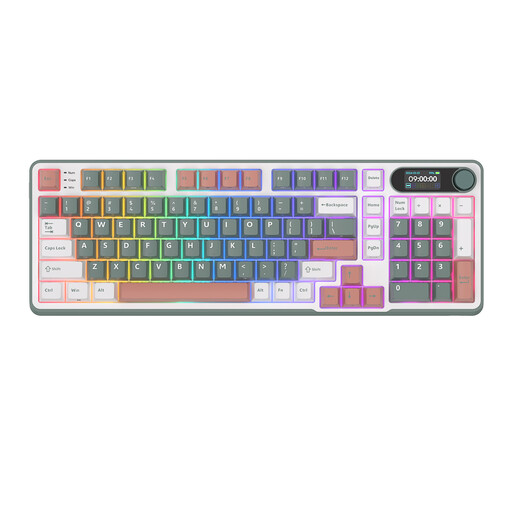 No image available
RK ROYAL KLUDGE S98 96% Wireless Mechanical Keyboard
A good fit if you’re looking for a wireless layout that still includes a number pad.
96% layout with 98 keys; Bluetooth, 2.4 GHz and USB-C; Blue Switch.
View at Joybuy
Frequently asked questions
Can you play fantasy games on your console with a gaming keyboard?
That also depends on whether the specific game supports it. Corsair describes connection options for several consoles, but you should also check whether your game supports keyboard controls.
What can you check if the K65 PLUS wireless connection or lighting stops working?
First, check the connection mode you’ve selected and the battery indicator. Corsair says that on this model, standard backlighting switches off when the battery level reaches 20% or below. The manual also describes a wired mode.
How long do you have to change your mind about a keyboard bought online, and who can help if it’s faulty?
For a typical online consumer purchase in the Netherlands, you have a statutory 14-day cooling-off period after delivery, subject to applicable terms and exceptions. This applies to changing your mind. If a product is faulty or doesn’t meet reasonable expectations under normal use, the seller is responsible for providing an appropriate solution under the statutory guarantee. This guarantee doesn’t have a fixed, general duration of two years. ACM ConsuWijzer explains these consumer rights.
Can a wireless gaming keyboard be sold in the Netherlands without a CE marking?
Radio equipment placed on the EU market under the Radio Equipment Directive must meet conformity requirements and carry a CE marking. The Dutch Authority for Digital Infrastructure says that the manufacturer applies the marking when the relevant requirements have been met. A CE marking alone doesn’t prove that a specific product on offer is actually compliant.


