Who is this guide for?

Players short on mouse space

On a small desk, your mouse can quickly bump into your keyboard. Decide how much width you can free up and which keys you might be happy to make less accessible in return. Trust and Coolblue describe 60% as a compact layout; check the dimensions of the specific model too.

Players who need keys within easy reach

You regularly use the arrow, navigation or function keys while gaming or chatting, and want to know whether a compact layout will work well for you. Razer says its BlackWidow V4 75% retains the arrow keys and function row.

Players in shared spaces

You’re mindful of typing noise and how practical the keyboard will be on a small desk. Check the switches and the specific model; a description such as ‘quiet’ isn’t an independent noise measurement. SteelSeries describes the Apex 3 TKL’s switches as Whisper Quiet.

What should you look for?

60%

A good fit if: you prioritise mouse space and are happy to use key combinations for secondary functions.

Bear in mind: a standard 60% layout doesn’t have dedicated arrow or function keys.

75%

A good fit if: you want to save space but keep the arrow keys and function row readily accessible.

Bear in mind: how much space you save depends on the model’s dimensions and your mouse setup.

TKL

A good fit if: you can do without a number pad but don’t want to go as compact as 60%.

Bear in mind: TKL is less compact than 60%, so check that the keyboard will fit on your desk.

What to consider What should you check? Who is this important for?
Room to move your mouse Measure the available desk width with your mouse mat in place, then compare it with the exact model’s external dimensions. If your mouse has little room to move on a narrow desk, you’ll want to know how much space the keyboard takes up. Around 36% of consumers prioritise mouse space above all.
Keys within easy reach Make a note of the arrow, function and navigation keys you use, then compare 60%, 75% and TKL layouts. If you often use individual keys while playing or chatting, you may not want to rely on an Fn combination every time. Around 29% of consumers prioritise direct access to keys.
Noise in a shared space Check the switch type and, if possible, try typing on the keyboard yourself. Descriptions such as ‘quiet’ are manufacturer claims. If you play in a room with other people, a less distracting typing feel may matter more than having the smallest case. Around 21% of consumers mainly consider noise.
Adjustable input behaviour Check whether actuation is adjustable on the exact version and how you change the settings. If you want to fine-tune actuation or repeated input, make sure the feature in question is available on your model. Around 14% of consumers prioritise adjustable input.

Common buying mistakes

  • Choosing solely for the smallest layout

    A standard 60% layout saves space, but doesn’t have dedicated arrow or function keys. If you use these often, accessing them as secondary functions may be less practical.

    Make a note of the keys you use while gaming and chatting before comparing 60% with 75% or TKL.

  • Assuming rapid trigger guarantees better gaming performance

    Razer lists this feature for the Huntsman V3 Pro Mini. It’s a model-specific feature, not proof of better results in co-op shooters.

    Choose adjustable actuation only if you want to fine-tune how it works and are happy to try out the settings.

  • Confusing a manufacturer’s warranty or protection plan with your statutory rights

    A commercial warranty or additional protection plan isn’t automatically the same as your statutory rights. ACM ConsuWijzer points out that the statutory warranty doesn’t simply have a fixed term of two years.

    Read what cover an offer provides, and treat questions about your statutory rights separately from optional additional cover.

Brands to consider

Trust

The GXT 867 Acira is a mechanical keyboard with a 60% layout, while the GXT 872 Xyra is a TKL alternative.

  • For the Acira, Trust specifies Outemu Red switches, dual-function keys and a detachable cable. For the Xyra, the brand lists hot-swappable 3- and 5-pin switches and padding.
  • These features apply to the models listed and don’t prove that all Trust keyboards have the same features.

Razer

According to Razer, the BlackWidow V4 75% retains a function row and arrow keys, while the Huntsman V3 Pro Mini is a compact model with adjustable actuation.

  • Razer lists hot-swappable switches for the BlackWidow and analogue optical switches with rapid trigger for the Huntsman V3 Pro Mini.
  • These are manufacturer specifications for specific models, not independent evidence that one model will work better for every player.

SteelSeries

The Apex 3 TKL is worth considering if you’re looking at a TKL layout and want a typing feel the manufacturer describes as quiet.

  • SteelSeries lists Whisper Quiet switches, dedicated media controls and an IP32 rating for the Apex 3 TKL.
  • The manufacturer’s description isn’t an independent noise comparison with other models.

Wooting

The 60HE+ is a 60% option if you’re considering Hall effect switches and adjustable key actuation.

  • For this model, Wooting describes rapid trigger, adjustable actuation and saved profiles.
  • Wooting states on its product page that delivery to the Netherlands isn’t available. Check whether you can actually buy it before placing your order.

Compact gaming keyboards at Joybuy

This selection focuses on compact gaming keyboards for small desks, including 60% and 65% layouts. Some models list adjustable actuation; check which keys are directly accessible and which functions use key combinations for each version.

Redragon M68 Magnetic Switch gaming keyboard

Redragon M68 Magnetic Switch gaming keyboard, 68 keys, US layout

The compact 65% layout could be a good fit if you want more room to move your mouse and are looking for adjustable key input.

The product name lists 68 keys, Rapid Trigger, an 8000 Hz polling rate and a metal top plate. The layout is US.

View at Joybuy

AULA WIN60HE compact gaming keyboard

AULA WIN60HE 60% gaming keyboard

The 60% layout is an option if you have limited desk space and want to consider adjustable actuation.

The product name lists Hall effect switches, Rapid Trigger, an 8K polling rate and adjustable actuation from 0.01 mm.

View at Joybuy
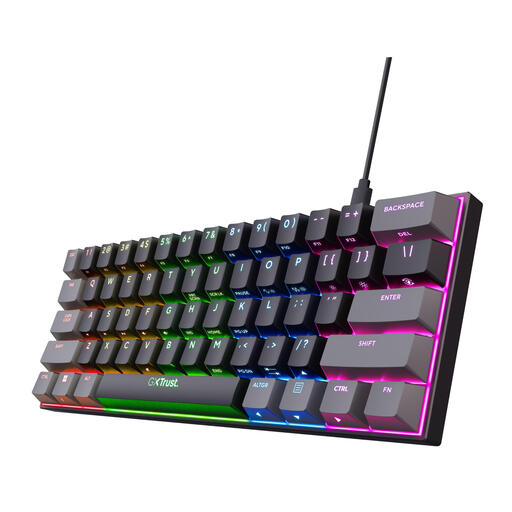
Trust GXT 867 Acira mechanical gaming keyboard, 60%, US layout

Trust GXT 867 Acira, mechanical 60% gaming keyboard, US QWERTY

This 60% model suits players who prioritise mouse space and are happy to use an Fn layer for arrow and navigation functions.

Trust lists Outemu Red switches and a detachable cable. There are no dedicated arrow keys; arrow and navigation functions are accessed via the Fn layer.

View at Joybuy

Razer Huntsman V3 Pro Mini, white, US QWERTY layout

Razer Huntsman V3 Pro Mini, white, US QWERTY layout

This compact model suits anyone short on desk space who wants adjustable actuation. Check whether using modifier keys works for you.

For the Huntsman V3 Pro Mini, Razer lists analogue optical switches, rapid trigger and an actuation range of 0.1 to 4.0 mm. Arrow and navigation functions are accessed using modifier keys.

View at Joybuy

Razer Huntsman Mini gaming keyboard, model RZ03-03390200-R3M1

Razer Huntsman Mini, model RZ03-03390200-R3M1

The 60% layout could be worth considering if you’re looking for a compact keyboard and are happy to use secondary key functions.

The product description lists optical switches, RGB lighting and onboard profile storage. A standard 60% layout doesn’t have dedicated arrow or function keys.

View at Joybuy

Frequently asked questions

Is 60% practical if I also chat or use menus between rounds?

It depends on which keys you use. A standard 60% layout doesn’t have dedicated arrow or function keys. Check the secondary functions on the exact model and whether you find them comfortable to use.

How do I connect and maintain a compact keyboard?

Check the connection type and care instructions for the specific version. Trust lists a detachable cable for the GXT 867 Acira; the product information for this model describes a USB-C-to-USB-A connection and recommends cleaning the keys regularly. This doesn’t necessarily apply to other models.

When buying online in the Netherlands, am I always covered by just a two-year warranty?

No. According to ACM ConsuWijzer, statutory cover in the Netherlands doesn’t have a fixed two-year term; a product should last as long as you can reasonably expect with normal use. If there’s a problem, contact the seller.

Can I return a standard keyboard bought online if I don’t like the layout?

For a standard online consumer purchase, you generally have a statutory 14-day cooling-off period after delivery, according to ACM ConsuWijzer. Check whether a legal exception applies and read the returns policy. This is separate from your statutory rights if the product is faulty.

What safety rules apply to a keyboard sold in the Netherlands?

Applicable European safety rules apply to electrical and electronic equipment. According to Business.gov.nl, where required, the manufacturer must affix a CE marking and draw up an EU declaration of conformity. Versions with Bluetooth or a radio module may also be subject to rules for radio equipment. Check the documentation for the specific version: a CE marking isn’t an independent quality mark.
