
Night-time gamer sharing a room
You practise while someone else is resting in the same room, so you want to take keyboard noise into account. Compare the switch type and, where possible, assess the sound in your own room.


Start with a key sound your roommate can live with, then check that your main support actions are easy to use. A membrane keyboard that the manufacturer describes as quiet is a sensible first option. Choose TKL if you need more room for your mouse, or a larger model if you use the number pad and extra controls. Manufacturer terms such as ‘quiet’ are not directly comparable sound measurements.
You practise while someone else is resting in the same room, so you want to take keyboard noise into account. Compare the switch type and, where possible, assess the sound in your own room.
You want to carry out actions consistently. Check the keyboard layout, simultaneous key presses and any remapping options before choosing extra features.
You need room to move your mouse, but want to know which keys you’ll lose with a TKL layout that has no number pad.
Balance the noise in your shared room against the actions you want to access quickly and the desk space you need.
| What to consider | What to look for when buying | Who is this important for? |
|---|---|---|
| Key noise | Check the switch type for the exact version and, if possible, try it on a similar desk. Manufacturer terms such as ‘Whisper Quiet’ are not comparable decibel ratings. | If you play while your roommate is resting, you’ll want to reduce disruptive keystrokes without assuming a keyboard will be quiet in every room. Around 36% of consumers prioritise peace and quiet in the bedroom. |
| Support actions | Compare your key bindings with the physical keys and test your usual combinations. Check that remapping works on your device; check the game’s rules separately before using macros. | If you want reliable access to actions while playing, check that the layout suits the way you play. Around 29% of consumers prioritise direct control of support actions. |
| Desk space | Measure the space available and consider whether you need a number pad. TKL layouts omit the number pad; also check the actual layout of the version you’re choosing. | If you need room to move your mouse beside the keyboard, its width matters, but you won’t want to lose keys you use. Around 21% of consumers prioritise desk space. |
| Extended use and aftercare | Check which controls and accessories come with the exact version, and keep your proof of purchase in case you need to make a claim to the retailer. | If you play for longer sessions, you could look for features such as a wrist rest and media keys, and find out what to do if something goes wrong. Around 14% of consumers prioritise ease of use and aftercare. |
Manufacturers use descriptions of sound, but these don’t provide measurements that can be compared from one room to another. The keys may sound different in your room from what you expect based on a product description.
Choose based on the switch type and, if possible, try the keyboard on a similar desk. Don’t expect absolute silence.
Razer describes the Ornata V3 X as a model with quiet membrane switches; according to its product listing, the Ornata V3 has audible feedback from mecha-membrane switches.
Check the full model name and switch type on the product page.
A TKL layout omits the number pad. This can give you more room to move your mouse, but you’ll also lose direct access to those keys.
Check your in-game layout and any other tasks you use the keyboard for before swapping a full-size model for a TKL one.
Your legal claim against the retailer depends on what you could reasonably expect from the product under normal use, not just the period stated by the manufacturer.
Keep your proof of purchase and contact the retailer if the product is faulty.
The Apex 3 TKL is a compact, wired model for anyone looking for more room for their mouse and a quieter keyboard.
The K55 CORE TKL is a compact membrane model; the larger K55 RGB PRO has six dedicated macro keys.
The Ornata V3 X is a low-profile, full-size membrane model for anyone who wants direct access to a wide range of keys.
The G213 Prodigy combines a full-size layout with a wrist rest and dedicated media keys.
The Alloy Core RGB is a full-size membrane model for anyone looking for quiet keys and media controls.
This Joybuy selection includes gaming keyboards with compact layouts and models offering a range of control features. Check that the layout, connection and features of each version suit the way you plan to use it.
 No image available
A TKL layout could suit you if you don’t need a number pad and want more room to move your mouse.
Wired; QWERTY; for PC and PS5. The description lists a membrane keyboard, anti-ghosting for up to 10 simultaneous key presses and media keys.
 No image available
This compact membrane model could suit you if you need more room for your mouse and can manage your actions using the keys available.
Wired USB connection; four media keys; the product description mentions 12-key rollover and key remapping via iCUE. The TKL layout has no number pad.
 No image available
The compact layout could suit you if you’re looking for a gaming keyboard with fewer keys; check in advance that you can still reach all the actions you need.
Mechanical Hall-effect switches; adjustable actuation and Rapid Trigger. The title lists an 8000 Hz polling rate and a metal top plate.
 No image available
The description mentions a detachable wrist rest for longer sessions; check that this version suits your desk and how you use it.
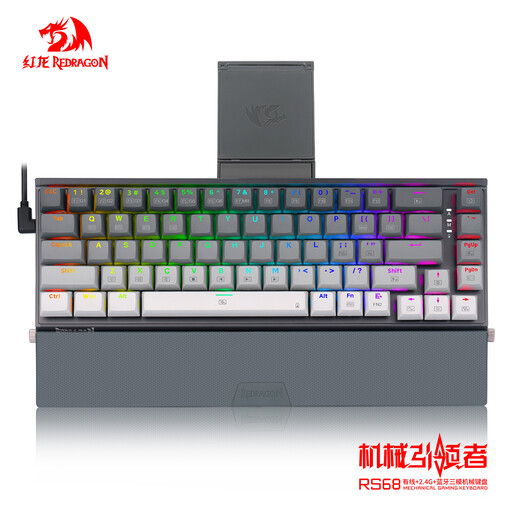
Mechanical keyboard with tri-mode connectivity: wired, 2.4 GHz and Bluetooth. The description also mentions a hot-swappable PCB, aluminium case and RGB lighting.
 No image available
The 68-key layout could suit you if you’re looking for a compact gaming setup; check that it keeps the keys you need within easy reach.
Linear Hall-effect switches; adjustable actuation and Rapid Trigger. The title lists an 8000 Hz polling rate and a metal top plate.
Start with the actions you use in your game and compare them with the physical keyboard layout. Test the simultaneous key presses you use most often and check that remapping works on your device. Extra macro keys don’t automatically mean that automated actions are allowed in your game.
According to the Corsair manual, connect the USB plug to a USB-A port, version 2.0 or higher, on a compatible device. The manual also covers lighting and key settings; check which features are available on your system, with or without iCUE.
Follow the care instructions for the exact model. A stated spill-resistance rating or IP32 classification doesn’t mean it’s safe to submerge the keyboard or clean it with lots of water.
For a standard online purchase, ACM ConsuWijzer says you generally have a 14-day statutory cancellation period after delivery; legal exceptions apply. You’re also covered by the statutory guarantee if, under normal use, a product doesn’t meet what you could reasonably expect. The retailer must then offer an appropriate free solution; a manufacturer’s warranty does not replace these rights.
Electronic equipment may be subject to specific EU rules on CE marking. CE is the manufacturer’s declaration of conformity, not an independent noise rating. If you choose a wireless version, the radio equipment is also covered by the EU Radio Equipment framework. Check the documentation for the exact version and don’t rely solely on a product listing to establish conformity.