What to consider when choosing
Start with the connection you’re actually short of: a spare power socket isn’t the same as a spare USB port.
| Consideration |
What should you check? |
Who is this important to? |
| Connecting without an extra power socket |
Check the USB connection, available ports and whether a wireless receiver is needed. For wireless models, also check how the battery is charged. |
I don’t want to use an extra power socket, but I may be able to free up a USB port. Around 36% of consumers in this group give top priority to connecting without an extra power socket. |
| Registering simultaneous key presses |
Look up the specifications for the exact version and check the combinations you use yourself. |
If my game mode uses several keys at once, I want to be able to check those specific combinations. Around 29% of consumers in this group prioritise registering simultaneous key presses. |
| Repeated key presses |
Check whether actuation is adjustable and whether you can assess the setting with your keys and game. |
I want repeated key presses to feel comfortable, without assuming that a more sensitive setting will improve my timing. Around 21% of consumers in this group give top priority to checking performance during rapid repeated presses. |
| Layout and playing space |
Compare the physical key positions with your game controls and any other keys you need. |
With limited space for gaming, I want to save room without losing keys that I need for my layout. Around 14% of consumers in this group prioritise keyboard layout and playing space. |
Wired keyboards for rhythm games
This Joybuy selection focuses on wired USB gaming keyboards, including models with USB-C. This means you won’t need a separate mains connection for the keyboard, but you will need a suitable USB port.
 Image unavailable
GXTrust Thado TKL gaming keyboard, QWERTY, black (PC/PS5)
Suitable if you’re looking for a wired keyboard and want to consider a TKL layout.
The description lists USB, a 1,8 m cable and registration of up to 10 keys at once. It also mentions use with PC and PS5.
View at Joybuy
 Image unavailable
AULA WIN60HE, 60%, wired gaming keyboard
Suitable if you’re looking for a compact wired layout and want to adjust actuation.
The product name lists Hall effect switches, Rapid Trigger, RGB and adjustable actuation from 0,01 mm. An 8K polling rate is also mentioned.
View at Joybuy
 Image unavailable
Redragon M68 mechanical gaming keyboard, 68 keys, US layout
Suitable if you’re looking for a compact wired version and want to adjust actuation.
The description lists a wired Type-C mode, magnetic switches and Rapid Trigger. Adjustable actuation ranges from 0,2 to 4,0 mm.
View at Joybuy
 Image unavailable
AJAZZ AK820 MAX, 75%, 82 keys, grey side-printed keycaps
Suitable if you’re looking for a compact wired layout and want to adjust actuation for repeated key presses.
The description lists magnetic switches, USB-C and adjustable actuation from 0,1 to 2,0 mm.
View at Joybuy
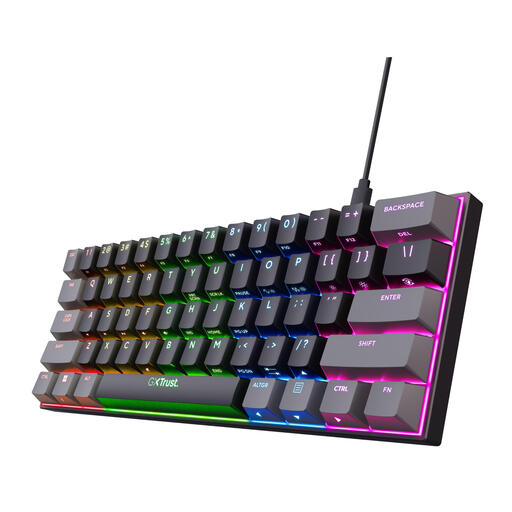 Image unavailable
GXTrust Acira, 60%, mechanical, US QWERTY, black
Suitable if you’re looking for a compact wired keyboard and press several keys at once.
The description lists linear Outemu Red switches, N-key rollover and a detachable 1,8 m USB-C cable. According to the description, the arrow keys and function row are accessed via an Fn layer.
View at Joybuy
Frequently asked questions
Do you need a wireless keyboard if you have few power sockets?
No. A wired USB model can connect to a suitable spare USB port on your computer. Wireless use avoids the cable, but requires a suitable connection and battery management.
How can you check whether your rhythm-game keys work simultaneously?
Make a note of the keys and combinations used in your game mode, then compare them with the specifications for the exact version. Test them if possible; osu!mania, for example, offers game modes with different numbers of keys.
What if the keyboard doesn’t work properly during normal use?
According to ACM ConsuWijzer, you’re entitled to a legal guarantee in the Netherlands if a product doesn’t meet what you could reasonably expect. The seller is responsible for providing an appropriate solution at no extra cost.
Can you assess the keyboard layout after buying online?
According to ACM ConsuWijzer, for a standard online consumer purchase you generally have a 14-day cooling-off period after delivery, subject to applicable exceptions. Check the terms that apply to your purchase.
Where can you take a replacement keyboard or empty batteries?
According to the Dutch government, when you buy a similar new appliance, you can return your old one free of charge under the take-back scheme, including when you buy online. Loose, used household batteries should be taken to a battery collection point, not put in the bin.


