
Players who need to enter fast sequences
You mainly play rhythm games with lots of repeated key presses and want to adjust when a key activates and resets ready for another press.


If you often play rhythm games that involve fast, repeated key presses, compare keyboards with adjustable actuation and Rapid Trigger. For less intensive gaming, a conventional mechanical model may still be responsive enough. RTINGS notes that adjustable magnetic switches may be useful for rhythm games, but aren’t essential for a responsive gaming experience. Also consider key noise, the keys you need for work and the connection that suits your gaming device.
You mainly play rhythm games with lots of repeated key presses and want to adjust when a key activates and resets ready for another press.
You game and work in the same place, so key noise and a comfortable typing experience matter to you.
You want enough useful keys for everyday tasks without giving up unnecessary desk space.
Choose this if: fast, repeated key presses are your main priority and you want to adjust the sensitivity.
Bear in mind: a very sensitive setting may be less forgiving of accidental key presses.
Choose this if: you want to adjust Rapid Trigger and this type of switch and its controls suit you.
Bear in mind: the technology alone doesn’t prove you’ll perform better in a specific rhythm game.
Choose this if: you also do a lot of typing or don’t need adjustable key reset.
Bear in mind: sound dampening doesn’t guarantee a quiet keyboard. The specific switch and your workspace both make a difference.
If your game involves lots of repeated key presses, start with key reset. Then weigh up noise, layout and connectivity against your working day.
| What to consider | What to look for | Who should pay particular attention? |
|---|---|---|
| Key reset | Compare Rapid Trigger and adjustable actuation; if necessary, try a less sensitive setting. | If I play fast sequences, I want keys to register again in a way that suits how I press them. Around 33% of consumers give repeated key presses top priority. |
| Key noise | Check the exact switch variant and any sound dampening; a claim about dampening isn’t a sound measurement for your room. | If I work in a shared space, I want to consider key noise alongside how the keys feel. Around 25% of consumers prioritise quiet key presses. |
| Keyboard layout | Check the gaming keys, arrow keys, function keys, any number pad and the language layout available. | If I use the same keyboard for work and gaming, I want the keys I need every day within easy reach. Around 25% of consumers mainly choose a practical layout for work. |
| Connectivity | Check which connections the exact version offers and which mode you want to use for your gaming setup. | If I switch between work and gaming devices, it’s important that the connection works with both. Around 17% of consumers give switching between devices top priority. |
Adjustable actuation may be useful for fast inputs, but RTINGS’ overall gaming rating doesn’t prove that every player will perform better in every rhythm game.
Choose based on your own repeated key presses and adjust the sensitivity so you can control accidental inputs.
Manufacturers describe sound-dampening materials, but that isn’t a like-for-like sound measurement for your workspace.
Check the switch variant and assess the sound of the exact version.
A model name can cover different connections or switches, and these details determine whether the version suits your needs.
Before buying, check the full model name, connection, switch and layout.
The wrong connection mode or switch variant could mean the keyboard isn’t suited to how you intend to use it.
The 80HE is a wired model with an 80% layout, magnetic switches, Rapid Trigger and adjustable actuation.
According to SteelSeries, the Apex Pro TKL Gen 3 combines adjustable magnetic switches with a TKL layout and sound dampening.
According to Razer, the Huntsman V3 Pro Tenkeyless uses analogue optical switches with Rapid Trigger and adjustable actuation.
The K2 HE focuses on a compact 75% layout, magnetic switches and several connectivity options.
According to Logitech G, the G515 LIGHTSPEED TKL is a low-profile mechanical model with a sound-dampening design and multiple connection modes.
According to AJAZZ, the AK820 Pro is a conventional mechanical model for typing and gaming, with wired and wireless modes.
This selection focuses mainly on compact gaming keyboards with magnetic switches and Rapid Trigger. It also includes a conventional mechanical TKL model.
 No image available
A compact option for fast, repeated key presses when adjustable actuation is important.
68 keys, US layout, wired, Gateron HE magnetic switches and Rapid Trigger.
 No image available
A compact choice if you want to combine Rapid Trigger with a 68-key layout.
68 keys, US layout, magnetic switches, Rapid Trigger and a detachable Type-C cable, according to the product information.
 No image available
A compact layout to consider if you want to adjust settings for fast, repeated key presses.
75% layout, wired, magnetic switches and adjustable actuation with RT, according to the product information.
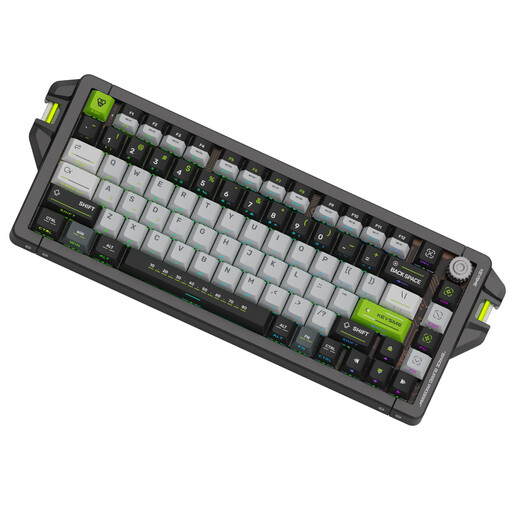 No image available
A compact wired option to compare if you’re looking for adjustable Rapid Trigger.
QWERTY US layout, magnetic Jade Switch Pro switches and an adjustable trigger range of 0,1–4,0 mm, according to the product name.
 No image available
A conventional mechanical alternative if you don’t need adjustable Rapid Trigger and also want to consider the layout for work.
TKL layout, mechanical MLX Red switches and a detachable USB-C cable, according to the product information.
No. Rapid Trigger isn’t essential for a responsive gaming keyboard. RTINGS notes that adjustable magnetic switches may be useful for fast rhythm games; consider this extra adjustability especially if repeated key presses are a priority for you.
Start with the actuation and reset sensitivity of the keys you actually use. The controls differ by brand and model, so test the settings in your own game rather than assuming one sensitivity will suit everyone.
First check whether you need arrow keys, function keys or a number pad, then look at the connection modes available on the exact version. For gaming, RTINGS prefers a cable or wireless receiver over Bluetooth; Bluetooth can be useful when switching between devices.
For eligible distance purchases from a business, you generally have 14 days to change your mind, according to the Dutch government. In the Netherlands, the statutory guarantee doesn’t have a fixed two-year term: you’re entitled to a product that works as it should, and the seller is your point of contact if something goes wrong. Before placing your order, check who the seller is and which terms apply to your purchase.
Check the seller, the product information and the applicable safety marking for the specific version. The Dutch government notes that consumer rights and additional costs can differ when buying from an online shop outside the EU, and that electronic products must meet applicable European safety requirements.