If you play on a PC from the sofa, choose a wireless keyboard with a connection and receiver that suit your setup. If you play in one place, a wired keyboard may be more practical, as you won’t need to charge it. For gradual acceleration or braking, you’ll need analogue gamepad input and a racing game that supports the selected mode, as Wooting explains for its keyboards. On a console, check separately whether both the device and the specific game support keyboard input.
Who is this for?
Sofa racer on PC
You play on a PC connected to a big screen and want to control it from the sofa without an awkward cable getting in the way. Check that the connection, receiver and charging options suit your playing area. Logitech G and Razer describe wireless options with different connectivity features.
Racer looking for finer control
You want to find out whether analogue keys let you accelerate, brake or steer gradually in your PC racing game. The game must support the selected input and configuration; Wooting describes analogue keys and gamepad modes.
Racer with a fixed setup
You play close to your PC and prefer a wired connection and a suitable keyboard layout to the freedom of wireless. Logitech describes a wired G515 TKL, which you shouldn’t confuse with the wireless LIGHTSPEED version.
What should you look for?
When choosing a gaming keyboard for racing games on a big screen, your decision mainly depends on how far you sit from your PC, the input your game accepts and the layout that suits your playing area.
| What to consider |
What should you check? |
Who is this important for? |
| Connection from the sofa |
Check whether the exact model supports wireless connections such as 2.4 GHz or Bluetooth, where you can place the receiver and whether you can charge the keyboard while using it. |
I want to control my PC from the sofa without running a cable across the room. Around 33% of consumers say a wireless sofa setup is their top purchase priority. |
| Gradual input for racing |
Check whether the keyboard offers analogue gamepad output and whether your racing game supports the selected mode; adjustable key actuation is not the same as analogue output. |
If I want to control acceleration or braking gradually, my game needs to process the right input. Around 27% of consumers give analogue racing input top priority. |
| Console and game |
Check compatibility with the console, keyboard model and specific racing game separately. |
I want to be sure before buying that my console and racing game will actually use the keyboard for control. Around 20% of consumers prioritise compatibility with their console and game. |
| Wired comfort and layout |
Check whether you can route the cable safely and whether the exact version and keyboard layout suit you; wired and wireless models with similar names may differ. |
If my PC is close by, I can choose a fixed wired setup and a layout that suits my desk. Around 20% of consumers say wired comfort and layout are their top purchase priority. |
Common pitfalls
-
Confusing a wireless model with a similarly named wired version
According to Logitech, the Logitech G515 LIGHTSPEED TKL and G515 TKL have different connectivity features. Check the full model name and connection type; a product title that mixes up several features can cause confusion.
Compare the full model name and connection on the product page with the version you’re looking for.
-
Assuming adjustable key actuation automatically means analogue steering
Adjustable actuation and analogue gamepad output are different features. For gradual racing input, your game must also process the selected gamepad mode.
Specifically check for analogue output, the available gamepad mode and support in your racing game.
-
Thinking every console racing game works with a keyboard
Sony warns that not every keyboard is compatible with a PS5. Microsoft says support on Xbox can vary by game or app.
Check support for both your console and the specific racing game before relying on a keyboard setup.
Brands to consider
Logitech G
Worth considering if you want to compare the wired G515 TKL with the wireless G515 LIGHTSPEED TKL.
- According to Logitech, the wireless version offers LIGHTSPEED, Bluetooth and wired data transfer.
- The wired G515 TKL has no wireless mode; don’t compare the versions based only on their similar names.
Razer
The DeathStalker V2 Pro Tenkeyless is a compact wireless option if you’re looking for a TKL layout.
- Razer lists 2.4GHz wireless, Bluetooth and wired use while charging.
- These specifications don’t confirm that a console or a particular racing game supports keyboard controls.
Wooting
The 80HE is worth looking into if you want analogue key input for racing games on PC.
- Wooting describes analogue key movement and XInput and HID gamepad modes.
- The specific game must support the selected mode; adjustable actuation alone doesn’t prove that analogue gamepad input is available.
SteelSeries
The Apex Pro TKL Wireless Gen 3 is a wireless TKL option to compare if adjustable key actuation is important to you.
- SteelSeries lists 2.4GHz wireless, Bluetooth and adjustable actuation from 0.1 to 4.0 mm.
- This actuation specification alone doesn’t prove that the racing game receives variable analogue gamepad input.
Gaming keyboards on Joybuy
This selection includes wired and wireless keyboards for gaming setups, including models with a 75% or tenkeyless layout.
 No image available
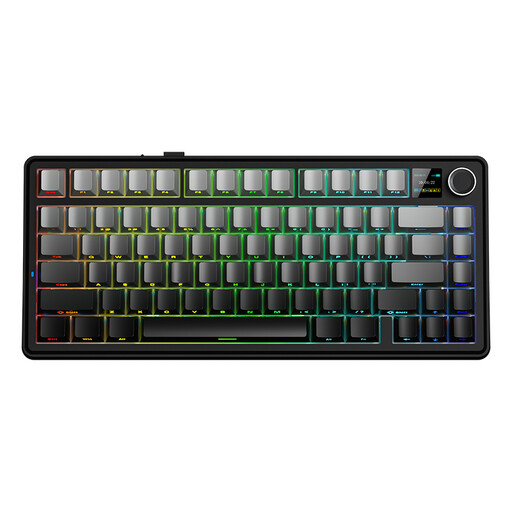
AULA F75 MAX 75%, Gradient Grey, Reaper Switch
The combination of wired and wireless connections may suit a setup where you want a choice of connection options.
75% layout; mechanical keyboard; US QWERTY; tri-mode: wired, Bluetooth and 2.4G.
Joybuy
 No image available
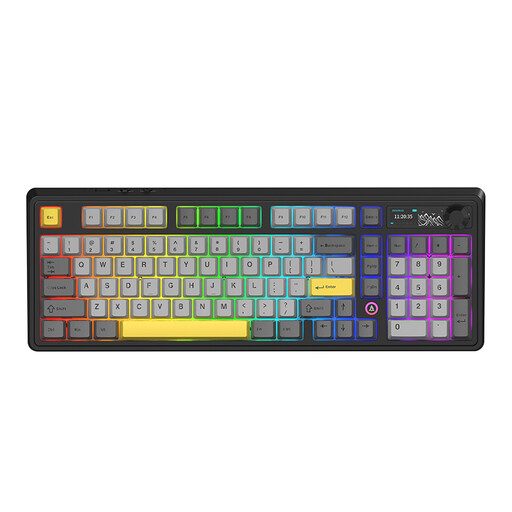
AJAZZ AK980 V2, Starry Night Gray, Gift Switch V2
This model may suit you if you’re looking for a larger layout and both wired and wireless connectivity options.
98% layout; QWERTY; volume knob and TFT display; tri-mode: wired, Bluetooth and 2.4G; 10,000 mAh battery.
Joybuy
 No image available
AJAZZ AK820 MAX 75%, Flying Fish switches
The 75% layout and tri-mode connection may suit a compact playing area where you want to choose between connection options.
Mechanical gaming keyboard; 75% layout; US QWERTY; tri-mode; 8,000 mAh battery; hot-swappable.
Joybuy
 No image available
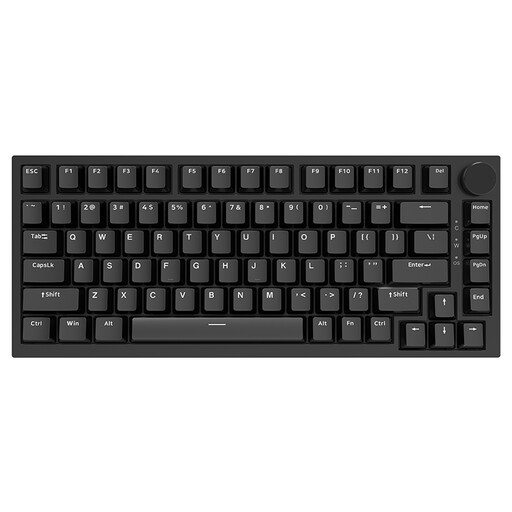
AJAZZ AK820 75% wired, black, Red Switch
A wired version may suit you if your PC is close by and you don’t need a wireless connection.
75% layout; US QWERTY; hot-swappable linear switches; Red Switch; compatible with PC, Win and Mac.
Joybuy
 No image available
Razer DeathStalker V2 Pro Tenkeyless, US layout
The wireless connection and tenkeyless layout may suit a compact playing area that’s further from your PC.
Razer lists 2.4GHz wireless and Bluetooth, as well as wired use while charging. You’ll need to check game and console compatibility separately.
Joybuy
Frequently asked questions
Does every gaming keyboard work with racing games on PS5 or Xbox?
No. Being able to connect a keyboard doesn’t automatically mean it will work in your racing game. Sony describes USB and Bluetooth keyboards for PS5, but warns that not all devices are compatible. Microsoft says Xbox support can vary by game or app, so check the input options for the specific game too.
How do you use an analogue keyboard for gradual racing input?
On a supported Wooting keyboard, select a gamepad output your PC game accepts, such as XInput or HID, then map the input in the game. Wooting describes these output modes; check before buying that your game supports the mode you’ve selected.
Does adjustable key actuation mean a keyboard steers by varying pressure?
No. Adjustable key actuation alone doesn’t prove that a keyboard has analogue gamepad output. SteelSeries lists adjustable actuation for the Apex Pro TKL Wireless Gen 3, while Wooting describes analogue input and gamepad modes separately. Check exactly which output the specific game accepts.
What are my rights when buying online in the Netherlands?
For a standard online consumer purchase from a business, you’ll often have a 14-day cooling-off period, according to the Dutch government; exceptions and the type of seller may affect this. ACM ConsuWijzer also explains that the statutory guarantee doesn’t automatically end after two years: the product’s expected lifespan and the circumstances are taken into account.


