Who is this relevant to?

Racers who don’t want to disturb others

You play with a headset but want to keep the sound of your keystrokes down for others in the same room. Compare the key mechanism of the exact version you’re considering, and think about whether physical media controls would be useful. A product description that says ‘quiet’ isn’t a sound measurement.

Racers who want to modulate acceleration and steering

You’re looking for gradual input rather than just on-off commands. Whether this works depends on your game’s support and how it handles combined inputs.

Racers sharing a desk

You also use your keyboard for other tasks, or have little room beside your mouse. Compare a compact TKL layout with a full-size one, based on the physical keys and controls you actually need.

What should you look for?

Standard keys

Choose this option: if your racing game uses digital keys and you also want to take noise levels for other household members into account.

Bear in mind: digital keys don’t automatically provide gradual acceleration, braking or steering input. Claims of quiet keystrokes are not comparative sound measurements.

Analogue input

Choose this option: if gradual control matters to you and your specific game accepts the controller input you select.

Bear in mind: controller emulation can cause issues when a game processes keyboard and controller input at the same time.

What to consider What should you check? Who should pay particular attention?
Key noise and controls Compare the mechanism of the exact version and check whether it has media keys. Manufacturer descriptions such as ‘whisper-quiet’ are not comparative sound measurements. If I play with a headset, I want my keystrokes to disturb others in the room as little as possible, and I want to be able to adjust the volume. Around 36% of consumers prioritise quiet keystrokes and easy-to-reach audio controls.
Gradual control Check that your game and platform support the XInput or DirectInput mode you want and handle combined input properly. I want to be able to modulate acceleration, braking or steering gradually, but only if my racing game accepts that input. Around 29% of consumers prioritise analogue control.
Layout and desk space Compare the physical keys you use in your game with TKL, 60% and full-size layouts, including function keys, arrow keys and the number pad. If I also use my keyboard for other tasks or have little room beside my mouse, I want to know which keys I really need. Around 21% of consumers choose mainly based on layout and desk use.
Connection and terms Check the connection and supported devices for the exact version. Consider any additional warranty separately from your statutory rights. I want to know in advance whether the version will connect to my device and what any additional cover includes. Around 14% of consumers prioritise straightforward connections and after-sales support.

Common buying mistakes

  • Assuming ‘analogue’ guarantees better racing control

    A game may struggle to process keyboard and controller input at the same time. An analogue feature therefore doesn’t guarantee that your racing game will handle that input properly.

    Check your own game’s input support before making analogue keys a deciding factor in your purchase.

  • Choosing a compact layout without checking the keys you use in-game

    A TKL keyboard has no number pad; even more compact layouts may lack physical keys or direct access to certain commands.

    Make a note of the commands you use and compare them with the physical layout of the exact version.

  • Assuming an additional warranty replaces your statutory rights

    According to ACM ConsuWijzer, the statutory guarantee is separate from any paid additional warranty.

    Check what an additional package includes before weighing it up against your statutory rights.

Brands to consider

SteelSeries

The Apex 3 TKL is a compact, wired option with a TKL layout.

  • SteelSeries lists Whisper Quiet switches and IP32 for this model.
  • The TKL layout has no number pad. ‘Quiet’ is not an independent comparison with other models.

Logitech G

The G213 Prodigy combines a full-size layout with an integrated palm rest and dedicated media buttons.

  • Logitech describes the Mech-Dome keystroke as whisper-quiet and states that this model is spill-resistant up to 60 ml.
  • The product description is not proof that this keyboard is quieter than other models.

HyperX

The Alloy Core RGB is a membrane model with media buttons.

  • HyperX lists quiet, soft-touch keys, anti-ghosting and spill resistance tested up to 120 ml.
  • The version referenced has a US product layout; check the layout of the version you’re considering.

Corsair

The K55 RGB PRO is a full-size option with media controls and macro keys.

  • For the version consulted, Corsair lists six macro keys, media buttons and IP42.
  • The extra controls take up more space than a TKL model and don’t prove better racing performance. The quiet keystroke is a Corsair claim, not a comparative measurement.

Wooting

Wooting analogue keyboards are worth considering when gradual control is an important reason for your purchase.

  • Wooting documents XInput and DirectInput modes for controller input.
  • Wooting warns that games don’t always handle combined keyboard and controller input properly. Check your own game and setup.

Razer

The Huntsman V2 Analog and Ornata V3 X offer different options: analogue input or membrane keys.

  • Razer describes the Huntsman V2 Analog as offering analogue input and the Ornata V3 X as having quiet membrane switches.
  • These are different models; the Huntsman’s analogue feature is not found on the Ornata V3 X.

Joybuy products

This Joybuy selection includes keyboards with different layouts, connections and control options. Compare each version with the keys and features required for your racing game and other uses.

GXTrust Thado TKL wired gaming keyboard, QWERTY, black

GXTrust Thado TKL wired gaming keyboard, QWERTY, black

The compact TKL layout and physical media controls could suit you if you want to save desk space and adjust the volume while playing.

Wired USB connection; membrane keys; direct media controls for volume and playback; supports up to 10 simultaneous keystrokes. The TKL layout has no number pad.

View at Joybuy

Corsair K55 CORE TKL gaming keyboard, US QWERTY

Corsair K55 CORE TKL, US QWERTY

This TKL version could suit you if you’re looking for a compact layout with physical media controls.

The product description lists quiet membrane switches, four media keys and 12-key rollover. Wired USB connection; no number pad. The description ‘quiet’ is not a comparative sound measurement.

View at Joybuy

AJAZZ AK820 MAX 75% wireless mechanical gaming keyboard, US QWERTY

AJAZZ AK820 MAX 75% wireless mechanical keyboard

The 75% layout could suit you if you want to save space while keeping the function and arrow keys.

The description lists 82 keys, tri-mode connectivity and a physical volume knob. The product name specifies Flying Fish switches, an 8000mAh battery and a US QWERTY layout.

View at Joybuy
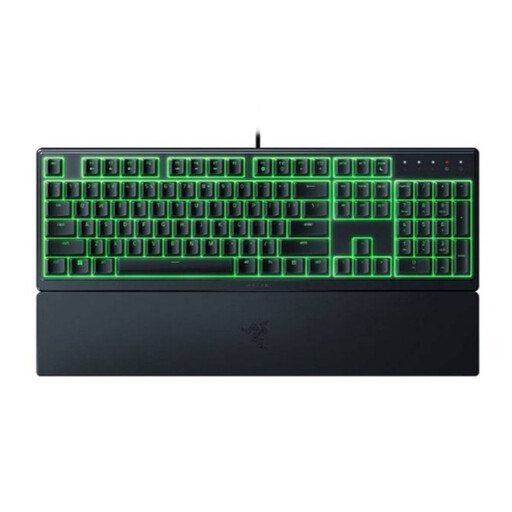
Razer Ornata V3 X low-profile gaming keyboard, US layout

Razer Ornata V3 X low-profile, US layout

The full-size layout and integrated wrist rest could suit you if you also use the keyboard for longer sessions.

Membrane keys; full-size layout; RGB lighting and programmable keys. The product description also mentions a wrist rest. Razer describes the membrane switches as quiet; this is not a comparative sound measurement.

View at Joybuy

MageGee TS91 60% wired gaming keyboard, US QWERTY, 61 keys

MageGee TS91 60% wired gaming keyboard, 61 keys

The 60% layout could suit you if desk space is a priority and you’re happy with the physical keys available on an extra-compact layout.

Wired connection; membrane technology; 61 keys and US QWERTY. This layout has no number pad.

View at Joybuy

Frequently asked questions

Does an analogue keyboard automatically work better with every racing game?

No. Check which controller inputs your game supports and whether they work alongside mouse or keyboard input. Wooting documents XInput and DirectInput and describes potential issues with combined input; this doesn’t confirm compatibility with a specific game.

How do you set up an analogue keyboard for a racing game?

Only select a controller mode supported by your game and operating system. Wooting documents the option to send input as an Xbox controller via XInput or as a classic controller via DirectInput; then check the key bindings in the game.

Should you still consider sound when using a ‘quiet’ keyboard with a headset?

Yes, if the sound of your keystrokes matters to others. SteelSeries, Logitech and HyperX describe specific models as having quiet keys, but these product descriptions are not comparable sound measurements.

If you buy online in the Netherlands, do you get a cooling-off period and a statutory guarantee?

Online purchases generally come with a statutory cooling-off period of up to 14 days after delivery, subject to applicable exceptions. ACM ConsuWijzer also makes clear that the statutory guarantee is separate from any paid or manufacturer-offered additional warranty, so assess such a package separately.

What should you look for in product safety and a CE mark?

The Dutch government states that electronic devices offered in the EU must meet the applicable safety requirements and carry a CE mark. The requirements for a specific version need to be assessed for that product; a brand name or mention in this guide does not prove that an individual model meets the requirements.
