
Gamer with few power sockets
You don’t want to need an extra power socket for your keyboard. A wired USB model needs a suitable computer port; with a wireless model, you also need to consider the connection and power supply.


Having few power sockets doesn’t automatically mean you need to choose wireless: a wired USB keyboard uses a suitable computer port, while wireless mainly removes the cable to the keyboard and still needs power or charging. Then choose based on the keys and layout you use, the space available on your desk and the sound you prefer when typing. Before buying, check the exact version and the correct CE marking; the Netherlands Authority for Digital Infrastructure states that this is required for electrical and electronic equipment.
You don’t want to need an extra power socket for your keyboard. A wired USB model needs a suitable computer port; with a wireless model, you also need to consider the connection and power supply.
You want to access frequently used commands easily, so you’re looking at the available keys and programming options. Razer lists six macro keys for the BlackWidow V4 X; also check that your chosen key assignments work with your game and software.
You’re weighing up the space you need for your mouse and the sound of the keys against keeping a number pad and getting the typing feel you want. Logitech G describes the G515 LIGHTSPEED TKL as a TKL model; SteelSeries describes the Apex 3 TKL as quiet to type on, although this isn’t based on independent sound measurements.
| What to consider | What should you check? | Who is this important to? |
|---|---|---|
| Connection and power | Check that your computer has a suitable free USB port. For wireless models, also check the supported connection and how the keyboard is powered or charged. | If I don’t want to use an extra power socket for my keyboard, I’ll check the computer port and power supply first. Around 37% of consumers prioritise connection and power. |
| Custom shortcuts | Compare dedicated macro keys with the keys you can assign, and check the game’s settings and software. | If I use the same commands often, I want to know whether I can assign them to keys that are easy to reach. Around 27% of consumers prioritise custom shortcuts. |
| Desk space and layout | Check the size and keyboard layout of the exact version. TKL models don’t have a separate number pad; a full-size model keeps it. | If I need space next to my keyboard but don’t want to lose the number pad, I’ll check which layout suits the way I use it. Around 18% of consumers prioritise size and layout. |
| Typing sound and feel | Check the exact switch version and distinguish between the manufacturer’s description and an independent sound measurement. | In a shared space, I want to know in advance how the keys I’ve chosen feel and how much sound they make. Around 18% of consumers put typing sound and feel first. |
A wired USB keyboard can connect to a suitable computer port and doesn’t need its own power socket for that connection. Wireless mainly removes the cable to the keyboard.
First check which computer ports are free, then compare the connection and power options for the exact version you want.
With wireless use, you’ll need to allow for battery power or charging.
A TKL model doesn’t have a separate number pad. This can free up space, but it might not suit your in-game commands or other keyboard tasks.
Check which keys you use regularly before choosing a TKL or full-size model.
The G515 name is used for different connection versions. A Joybuy listing refers to a wired USB version, which isn’t necessarily the same version as the wireless G515 LIGHTSPEED TKL described by Logitech G.
Before ordering, compare the full model name, connection, switch version and layout on the product page.
Logitech G describes both a wireless TKL version and a wired full-size keyboard. The right choice depends, among other things, on your preferred connection and whether you use the number pad.
The BlackWidow V4 X is worth considering if you want dedicated macro keys and a choice of switch versions.
The wired K55 CORE TKL is a compact membrane option for anyone who can manage without a number pad.
The Apex 3 TKL is a TKL option with media controls and a quiet typing feel, as described by SteelSeries.
This selection includes wired USB keyboards and models with both wired and wireless connection options, in a range of sizes and versions.
 No image available
A wired TKL option if you want to connect via USB and don’t need a separate number pad.
The product description lists a USB connection, membrane keys, media keys and anti-ghosting for up to 10 simultaneous key presses.
 No image available
A compact wired option if you can manage without a number pad and are considering membrane keys.
Corsair lists a wired USB connection, membrane keys, four media keys and 12-key rollover. The TKL layout doesn’t have a number pad.
 No image available
An option if you want to choose between wireless and wired connections and are looking for a 98% layout.
The product information lists Bluetooth, 2.4G and wired USB-C, a volume knob, a TFT screen and a 10,000 mAh battery. Wireless use still requires charging.
 No image available
A compact option if you want fewer cables on your desk while still having the option to connect by wire.
The product information lists Bluetooth, 2.4G and a wired connection, a 75% layout with arrow and function keys, and an 8,000 mAh battery. Wireless use requires battery power; battery life depends on the lighting.
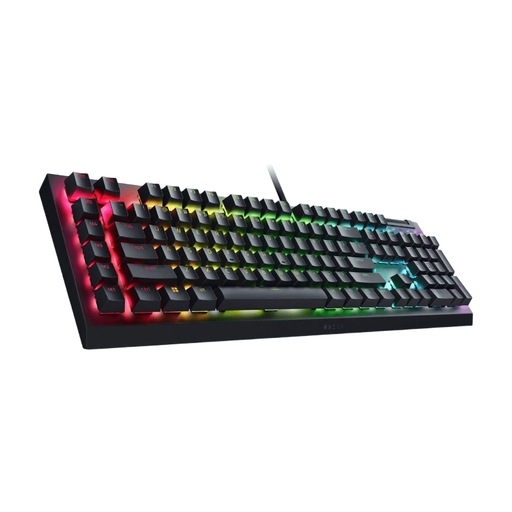 No image available
A wired option if you want to use dedicated programmable macro keys.
Razer lists six macro keys for the BlackWidow V4 X and describes the Green switch as tactile and clicky. The product title specifies a USB connection.
Not for the standard connection of the USB models reviewed: they connect to a suitable computer port. Check that the port is free; this doesn’t say anything about how the computer itself is powered.
Check the connection options for the exact version and what your computer supports. Logitech G lists Bluetooth, LIGHTSPEED and wired data for the G515 LIGHTSPEED TKL; a receiver and a cable each have different requirements for the ports available.
Compare the version shown in the product title and information with the one you want. Razer describes the Green switch on the BlackWidow V4 X as tactile and clicky, and the Yellow switch as smooth and quiet. These are the manufacturer’s descriptions, not independent sound measurements.
Check that the exact electrical or electronic version has the correct CE marking. The Netherlands Authority for Digital Infrastructure states that this equipment must have the correct CE marking; a brand name or similar product name in an advert doesn’t confirm that the marking is present.
ACM ConsuWijzer states that the 14-day cooling-off period ends 14 days after delivery. The applicable terms and exceptions still matter.