
Gamers in a dark room
You want to find keys and shortcuts without bright room lighting, and adjust the illumination to suit your preferences. Logitech G, SteelSeries and Razer describe lighting settings for the keyboard models mentioned here.


For political simulations in a dimly lit room, adjustable lighting is a sensible place to start. Then choose based on the shortcuts you use, your preferred keypress sound and the space available on your desk. A TKL layout saves space but has no number pad, while dedicated macro keys take up extra room. Zone lighting is also different from per-key lighting.
You want to find keys and shortcuts without bright room lighting, and adjust the illumination to suit your preferences. Logitech G, SteelSeries and Razer describe lighting settings for the keyboard models mentioned here.
You regularly use in-game commands and want to know whether remapping keys or having dedicated macro keys will make them easier to use. This also depends on the shortcuts you use in your game.
As well as lighting, you consider the sound of the keys and how much space the keyboard takes up. Bear in mind that manufacturers’ descriptions such as ‘quiet’ are not directly comparable sound measurements.
Start with what you actually need to see in the dark, then decide whether shortcuts, keypress sound or a compact layout matters most to you.
| What to consider | What to look for | Who should consider this? |
|---|---|---|
| Clear, adjustable lighting | Check whether the lighting can be adjusted by zone or by key, and whether the legends are easy to read at your preferred brightness. | I want to read the keys in a dark room without distracting, overly bright effects. Around 36% of consumers give clear, adjustable lighting top priority. |
| Shortcuts and programmability | Check which commands your game uses, what software is required and whether settings can be saved to the keyboard. | I use commands repeatedly and want them to be easy to access. Around 29% of consumers prioritise programmable shortcuts. |
| Sound and key feel | Check the exact switch type, try the keys if possible and don’t judge the noise level by the model name alone. | I play in a shared space and want to be mindful of the sound of my keystrokes. Around 21% of consumers give quiet keypresses top priority. |
| Size and desk space | Decide whether you need a number pad, measure the available space and check the layout of the version on offer. | I want enough room for my mouse and need to know whether I can do without a number pad. Around 14% of consumers consider desk space their main priority. |
According to SteelSeries, the Apex 3 TKL has eight lighting zones; Razer describes the BlackWidow V4 X as having per-key lighting. These features are not the same.
Check whether you simply want to see the keyboard or highlight individual keys.
Logitech G describes the wired G515 TKL and the wireless G515 LIGHTSPEED TKL as separate products. Choosing the wrong version could mean missing out on the connection option you want.
Before buying, check the full model name and the connection type of the specific offer.
The BlackWidow V4 X is available with Green and Yellow switches. Razer describes Green as clicky and Yellow as quieter; this is not a comparative sound measurement.
Check the switch type of the version you choose and, if possible, try the keys yourself.
The Dutch government states that the Netherlands has no fixed statutory guarantee period. The retailer remains your point of contact if something is faulty; what you can expect from a product depends, among other things, on the product and the sales information.
Keep your proof of purchase and report any fault to the retailer.
The G515 TKL is a wired, low-profile version; the separate G515 LIGHTSPEED TKL offers wireless connection options.
The Apex 3 TKL combines a compact layout with eight-zone RGB lighting and switches that SteelSeries describes as quiet.
The BlackWidow V4 X is aimed at gamers looking for dedicated macro keys and adjustable per-key lighting.
The K55 RGB PRO is an option for gamers who want dedicated macro keys and zone lighting.
The V series is worth considering if you want to configure a mechanical keyboard. The V6 8K is a full-size, wired example.
These Joybuy products are suited to gaming in low ambient light and offer a range of keyboard layouts. Check the lighting and layout of each version to make sure they match your preferences.
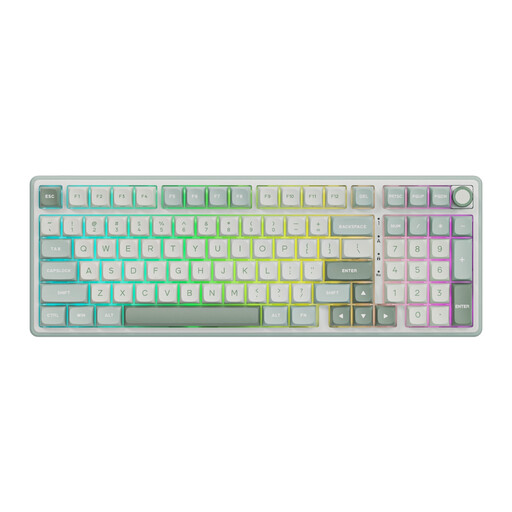 Image unavailable
A good fit if you’re looking for a wired mechanical keyboard with RGB lighting and have room for a number pad.
The product name lists a number pad, volume knob, hot-swappable switches, MDA-profile PBT keycaps and Beige linear switches.
 Image unavailable
A good fit if you’re looking for a wired mechanical keyboard with RGB lighting and have room for a number pad.
The product name lists a number pad, volume knob, hot-swappable switches, MDA-profile PBT keycaps and Cream linear switches.
 Image unavailable
A good fit if you’re looking for a keyboard with several connection options and a 98% layout.
The product name lists QWERTY, hot-swap, RGB lighting, a TFT screen, a 10,000 mAh battery, and wired, Bluetooth and 2.4G connections.
 Image unavailable
A good fit if you’re looking for a compact layout and don’t need a number pad.
The product name lists 68 keys, magnetic switches, Rapid Trigger, an 8,000 Hz polling rate and a US layout.
 Image unavailable
A good fit if you want a compact 75% layout and several connection options.
The product name lists tri-mode connectivity, hot-swappable switches, a volume knob, RGB lighting and an 8,000 mAh battery.
No, not if you don’t need the extra keys. First check which shortcuts you use in the game. Dedicated macro keys give you extra physical keys for commands, while some models let you programme existing keys. Logitech describes this option for the wired G515 TKL using software.
According to Corsair, the K55 RGB PRO can use saved lighting settings and macros in hardware mode without the iCUE software running. Corsair states that a macro recorded in this mode can contain up to 50 keystrokes; check the setting you want while configuring it.
Keep liquids away from it and follow the care instructions for your exact model. SteelSeries describes the Apex 3 TKL as water-resistant, but that doesn’t mean you should treat the keyboard as waterproof.
Report any fault to the retailer. The Dutch government states that the Netherlands has no fixed statutory guarantee period; what you can expect in terms of a product’s lifespan depends on the product and the sales information. A manufacturer’s warranty does not replace these statutory rights.
For eligible distance purchases from a business, you generally have 14 days to change your mind, according to the Dutch government. This does not automatically apply to every seller or every type of purchase, so check who you are entering into the contract with.