
Player in a shared room
You play with headphones while others can hear your keystrokes, so you’re mainly comparing switch types and how noisy they sound.


Base your choice on the keys you use in your management game and how much your housemates can hear you typing: wearing a headset won’t make your keyboard quieter in the room. A membrane keyboard is a good choice if keeping key noise to a minimum is your priority. A sound-dampened mechanical model or a larger keyboard with macro and media keys may suit you better if key feel, shortcuts or direct audio controls matter more. Always check the switches and layout of the exact version.
You play with headphones while others can hear your keystrokes, so you’re mainly comparing switch types and how noisy they sound.
You regularly switch between tasks in management games and want a layout that works for you or keys you can remap. The combinations you need vary from game to game.
You want to adjust the volume or control media while playing without going through menus, so you’re looking for dedicated media keys or a volume wheel.
Choose this if: keyboard noise disturbing your housemates is your main concern. Razer describes the Ornata V3 X as having quiet membrane switches.
The trade-off: membrane keys can feel different from mechanical keys. The European Ornata V3 X version reviewed has a US layout, so check which version you’re buying.
Choose this if: you value a mechanical feel and a more compact keyboard. Logitech says the wired G515 TKL has a sound-dampening design.
The trade-off: sound dampening doesn’t guarantee quiet typing. TKL keyboards don’t have a number pad, so also check whether your chosen version has linear or tactile switches.
Choose this if: you want plenty of shortcuts, dedicated macro keys or media controls. Corsair lists six dedicated macro keys and media controls for the K55 RGB PRO.
The trade-off: a larger keyboard takes up more desk space. Check that the key combinations you want work with your game, and don’t confuse the K55 RGB PRO with the PRO XT.
| What to consider | What to look for | Who will find this important? |
|---|---|---|
| Keyboard noise for others | Check the switch type and exact version, and compare how noisy they sound in similar conditions. | If I play with other people nearby, I want my keystrokes to be as quiet as possible. Around 36% of consumers say low keyboard noise is their top buying priority. |
| Shortcuts and layout | Compare the shortcuts in your game with the physical layout. Check whether you need a number pad and whether the keys can be remapped. | If I often switch between tasks, I want to reach the keys I need straight away. Around 29% of consumers prioritise shortcuts and layout. |
| Volume and media | Check whether the keyboard has dedicated volume or media keys, and whether they control the audio output you want. | If I want to adjust the volume while playing, I want to do it without opening an on-screen menu. Around 21% of consumers prioritise direct audio controls. |
| Fit and connection | Compare the dimensions and any wrist rest with your desk. For a wireless model, check how it connects; for a wired model, check the connector. | If I have long gaming sessions or a particular desk setup in mind, I want the size and connection to suit it. Around 14% of consumers put fit and connection first. |
A headset won’t change how much keyboard noise others in the room can hear. RTINGS generally describes membrane switches as one of the quieter types. Compare the switch type and construction rather than relying on the ‘gaming’ label alone.
Check the exact version, and only compare noise information gathered in similar conditions.
The K55 RGB PRO and K55 RGB PRO XT are different models. The wired G515 TKL and G515 LIGHTSPEED TKL are also separate versions.
Before buying, check the full model name, connection, switches and keyboard layout.
A TKL layout leaves out the number pad. A larger keyboard may have extra controls, but it takes up more desk space.
Check the shortcuts in your own game before choosing between a more compact layout and extra keys.
According to the Dutch Government, the Netherlands has no fixed statutory warranty period. A manufacturer’s warranty is not the same as your legal rights if a product doesn’t meet reasonable expectations.
Keep your proof of purchase and contact the retailer if you think a product is faulty.
The Ornata V3 X is a low-profile model with membrane switches that Razer describes as quiet.
The Apex 3 range includes both a full-size and a TKL version, with different layouts.
The wired K55 RGB PRO is a rubber-dome keyboard with extra macro and media controls.
The wired G515 TKL is a low-profile mechanical model without a number pad.
The V6 Max ISO range is a full-size keyboard with hot-swappable switches.
The Joybuy products below include compact gaming keyboards and full-size mechanical keyboards. Check the layout and switch type for each version.
 No image available
This compact wired layout suits a gaming setup where you’re looking for a 60% keyboard.
Hall Effect magnetic switches; Rapid Trigger; 8K polling rate; adjustable actuation from 0.01 mm; RGB.
 No image available
The product name specifies a full-size keyboard with 108 keys and a US layout.
Tri-mode wireless; hot-swappable; 8000 mAh; RGB; Powder White; Thocky Linear Switches.
No image available
The product name specifies a full-size keyboard with 108 keys and a US layout.
Tri-mode wireless; hot-swappable; RGB; the product name specifies Silent Tactile Switches.
 No image available
The product name describes a compact gaming keyboard for a smaller keyboard setup.
68 keys; magnetic switches; Rapid Trigger; 8000 Hz polling rate; metal top plate; US layout.
 No image available
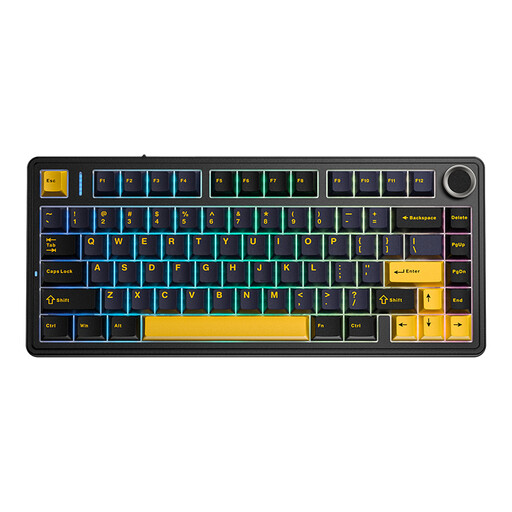
The product name specifies a wireless keyboard with a 75% layout.
Mechanical; gasket construction; RGB lighting; PBT keycaps; QWERTY US layout.
No, management games don’t inherently require mechanical switches. Ubisoft describes customisable controls for Anno 1800 with a supported keyboard, while Factorio uses shortcuts, among other controls. Choose a layout and key feel that suit the controls you use.
According to Ubisoft, in Anno 1800 you can select, change and confirm a key via Options and Controls; this applies to supported peripherals. Check that the key combination you want is available in your version of the game.
No. According to the Dutch Government, the Netherlands has no fixed statutory warranty period: you’re entitled to a product that meets what you could reasonably expect from it. If a product is faulty, the retailer is responsible for providing an appropriate solution; a manufacturer’s warranty is separate.
For many distance purchases from a business, the Dutch Government says you have a 14-day cooling-off period. Before buying, check who the retailer is and which terms apply. The cooling-off period is separate from your rights if a product is faulty.